
 Laura Marano
Quick Answer
ZD Screen Marker Pro is free right now through an official giveaway — claim a lifetime license (worth $39) at no cost, ✅verified Sep 2026 by Laura. Just register on the developer’s giveaway page below to get your key. Prefer the latest version with updates? Use code SM***E2PC for 30% off – 5 PCs ($136). Works on Windows 8/8.1/10/11.
ZD Screen Marker is an all-in-one screen annotation and recording tool designed for teaching, presentations, tutorials, reviews, and live demos. It lets you draw, write, highlight, capture screenshots, record your screen, add webcam overlays, and manage unlimited whiteboards all directly on your desktop.
ZD Screen Marker Pro
Draw, highlight, explain, use whiteboards, and record annotated sessions on Windows with ZD Screen Marker.
- Product
- ZD Screen Marker Pro
- Product website
- zdsoft.com
- License
- Lifetime
- Platform
- Windows
- Installer
- ScnMkr.msi
- Usage
- Non-commercial only
- Updates
- No future upgrades
- Support
- No support
- Updated
- 2026-06-25
Continue on zdsoft.com
Share to reveal your free license code, then activate it inside the app.
This giveaway ended on .
30% Off ZD Screen Marker Pro - (5 PCs)
ZD Screen Marker Coupon Code (100% Working)

You may also like

Activation Guide: ZD Screen Marker License Key for Free
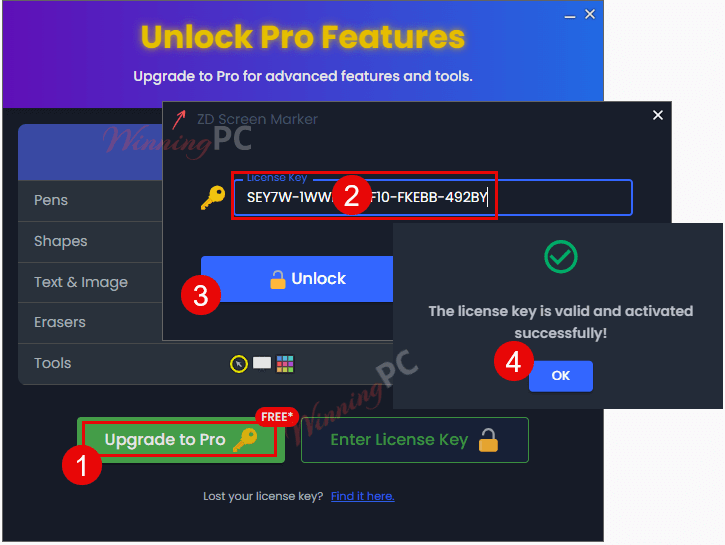
Download and install ZD Screen Marker on your computer, then choose “Unlock Pro Features”

Enter your ZD Screen Marker Pro license key that you received to upgrade it to Pro:
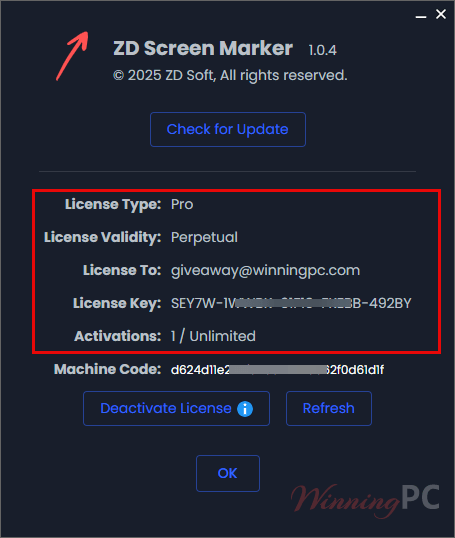
Enjoy this awesome app for a lifetime free!
ZD Screen Marker Pro: Review & Features

Key Features:
- 7 Pen Styles: Pen, Highlighter, Chalk, Pencil, Ink Pen, Calligraphy Pen, and Ink Brush.
- 10 Ready-to-Use Shapes: Arrows, numbers, lines, rectangles, ellipses, curves, polygons, and more.
- 3 Eraser Modes: Object, Pixel, and Area erasers for precise control.
- Custom Text Tools: Choose fonts, colors, outlines, and alignment.
- Built-in Image & Icon Library: Import images or use 1,000+ cute icons instantly.
- Persistent, Editable Annotations: Auto-save, move, group, resize, and edit any element.
- Unlimited Whiteboards: Create endless canvases with 50+ background styles.
- Advanced Color Palette: Save custom colors, pick from screen, or use RGB values.
- Custom Pointer Effects: Highlight your cursor with colorful circular effects or images.
- Auto Fade-Out: Set a timer to automatically clear annotations.
- Customizable Toolbar & Hotkeys: Show/hide tools and assign personal shortcuts.
- Webcam Overlay: Add, position, and annotate directly over a live webcam feed.
- Snapshot & Screenshot Tools: Capture clean or annotated areas with pixel accuracy.
- Built-in Screen Recorder: Record screen, audio, mic, webcam, and annotations in one go.
Pros & Cons
Frequently Asked Questions
What is ZD Screen Marker?
It’s a screen annotation and recording tool that lets you draw, highlight, add shapes, capture screenshots, create whiteboards, and record your screen for tutorials or presentations.
Is this the lifetime version?
Yes. WinningPC is offering ZD Screen Marker Pro lifetime licenses through our limited-time software giveaway.
Can I edit my annotations after drawing?
Yes, all drawings and objects are fully editable, movable, resizable, and customizable.
Does it include a screen recorder?
Yes, it has a built-in recorder that can capture your screen, mic, system audio, webcam, and annotations.
Can I use custom images or icons?
You can import your own images or choose from 1,000+ built-in icons.
Are whiteboards included?
Yes, you can create unlimited whiteboards with customizable backgrounds.
Does WinningPC provide the best discount after the giveaway?
Yes. When the giveaway ends, WinningPC will offer the best discount promo codes for ZD Screen Marker.
System Requirements & Details
| Language Support | English |
| Money Back Guarantee | N/A |
| Operating System | Microsoft Windows 8 / 8.1 / 10 / 11 |
| Shipping | Register code will be sent to your email in minutes |
| Subscription | Lifetime |
| Support Services | Email, Tickets |




Key Not accepted, it says, it has been used on your other computer
Hi, the giveaway has ended.
It couldn’t be installed on Windows 11 running machine but just gives error during installation process !
Could you please try again?
I have done it but no success , I have already contacted the developer of this app through their website contact service and he (admin – Joe) suggested a solution which didn’t work either , It seems to me this app is not really compatible with windows 11 , perhaps windows 10 users could use it !
Thank you for sharing. Please continue to seek support from Mr. Joe.
the Instructions to install says to enter the code given after installing….where is the FREE code in the above offer????
You have to submit a valid email address in the Email input box below the text
“License code – last updated: Dec 02, 2025”
On this page and hope the email makes it across the internet into your providers inbox.
TK