
 Chris Bruner
ArchiveKit is a dedicated web archiving tool that lets you capture, organize, and search fully functional webpages for offline access. It saves everything from text and formatting to embedded media and dynamic content, ensuring you have an exact replica of the original site for your research or reference needs.
- Product name: ArchiveKit
- Publisher: Swyshare
- Homepage: https://www.swyshare.com/archivekit/
- License type: 3-month license
- Price:
$29.95$0.0 - Platform: Windows 10 or later, Mac OS 11 or later
- Giveaway link: click here
📝 Note: Please follow the Activation Guide to successfully claim your license.
ArchiveKit Coupon Codes & Deals (100% Working)
ArchiveKit - Lifetime Plan
70% off coupon code: regular price $69.95, discounted price $20.96
Activation Guide: How to get ArchiveKit Key for free?
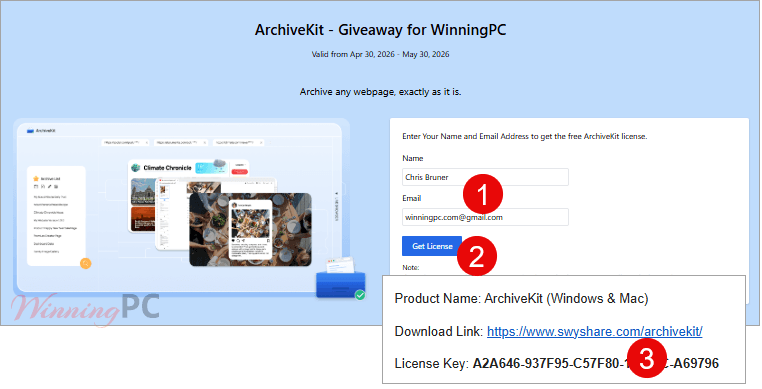
1. On the giveaway page, enter your Name and Email address to get the free ArchiveKit license.
2. Check your mailbox for the registration code (If you don’t receive it, please check your Spam mailbox).
3. Download and install this program on your computer. Run it, you will see the Register button on the right corner of the interface. Enter your license key in the prompt window.
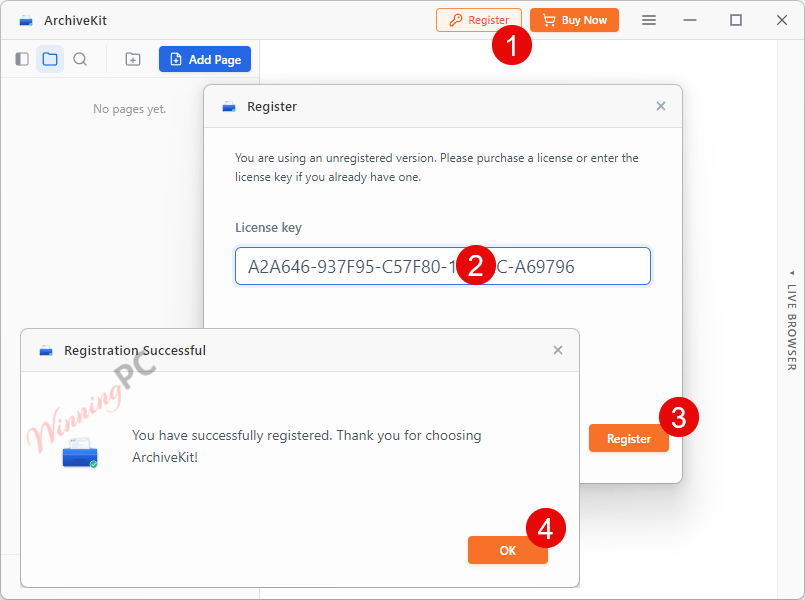
4. Enjoy the full features.
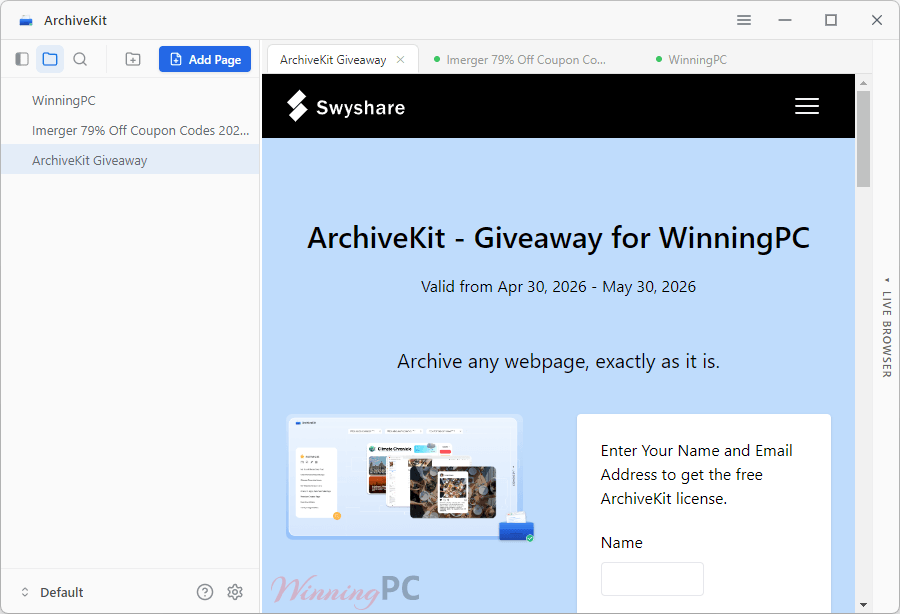
In-Depth Review & Features
Key Features
- One-click saving for entire pages without manual steps or missing visual assets.
- Preserves CSS styles, fonts, typography, layouts, and structures.
- Retains images, GIFs, and interactive JavaScript elements.
- Keyword-based search to locate specific information across titles and saved content.
- Folder and tag organization for managing large collections of educational resources or design inspiration.
- Local file storage with zero content tracking for complete privacy.
Pros & Cons
Frequently Asked Questions
Where can I get the free giveaway license key for ArchiveKit?
You can get the license key completely free at the official ArchiveKit giveaway program on WinningPC.
Where can I find a coupon code or deal for ArchiveKit?
The latest and best deals can be found on WinningPC, alongside the official software website or the developer’s social media channels.
What is the best discount currently available for ArchiveKit?
The best current discount is 84% OFF, available directly on WinningPC.
Can ArchiveKit save login-protected pages?
It lets you save full webpages exactly as they are, including the layout, media, and interactive elements for offline use.
Will archived pages still work if the original site goes offline?
Yes, ArchiveKit preserves pages locally for offline use, ensuring you still have access even if the original content is edited or removed from the web.
How are my saved files stored and organized?
Files are stored locally on your device or in your chosen storage location. You can easily manage large numbers of pages using folders and the built-in search feature.
System Requirements & Details
| Feature | Specifications |
|---|---|
| Language Support | English, German, French, Spanish, Portuguese, Italian, Simplified Chinese, Traditional Chinese, Japanese |
| Operating System | Windows 10 or later Mac OS 11 or later |
| RAM & Storage | 4GB RAM minimum (8GB recommended) |
| Supported Input | Static & dynamic (SPA) websites |
| Supported Output | HTML, CSS, JS, images, fonts |





The license key they sent doesn’t work!
“Your license key has reached its activation limit of the computers. If you want to continue using ArchiveKit, please order a new license or click the Reset button.”
Hi,
The license key now is normal and can be activated on multiple devices.
I think it’s better to just use and support archive.org to archive web pages and sites… I strongly suspect this is a 64bit application for it’s large system memory requirements.
Note you can archive pages as they appear in most cases using MS Edges Save As MHTML archives for free.
I note it is also using a long depreciated and abandoned version 128 of Chrome embedded browser so there WILL be situations where remote code executions and rendering errors occur as Chrome and other browsers have all moved on from this ancient version used to allow compatibility with no longer supported versions of windows.
User Agent header:
“Mozilla/5.0 (Windows NT 10.0; Win64; x64) AppleWebKit/537.36 (KHTML, like Gecko) ArchiveKit/1.2.0 Chrome/128.0.6613.186 Electron/32.3.3 Safari/537.36”
It also forces us to pollute our Documents folder with it’s potentially massive database of archived content! The program refuses to load if you do not grant it write permissions to the normally protected user Documents folder as it tries to create the Archiveit subfolder which contains it’s cache… That SHOULD BE USER DEFINABLE and SHOULD NOT BE IN THE USERS DOCUMENTS folder but in AppData\Roaming\Archiveit and sub folders. It corrupts Documents folder backup sets with NON-DOCUMENT files and folders.
There is no way to view the so called Archived pages in a different browser as it’s really just a modified obsolete chrome browser and the archive is just a modified browser cache! You are not saving the site in a usable manner for your Firefox or other browser. Originally I wanted to use GRC.COM shields up browser headers viewer but found this program is INCOMPATIBLE with GRC.COM shields up and does not allow browsing to the view browser headers function. So it’s a fail for me, I had to end up using a dedicated browser header viewer site to get the truth about the obsolete build of CEF they are using. After trying this I prefer using archive.org to archive websites and pages I am interested in and MS Edge Save As mhtml or print to PDF to keep a copy of pages for offline use, I’ll be deleting this as it’s buggy and does not do what I want and ties the archive to a single machine… which may one day become inoperative so my archiveit database will be lost and unusable as there is no export/import option either. Needs far more work before it’s ready for primetime.
Doesn’t even cache the streamed media on a archived web page or the linked to content on the page either!