


Vovsoft Speech to Subtitle Converter Key Free
Vovsoft Speech to Subtitle Converter
Creates subtitle files
- Product
- Speech to Subtitle Converter v2.2
- Website
- vovsoft.com
- License
- Lifetime
- Platform
- Windows 11, 10 (32-bit & 64-bit)
- Use
- Non-commercial use
- Updates
- No free updates
- Support
- No free tech support
- Updated
- 2026-07-30
Get your unique code by email
License key delivered free to your inbox within minutes.
This giveaway ended on .
Protected by Cloudflare Turnstile · Email quality checked by Reoon
This giveaway has ended, but you can still get a limited-time discount from the official offer page.
How to claim your free key in three steps
- Enter your email address in the WinningPC giveaway form on this page. Use an inbox you can open straight away, because the license code goes to that address and nowhere else.
- Check the mailbox for the code from Vovsoft. If it is not in the inbox after a few minutes, look in the spam or promotions tab before asking for a resend.
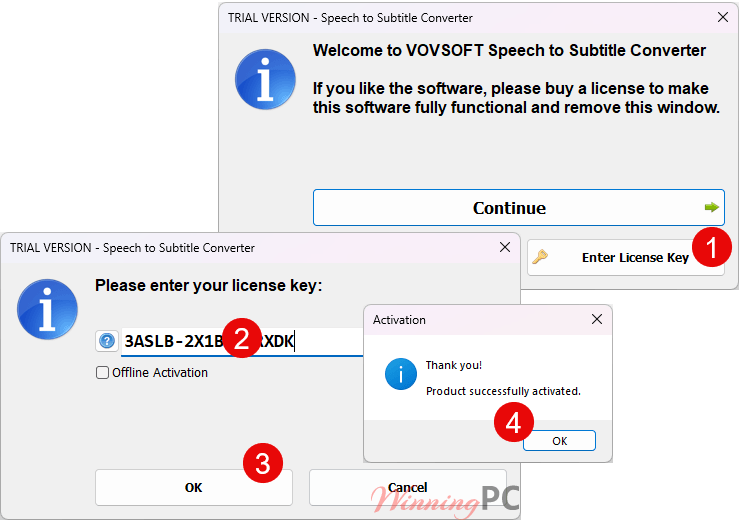
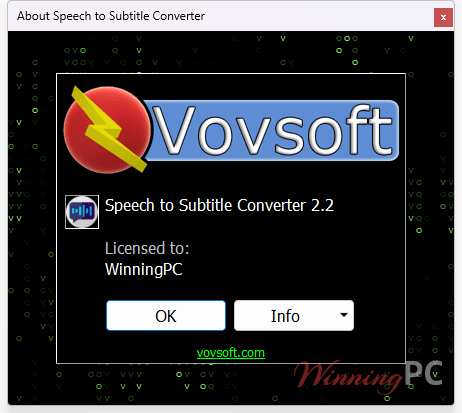
- Download Speech to Subtitle Converter from Vovsoft, install it (or unpack the portable build), open the registration window and paste the code in.
Vovsoft Speech to Subtitle Converter Coupon Code
Vovsoft discount
2 plans · best save 97%
Vovsoft Speech to Subtitle Converter
Lifetime license | All future updates

Vovsoft Universal License ★ Best Deal
115+ programs | Lifetime license | All future updates
Is this Vovsoft giveaway safe and legit?
Yes. You are installing the publisher’s own build and activating it with a key the publisher issued, and no payment details are involved anywhere in the process.
A real license key, not a patch.
The installer comes from vovsoft.com and the code activates the software the normal way. Nothing is cracked, patched or repackaged.
The publisher is running the offer.
Vovsoft arranged these keys for WinningPC readers directly. They are not leftover retail codes from a grey-market reseller.
Your recordings stay on your PC
The AI model runs locally, so audio and video files are never uploaded to a server for processing. That is worth knowing if the material is confidential.
Nothing to pay, nothing to fill in but an email.
There is no checkout and no card form in this giveaway. If you later decide to buy the paid license, that happens on Vovsoft’s own store through PayPro Global, their payment partner.
Vovsoft Speech to Subtitle Converter Review & Features
Running the AI model locally is the whole argument for this one. Cloud transcription services are usually quicker on a weak machine, because the heavy lifting happens on someone else’s GPU, but they also mean handing over your audio. Vovsoft flips that trade: the model lives on your PC, chews through the file with your own CPU and GPU, and works with the network switched off. The bill for that is your hardware.
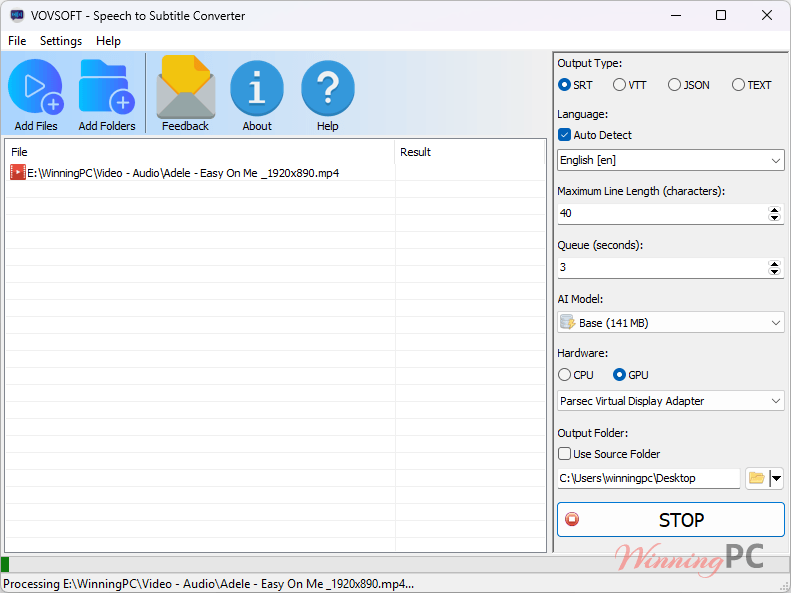
On a thin laptop a long recording will take its time, and Vovsoft publishes no speed figures at all, so plan for a coffee break rather than a stopwatch. The export side is more flexible than most single-purpose subtitle tools, which stop at SRT. Here you also get VTT for YouTube and Zoom, JSON if the text is feeding another script, and plain TXT for the times you only wanted the words.
Key features
- Reads audio directly from MP3, FLAC, WAV, WMA, M4A and OGG, so voice memos and podcast files go straight in with no conversion step first.
- Pulls speech out of video too (MP4, WEBM, MKV, AVI, WMV, TS, MOV) using bundled FFmpeg, which saves you running a separate audio ripper.
- Exports to SRT, VTT, JSON or TXT, so the same transcription can serve a video player, a YouTube upload or a text document.
- Works fully offline with no account and no per-minute credits. Nothing is metered and nothing leaves the machine.
- Ships as an installer or a portable build, which is handy on a locked-down work PC or a USB stick.
What we think
Vovsoft Speech to Subtitle Converter vs Others
| Tool | Price | Runs offline? | Best for |
|---|---|---|---|
| Vovsoft Speech to Subtitle Converter (our pick) | $19 one-time, free in this giveaway | Yes, model runs locally | Private files and a single payment |
| SpeechPulse | $84.15 with the WinningPC discount | Not confirmed | A fuller Windows dictation and transcription desktop app |
| BlipCut AI Video Translator | $151.99 lifetime, or $31.99 monthly with code | No, cloud | Translating and dubbing video, voice cloning |
| RecCloud AI | $40.80 a year (Basic, with code) | No, cloud | Subtitles plus recording, summaries and text-to-speech in one suite |
| PolyPal AI | $13.90 a month, or $119 a year with code | No, cloud | Live captions in meetings, classes and streams |
| VidScribe AI | $17 a month (Elite, with code) | Not confirmed | Re-dubbing and translating videos for social platforms |
| Subtitle Edit with a Whisper model | Free, open source | Yes | Anyone willing to set it up and tidy timings by hand |
Frequently Asked Questions
Is the free license really lifetime?
Yes, it does not expire. The catch is that it never updates either, so you stay on the version you install, which is 2.2 as of this giveaway. If Vovsoft ships a better transcription model next year, the free key will not reach it.
Can I use the giveaway key for paid client work?
No. The giveaway license is personal use only. Captioning videos you are billing someone for needs the $19 paid license, which allows commercial use.
Does it need an internet connection to transcribe?
No. The AI model runs offline on your own PC. You only need a connection to download the software and receive the license code by email.
How many languages does it support?
Vovsoft advertises more than 100. The language list published on the same product page names 57, including English, Spanish, Chinese, Japanese, Hindi, Arabic and Vietnamese.
Do I need a powerful PC?
Probably a reasonably modern one. The software uses your CPU and GPU to run the model, so transcription time scales with your hardware, and Vovsoft lists no minimum processor, RAM or disk requirement beyond Windows 10 or 11.
What if I miss the giveaway?
The lifetime license is $19 on Vovsoft’s store, a one-time payment that includes commercial use and all future updates. There is also a free trial, though it blocks commercial use and the premium AI models.
System Requirements & Details
| Feature | Specifications |
|---|---|
| Interface language | English |
| Operating System | Windows 11, Windows 10 (32-bit and 64-bit) |
| Supported Input | Audio: MP3, FLAC, WAV, WMA, M4A, OGG · Video: MP4, WEBM, MKV, AVI, WMV, TS, MOV |
| Supported Output | SRT, VTT, JSON, TXT |


This is an improvement over a previous version of audio to lyrics that had problems with auto language detection and was unable to use any GPU to accelerate processing, this version of the alternate brand of similar product does have manual language and GPU/CPU selection.