
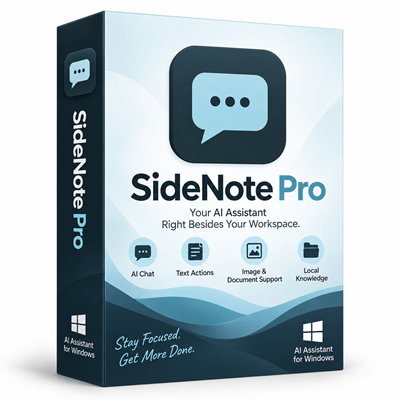

SideNote Pro Giveaway
SideNote Pro - AI Assistant for Windows 11
SideNote Pro is a native Windows 11 AI assistant that stays docked beside the app you are using, without the context switch. Bring your own AI provider or local model.
- Product
- SideNote Pro
- Website
- sidenotepro.com
- License
- 1-Year Promotional License
- Platform
- Windows 11 x64 only
- Installer
- SideNote Pro Installer.exe
- Devices
- Up to 2 computers per use
- Updates
- Included during the 12-month promotional period
- Commercial use
- Personal use only
- AI usage included
- No — BYOK
- Updated
- September 18, 2026
Get your unique code by email
License key delivered free to your inbox within minutes.
Protected by Cloudflare Turnstile · Email quality checked by Reoon
All codes have been claimed or the giveaway has closed.
How to claim your free SideNote Pro license
- Enter your email address in the giveaway form on this page and submit.
- Check your inbox for your unique SideNote Pro activation key.
- Download and install SideNote Pro from the Microsoft Store on your Windows 11 x64 PC.
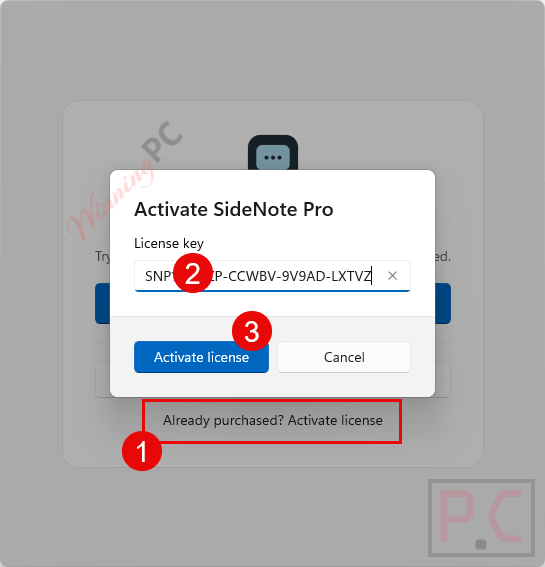
- Launch the app. When prompted, click “Already Purchased? Activate license” and enter your key.
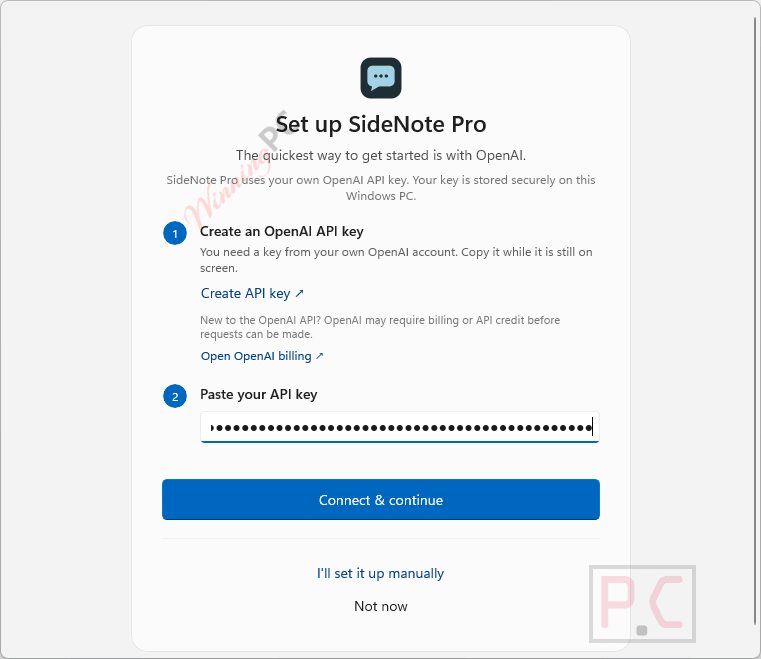
- Set up your AI provider: paste your API key from OpenAI, Anthropic, Gemini, or DeepSeek – or point the app at a local Ollama or LM Studio server. (Click “Not Now” to explore the interface first and configure a provider later in Settings.)
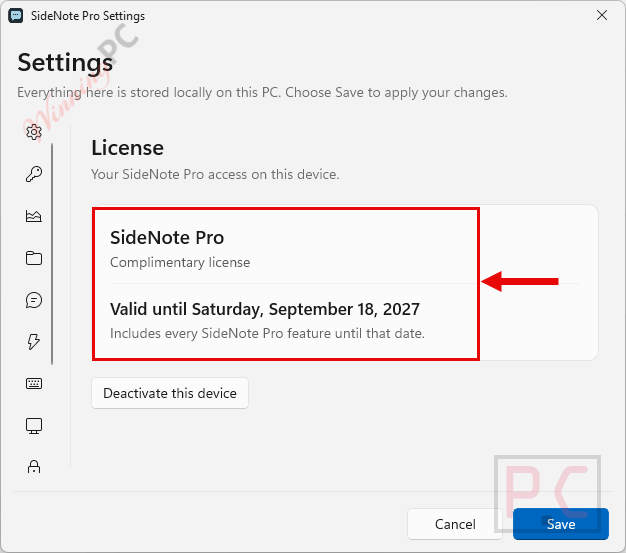
- Go to Settings > License to confirm your 1-Year promotional subscription is active.
Top AI Assistants Software Coupon Code Sep 2026
Lorka AI Pro
2 plans · best save 71%
1 Month
Billed monthly | Access to +20 Chat Models | No setup fees | Cancel anytime
1 Year ★ Best Deal
Billed yearly | Access to +20 Chat Models | No setup fees | Cancel anytime
MyClaw
2 plans · best save 61%
LITE (Yearly)
Personal AI assistant, 24/7 | Auto-updates, zero maintenance
MuleRun
2 plans · best save 60%
Plus - Monthly
2,000 credits per month | Deploy up to 10 pages with your own custom domain
Plus - Yearly ★ Best Deal
2,000 credits per month | Deploy up to 10 pages with your own custom domain
ChatOn AI Assistant Premium Plan
2 plans · best save 59%
1min.AI: Lifetime Subscription
2 plans · best save 87%
Pro Plan
1,000,000 credits/month | Lifetime access | 30-day money-back guarantee
Business Plan ★ Best Deal
2,000,000 credits/month | Lifetime access | 30-day money-back guarantee
Is this SideNote Pro giveaway safe and legit?
Yes. This is an official promotional giveaway run by BediniLabs, the developer of SideNote Pro, in partnership with WinningPC.
No crack or keygen
You activate the same retail installer available on the Microsoft Store using a genuine key issued by BediniLabs. Nothing is patched, repackaged, or pirated.
Official publisher partnership
Giveaway keys are provided directly to WinningPC by BediniLabs as part of a coordinated promotional program, not sourced from a grey-market reseller or key aggregator.
Secure installation
SideNote Pro is installed from the Microsoft Store, which scans apps for malware. Your activation key is delivered to the email address you register.
14-day refund on paid licenses
The giveaway key is free, so there is no financial risk here. If you later decide to purchase the lifetime license, BediniLabs offers a 14-day refund by email at info@bedinilabs.com.
What SideNote Pro actually does, and how well
The core idea is smart and the execution holds up. Instead of you going to the AI, SideNote Pro comes to your workspace. The drawer mode in particular solves the perennial problem of AI tools that hog screen real estate: when you are done with a question, press Esc and it folds away completely. It is still there at the edge, still holding the thread, but it is not in front of your spreadsheet.
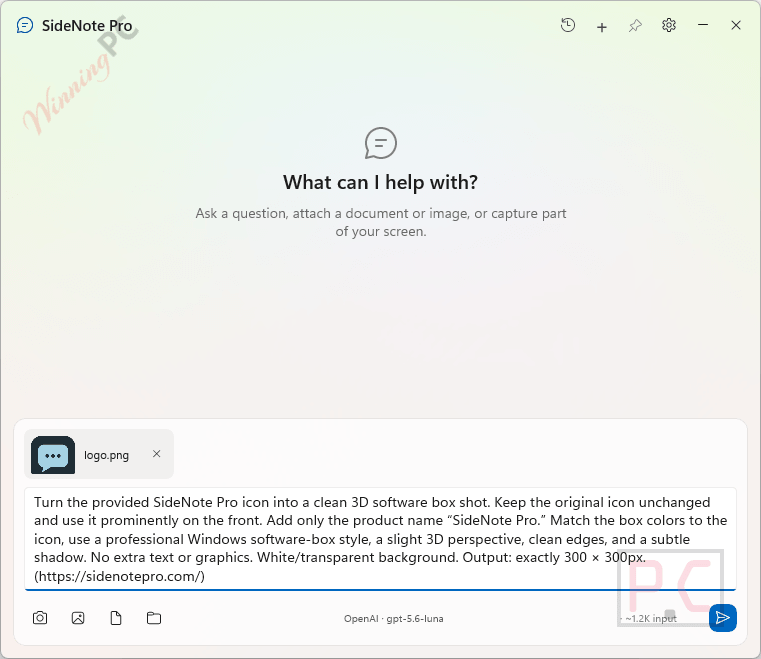
The BYOK architecture is the genuinely unusual part. There is no bundled AI plan, which means setup requires an API account before the assistant does anything useful. That is a friction point for non-technical users. On the other side: you choose the model, you control costs, and running a local model via Ollama means nothing leaves your machine at all. For anyone handling sensitive documents, that matters.
One real limitation to know upfront: no OCR. Scanned or image-only PDFs are rejected outright with a clear message, rather than being silently sent as empty documents. If your workflow involves scanned pages, attach the scan as an image instead.
Key features
- Global shortcut summon (Ctrl+Shift+Space): invoke the assistant from any Windows app instantly, without switching windows or loading a tab
- Selected-text actions: highlight text in any Windows application and trigger summarize, explain, rewrite, or translate actions via keyboard shortcut
- Multi-provider BYOK support: OpenAI, Anthropic, Gemini, DeepSeek, Ollama, LM Studio, or any OpenAI-compatible endpoint; switch between provider profiles per task
- Local folder indexing: index a folder and ask questions across its contents; indexing, search, and ranking all run on your PC with no vector database or embedding service involved
- Screenshot and document input: capture a region, active window, or full screen; attach PDF, DOCX, TXT, and Markdown files; text is extracted locally and the original file is never uploaded
- Right-edge drawer mode: retract the panel to a 44x68px leash at the screen edge when not in use; it remembers your thread and position
What we think
Screenshots
Free license or paid: what is the difference?
| Giveaway (1-Year) | Paid ($49 Lifetime) | |
|---|---|---|
| Price | $0 | $49 once |
| License duration | 12 months from activation | Permanent |
| Full app features | Yes | Yes |
| App updates | Included during the 12-month period | Lifetime updates |
| Devices | Up to 2 | Up to 2 |
| After expiry | AI generation stops; license required to continue | Keeps working indefinitely |
| Technical support | ||
| Money-back guarantee | N/A (free) | 14 days from purchase |
| AI usage cost | Your AI provider – not included either way | Your AI provider – not included either way |
SideNote Pro vs the alternatives
| Tool | Price | Where it runs | You choose the AI model? | Conversations stay local? | Best for |
|---|---|---|---|---|---|
| SideNote Pro | $49 once (free via this giveaway) | Native Windows 11 docked panel – lives beside any desktop app | ✅ Full BYOK – OpenAI, Anthropic, Gemini, DeepSeek, Ollama, LM Studio, or any OpenAI-compatible endpoint | ✅ Yes (conversations stored on device); 100% local with Ollama/LM Studio | Desktop workers who want AI beside any app, provider flexibility, and local-first privacy |
| Microsoft Copilot | Personal $9.99/mo | Windows sidebar + web; built into Edge and Office apps | ❌ Microsoft’s infrastructure only – no model swap | ❌ Processed by Microsoft Azure | Windows/Office users who want zero setup and deep Microsoft 365 integration |
| ChatGPT Desktop (Windows) | Plus $20/mo | Standalone Windows app; global Alt+Space shortcut | ❌ OpenAI models only | ❌ Processed by OpenAI | GPT power users who want voice mode, image generation, and Work With Apps on Windows |
| Ollama | Pro $20/mo | Terminal / local API; no built-in GUI | ✅ Any open-weight local model (Llama, Mistral, Gemma, etc.) | ✅ 100% local – nothing leaves the machine | Developers and power users comfortable with CLI who want fully offline, private inference |
| Lorka AI | Pro $69.99/yr | Web browser | ✅ Multiple managed models (GPT, Claude, Gemini, Grok, DeepSeek) – no API keys required | ❌ Processed by cloud providers | Users who want several leading AI models under one flat subscription with no API account setup |
| MyClaw | LITE $139.30/yr | Cloud-hosted agent accessed via Telegram, Slack, Discord | ❌ OpenClaw managed cloud – no model choice | ❌ Cloud agent; data processed remotely | Users who want a 24/7 autonomous agent that handles emails, browser tasks, and file automation hands-free |
Frequently Asked Questions
Do I still need to pay for AI after claiming the free license?
Yes. The giveaway key covers the SideNote Pro application for 12 months; it does not include AI usage. You connect your own provider (OpenAI, Anthropic, Gemini, DeepSeek, or similar) using your own API credentials and pay that provider directly for what you use. If you run a local model via Ollama or LM Studio on your own hardware, there is no per-request cost at all.
Does SideNote Pro work on Windows 10 or Mac?
No. SideNote Pro requires Windows 11 x64, version 22000.0 or higher. Windows 10, 32-bit Windows, macOS, and Linux are not supported. If you are on an earlier OS or a Mac, the alternatives table above is a better starting point.
What happens when my 1-year giveaway license expires?
AI generation stops – sending, regenerating, and editing prompts show a purchase prompt instead. Your conversation history, settings, and any exported files stay on your device and remain fully accessible. To keep using AI features, you would buy a SideNote Pro lifetime license at sidenotepro.com.
Are my conversations private? Does SideNote Pro store them on its servers?
No cloud storage. Your conversation threads are saved locally on your device under %LOCALAPPDATA%\SideNote Pro\ and never sent to BediniLabs servers. Requests you submit go to whichever AI provider you configured, and that provider applies its own privacy policies. With a local model (Ollama or LM Studio), nothing leaves your machine at all. SideNote Pro has no telemetry and no product analytics.
Can I use a free local AI model and avoid API fees entirely?
Yes. SideNote Pro has presets for Ollama (http://localhost:11434/v1) and LM Studio (http://localhost:1234/v1). You install and run the local server yourself, load a model, and point SideNote Pro at it. Inference runs on your hardware and there is no per-request charge. How well this works depends on your PC — local models are demanding, and a low-spec machine will struggle with larger ones.
System Requirements & Details
| Operating system | Windows 11 x64, version 22000.0 or higher (Home, Pro, Enterprise, Education) |
| Architecture | x64 only – 32-bit and ARM not supported |
| Supported input formats | PDF, DOCX, TXT, Markdown (.md); PNG, JPEG, JPG, WebP images; local folder text files (indexed on-device) |
| Supported output formats | Markdown export (full conversation thread); PDF export (individual responses, Latin script only); in-chat rendering of Markdown, tables, and code blocks |
| AI provider requirement | Own API credentials required for cloud providers (OpenAI, Anthropic, Gemini, DeepSeek, or any OpenAI-compatible endpoint); or a locally running Ollama or LM Studio server |
| Other requirements | Internet connection required for cloud AI inference and license activation; local model inference works offline |


It needs an existing AI account (paid, and password protected) to work? Isn´t this a big securtiy risk if you give your account data to a 3rd party program?
Not quite. SideNote Pro does not ask for your AI account password or login details.
It uses an API key from the AI provider you choose (OpenAI, Anthropic, Gemini, DeepSeek, etc.). The API key is stored locally on your PC and protected using Windows DPAPI, and requests are sent directly to the selected AI provider — BediniLabs does not receive your prompts or API key.
Also, a ChatGPT paid subscription is not required; the OpenAI API, for example, is separate from ChatGPT subscriptions and uses its own API billing. You can also use local models through Ollama or LM Studio, which require no AI account at all.
So you should never give SideNote Pro your OpenAI/ChatGPT password — only an API key if you choose to use that provider.