
Aiseesoft 4K Converter allows users to convert 4K videos to 1080p, 720p HD, and SD formats, while also allowing users to upscale lower-resolution videos to 4K. It supports a wide range of video formats and includes built-in editing tools for creating and customizing 4K content.
Aiseesoft 4K Converter
Convert 4K video to 1080p, 720p for your mobile devices with the best 4K video converter.
- Product
- Aiseesoft 4K Converter
- Product website
- aiseesoft.com
- License
- 1-Year
- Platform
- Windows 11, 10, 8, 7
- Installer
- 4k-converter.exe
- Usage
- Non-commercial only
- Updates
- Free update for 1-year
- Support
- No free tech support
- Updated
- 2026-06-30
Continue on winningpc.com
Share to reveal the official giveaway page, then register there to receive your license.
The free license is no longer available.
Table of Contents
Aiseesoft 4K Converter Coupon Code Nov 2026 (100% Working)
Aiseesoft 4K Converter for Windows
2 plans · best save 50%
1 Year ★ Best Deal
Use it on 1 PC | 1-year free upgrades | 30-day money-back guarantee
Lifetime
Use it on 1 PC | lifetime free upgrades | 30-day money-back guarantee
Aiseesoft 4K Converter for Mac
2 plans · best save 50%1 Year ★ Best Deal
Use it on 1 Mac | 1-year free upgrades | 30-day money-back guarantee
Lifetime
Use it on 1 Mac | lifetime free upgrades | 30-day money-back guarantee
How to get the Aiseesoft 4K Converter License Key Free?
Go to the Aiseesoft 4K Converter giveaway page, and enter your name and email address to get the registration code.
You will get the Aiseesoft 4K Converter license code via email:
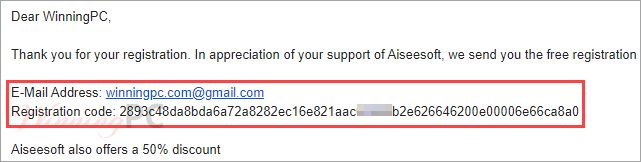
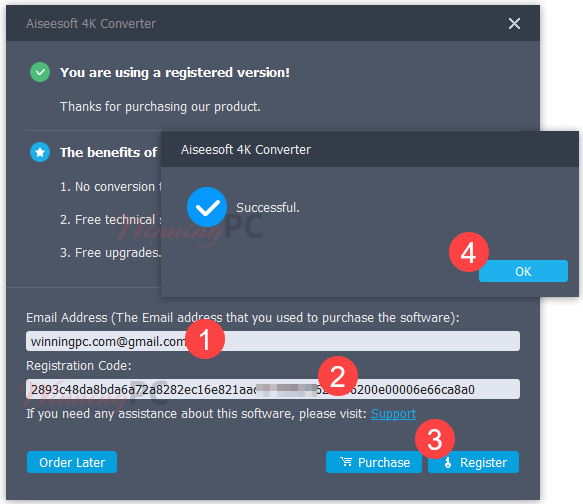
Install the software with the download link above, register the software with your registration code, and enjoy it!
Aiseesoft 4K Converter: In-Depth Review & Features

Key Features
- Convert 4K video from/to 1080p, 720p HD, or SD video
- Change the format of 4K videos
- Make home-made 4K films through editing
- Fast 4K video conversion
- Convert two or more 4K videos at the same time
- Add 3D effects to your 2D 4K films and make your 4K videos more vivid
- Take a snapshot of an excellent moment from 4K movies and save 4K pictures to the computer.
Pros & Cons
Frequently Asked Questions
Where can I find verified discount codes for Aiseesoft 4K Converter?
You can secure the latest working promos directly on WinningPC, alongside any seasonal offers found on the official Aiseesoft website.
What is the biggest price drop available right now for this software?
Currently, you can grab a massive 50% OFF deal right here on WinningPC, bringing the Lifetime license down to just $24.97 and the 1-Year license to $19.50.
Does this converter work on Mac computers?
Yes, it supports Mac OS X 10.7 or higher, as well as Windows operating systems ranging from XP to Windows 11.
Can I convert a regular HD video into 4K?
Absolutely. The software features an upscaling tool that increases the resolution of 1080p, 720p, or SD videos up to 4K.
Is it possible to edit my videos before converting them?
Yes, the built-in editor lets you clip, merge, rotate to the right angle, add watermarks, and adjust visual settings like brightness and contrast.
Will it take a long time to process massive 4K files?
The software utilizes technology that provides up to 30X faster conversion speeds to handle large file sizes efficiently.
Can I process multiple videos at once?
Yes, it includes a batch conversion feature so you do not have to process files one by one.
Does it support 3D video creation?
Yes, you can easily add 3D effects to your standard 2D 4K films.
System Requirements & Details
| Operating System | Windows 11, 10, 8.1, 8, 7, Vista, XP (SP2+) Mac OS X 10.7 or higher |
| Processor | 1GHz Intel/AMD CPU or above |
| RAM & Storage | 1GB RAM or more |
| Supported Input | 4K/HD/SD Video (MP4, MKV, AVI, etc.), Audio (MP3, FLAC, etc.) |
| Supported Output | 4K/HD/3D/Simple Video, Audio (Simple/Lossless) |




on completion of the installation even if you deselect the option to run the program it launches the main executable that immediately tries to make an unannounced and unauthorised internet connection to a website probably to announce the installation and details of the system it was installed on which in my opinion is a spyware activity. And not surprisingly this illegal software distributes an illegal to distribute under any circumstances FFMPEG.ORG binaries with the main FFMPEG.EXE renamed to convertor.exe which the license using the convertor.exe -L switch is:
“This version of ffmpeg has nonfree parts compiled in.
Therefore it is not legally redistributable.”
It is not surprising that a developer that is happy to build illegal to distribute builds and DISTRIBUTE it will also attempt to make stealthy attempts to harvest systems private details without the end users consent!
It is ILLEGAL FOR THIS WEBSITE TO DISTRIBUTE THIS SOFTWARE TOO!
Pros: none
Cons: makes unsolicited, unauthorised web connection on installation completion as a spyware act by launching the main executable stealthily on install completion without our consent.
Distributes and illegal to distribute build of FFMPEG.ORG binaries
Is an expiring license for a product that is illegally sold and distributed using non-expiring license so is not even a valid giveaway of a comercial license.
You'd be better off with always free and legal xmedia-recode handles 4K just as well as this does but legally!
On uninstallation it also launches the main executable before final deltion to announce to their server that the uninstallation took place without permission and without warning assuming you gave the main executable permission to access the internet to activate the trial license… I did not so my firewall warned me of the secret web connection attempt and blocked it, thankfully. Under standard windows firewall rules such underhanded secret communications would succeed and leak out data from your system.
i have no money unlock my iphone free please please please
i have no money unlock my iphone free