
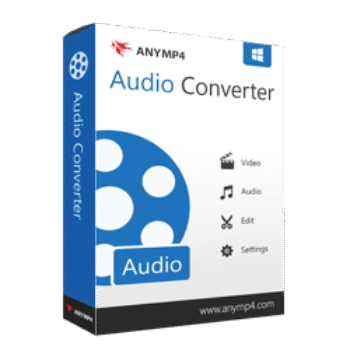
AnyMP4 Audio Converter lets you convert audio and video files into popular formats like MP3, AAC, WAV, FLAC, ALAC, and more. It also supports extracting audio from videos, batch conversion, audio trimming, merging, and volume adjustment.
AnyMP4 Audio Converter for Windows
2 plans · best save 50%
AnyMP4 Audio Converter for Mac
2 plans · best save 50%
📄 Licensing & Support Details
- 30-Day Money Back Guarantee
- License Instant Delivery by Email
- 100% Clean & Secure Purchase
- Free Customer Support
- Free Technical Support
- Free Upgrades.
📝 How to apply
Pressing the ‘Copy Code’ button in the coupon area above copies the code and transfers you to the checkout, where you can claim your discounted rate.
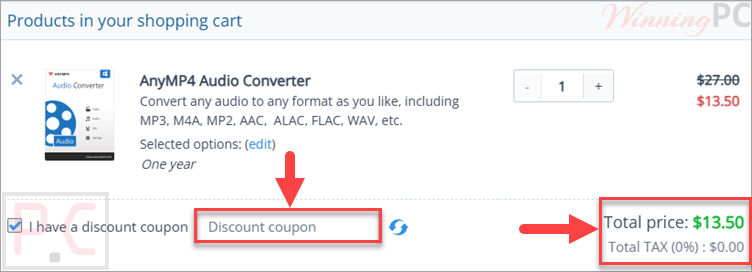
AnyMP4 Audio Converter License Key Free
- Product name: AnyMP4 Audio Converter
- Website: https://www.anymp4.com
- License type: 1-year
- Platform: Windows
- Giveaway link:
click here - Download: anymp4-audio-converter.exe
Go to the AnyMP4 Audio Converter giveaway page, enter your email and they will automatically send you an email with an annual license. If you can not find an email in the inbox, please check your spam inbox. Please mark their email and click on the field “no-spam”. Then you can easily receive their emails in the future.

Install/ open AnyMP4 Audio Converter and enter the license code above to finish registration:

AnyMP4 Audio Converter: In-Depth Review & Features

Key Features:
- Convert Audio to Various Formats: supports converting audio files to numerous formats for compatibility with devices like iPhones, iPods, iPads, Zune, Creative Zen, and Android devices.
- Extract Audio from Videos: allows you to extract high-quality audio from video files and save it in your desired format.
- Edit Audio Files: offers tools to cut audio clips, merge multiple files into one, and adjust audio effects with ease.
- Batch Conversion: converts up to 8 audio or video files simultaneously, saving time and effort.
- Simple Interface: designed with a user-friendly interface, making it accessible even for beginners.
- Fast Conversion Speed: ensures quick and efficient conversion without compromising audio quality.
- High-Quality Output: produces audio files with quality equivalent to the original source.
- Preview Edited Files: Enables listening to edited audio files before saving them.
Pros & Cons:
More screenshots:


Frequently Asked Questions
Where can I find AnyMP4 Audio Converter promo codes or discounts?
You can usually find the latest AnyMP4 Audio Converter coupons on WinningPC, along with official AnyMP4 seasonal sales and promotions.
What’s the biggest discount currently available for AnyMP4 Audio Converter?
Right now, WinningPC features a 50% OFF deal for both the 1-Year License and Lifetime License versions.
Can AnyMP4 Audio Converter extract audio from video files?
Yes. It can extract audio from video formats and save the sound in formats like MP3, AAC, WAV, FLAC, and more.
Does this software support batch conversion?
Yes. You can convert up to 8 files simultaneously using the batch conversion feature.
Is AnyMP4 Audio Converter beginner-friendly?
Yes. The software has a clean and simple interface that is easy for beginners to use.
What operating systems are supported?
It supports Windows XP and later versions, including Windows 11, as well as Mac OS X 10.7 or later.
Can I merge multiple audio files together?
Yes. The built-in merge feature lets you combine several audio files into one output file.
Does the software support FLAC conversion?
Yes. FLAC is supported as both an input and output format.
What payment methods are accepted?
AnyMP4 accepts Credit Cards, PayPal, Wire Transfer, and several other payment options.
System Requirements & Details
| Language Support | English, Français, Italian, Portuguese, Russian, Spanish, Swedish, and more… |
| Operating System | Windows 11/10/8/7/Vista/XP (SP2 or later) Mac OS X 10.7 or later |
| Processor | Intel Core 2 Duo Processor or AMD Athlon Processor, 2 GHz or faster. |
| RAM & Storage | 2 GB RAM or more recommended. |
| Supported Input | Audio and video formats including MP3, WAV, AAC, FLAC, MP4, MOV, AVI, MKV, WebM, and more. |
| Supported Output | FLAC, WAV, WMA, AAC, ALAC, AC3, AIFF, AMR, AU, MP3, MP2, M4A, MKA, OGG. |





Think back to some most successful item of articles. Now consider all the other ways you might send this information. Would it work well as a video? As an Info Graphic? As a more white paper or manual? To get a far more comprehensive series of shorter posts?
Thanks so much!