Cathryn Lee
AnyMP4 MP3 Converter for Mac converts audio and video files to MP3 on Mac, and can also convert MP3 into formats like WAV, OGG, AAC, M4A, and AIFF. It also includes basic editing tools for trimming, merging, volume adjustment, and batch conversion.
AnyMP4 MP3 Converter for Mac
2 plans · best save 50%
📄 Licensing & Support Details
- 30-Day Money Back Guarantee
- License Instant Delivery by Email
- 100% Clean & Secure Purchase
- Free Customer Support
- Free Upgrade (Applies to each package)
- Try 7 Days For Free.
📝 How to apply
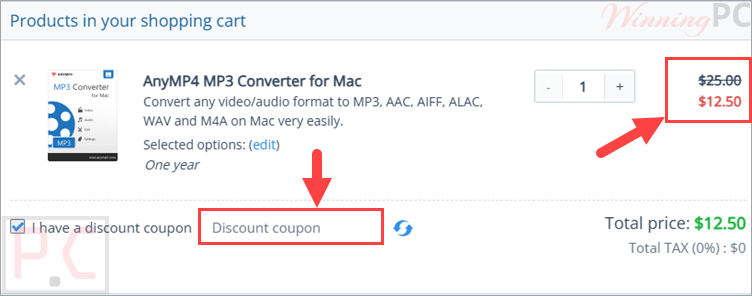
Click ‘Copy Code’ in the box above. We’ll automatically copy it and send you straight to checkout so you can claim your discount.
AnyMP4 MP3 Converter for Mac: Review & Features

Key Features:
- Converts audio files such as M4A, MP4, WAV, WMA, AIF, FLAC, and others to MP3 on Mac.
- Converts MP3 files to other audio formats, including WAV, OGG, AAC, M4A, AIFF, and ALAC.
- Extracts audio tracks from video files like MP4, MOV, MTS, AVI, MKV, FLV, and RMVB.
- Supports batch conversion for processing several audio files at the same time.
- Trims audio by setting custom start and end times.
- Merges multiple audio clips into one file.
- Lets users adjust encoder, sampling rate, channels, audio bit rate, and volume.
- Offers an intuitive interface designed for both beginners and advanced users.
- Supports many video, HD video, and audio input formats.
- Creates audio files for portable devices such as iPhone, iPad, iPod, Android devices, Nokia, Google Nexus, BlackBerry, Wii, and Sansa E200 Series.
Pros & Cons
More AnyMP4 MP3 Converter for Mac screenshots:


Frequently Asked Questions
Where can I hunt down promo codes for AnyMP4 MP3 Converter for Mac?
You can easily find valid discount codes for this software right here on WinningPC. We regularly update our pages with the newest offers, working closely with developers to bring you the best active deals.
What is the absolute lowest price I can get on this converter right now?
Currently, the best bargain available drops the price by 50%. You can secure the 1-Year plan for just $12.50 or pick up the Lifetime license for $21.85 using the deals listed on our site.
Can this software pull audio from my movie files?
Yes, it easily rips sound from video formats like MP4, AVI, MKV, and MOV, saving it as your preferred standalone audio file.
Will my music sound worse after converting it?
No, the program is built to ensure lossless audio quality, so your output files will sound exactly like the originals.
Is it possible to convert a whole folder of music at once?
Absolutely. You can load up multiple audio or video files and process them all simultaneously through the batch conversion feature.
Can I shorten an audio clip before saving it?
Yes, the application features a trim function that lets you cut the audio length by simply dragging a slider to your preferred start and end points.
Which file types can I actually export to?
You are able to save your final files as MP3, AAC, AIFF, ALAC, WAV, or M4A.
Does it let me combine different songs into one track?
Yes, the merge function allows you to put several different audio clips together to create a single compilation file.
System Requirements & Details
| Language Support | English, Français, Italian, Spanish, Swedish, and more… |
| Operating System | Mac OS X 10.7 or above (including macOS Monterey) |
| Supported Input | General Video: TS, MTS, M2TS, MXF, TRP, TP, MP4, M4V, QT, MOV, MPG, MPEG, MPEG2, MPEG4, MJPG, MJPEG, AVI, 3GP, 3G2, FLV, MOD, TOD, RM, RMVB, WMV, ASF, MKV, SWF, F4V, VOB, DAT, DV, DIF, OGM, WTV, DVR-MS, Bink video, WebM. HD Video: MTS, TS, M2TS, TP, TRP, HD MPG, HD MPEG, HD MPEG2, HD MPEG4, HD MP4, HD WMV, QuickTime HD MOV. Audio: FLAC, WAV, WMA, MP3, MP2, AAC, AC3, AIFF, APE, CAF, MPC, QCP, OGG, M4A, M4B, AUD, MKA, AIFC, RA, RAM, AU, AIF, CUE |
| Supported Output | MP3, AAC, AIFF, ALAC, WAV, M4A. |