

How to claim your free AOMEI license
AOMEI Backupper Professional
An all in one backup restore software for Windows 11, 10, 8.1, 8, 7 to protect data and system, replace or upgrade hard disk for Windows desktops and laptops.
- Product
- AOMEI Backupper Pro v8.4
- Product website
- aomeitech.com
- License
- 1-Year
- Platform
- Windows 11/10/8.1/8/7
- Usage
- Personal use only
- Updates
- Free updates for 1 year
- Support
- No support
- Updated
- 2026-10-16
Continue on aomeitech.com
Share to reveal your free license code, then activate it inside the app.
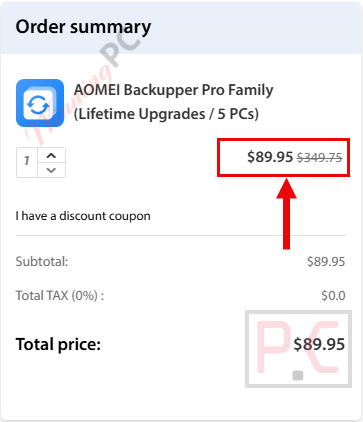
74% Off AOMEI Backupper Pro Family (Lifetime Upgrades / 5 PCs)
How to Get a License Key for Free
To keep things simple, just follow these steps:
- Completely remove the old version from your computer.
- Restart your PC, then install the new version.
- Activate the new version and enjoy!
- Download and install the software on your computer.
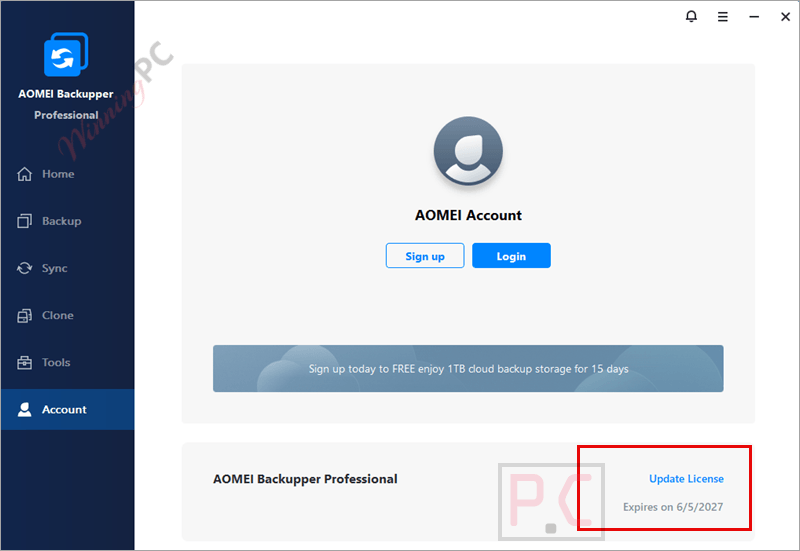
- Activate the full version of Pro in Menu> Register using the license key above for AOMEI Backupper Pro.
- Got it for 1-year free!


AOMEI Backupper Professional Plans & Coupon Codes

AOMEI Summer Sale 2026: Up to 80% OFF & New Family Bundle
Join AOMEI's Summer Sale 2026 and save up to 80% on popular software and the new Family Bundle. Protect, manage, and recover your valuable data for less. The event ends on Aug 31st, 2026!
AOMEI Backupper Professional
5 plans · best save 80%
Professional Lifetime
1 PC / License | One-time fee | Lifetime use and upgrades
Professional Family Lifetime
5 PCs / License | One-time fee | Lifetime use and upgrades

Special Offer: Up to 80% Off ★ Best Deal
Limited Time Offer for Upgrade AOMEI Backupper to Lifetime Up to Today Only – Hurry!
📄 Licensing & Support Details
- License Type: Yearly and Lifetime licenses available
- Delivery: Instant license code delivery
- Support: Perpetual free technical support
- Refund Policy: 90-day unconditional money-back guarantee
- Security: 256-Bit SSL secure order protection
📝 How to apply
- Click the “Copy” button in the coupon section above to grab this deal.
- The code will be applied automatically, and you’ll be taken to the checkout page to enjoy the discount.
In-Depth Review & Features
AOMEI Backupper Professional is a Windows backup, sync, and disk cloning software designed to protect files, operating systems, and entire drives. It helps users create backups, sync folders in real time, and clone disks or systems for upgrades and disaster recovery.

Key Features
- Backs up files, folders, entire disks, and specific partitions manually or automatically.
- Monitors directories to sync newly added, modified, or deleted files in real-time.
- Executes daily, weekly, or monthly scheduled backups using incremental or differential methods.
- Triggers specific tasks based on system events or when a USB is plugged in.
- Deletes old image files automatically based on your set backup cycle or count to save disk space.
- Creates WinPE bootable media to boot and restore a PC when Windows fails to load.
- Runs pre-assigned programs or scripts before and after operations.
- Sends email notifications detailing the success, failure, or required human intervention of a task.
Pros & Cons
More AOMEI Backupper Professional screenshots!
Backup: start your data insurance journey with backup Windows (create an image file) or back up hard disks, partitions, or any files/ folders:

Sync: Provide multiple modes to better synchronize your files

Clone: Clone or migrate your system to SSD or other disks, clone a hard disk drive/ a partition to another

Tools: Manage your system and data efficiently with common tools and other backup tools (note: some tools such as “Create Portable Version” are only on higher editions – Technical and Server)

Frequently Asked Questions
What is AOMEI Backupper Professional?
It’s a PC backup and recovery software offering system, disk, file backup, and clone features.
What are the key features of AOMEI Backupper Professional?
Features include system and disk cloning, file and folder backup, real-time and mirror sync, and the ability to create bootable media.
Does it offer any tools for data recovery on failing disks?
It includes features for cloning failing disks to prevent data loss.
Can I schedule backups with AOMEI Backupper Professional?
Yes, it allows the scheduling of backups with flexible options like daily, weekly, and event triggers.
Is there a discount for AOMEI Backupper Professional?
Yes, using coupon code AOQ***60 from WinningPC provides up to 80% off.
How can I get a free license code for AOMEI Backupper Pro?
To obtain a free one-year license code for AOMEI Backupper Pro, you can visit the product page on WinningPC. There, you can check for available giveaways and copy the license code provided.
System Requirements & Details
| Feature | Specifications |
|---|---|
| Language Support | English, Français, Italian, Portuguese, Russian, Spanish, Swedish, and more… |
| Operating System | Windows 11, 10, 8.1, 8, 7 |
| Subscription | 1-Year, Lifetime |
| Supported Input | Files, folders, partitions, disks, system images |
| Supported Output | Backup images, cloned disks, synced folders, bootable recovery media |


great set and forget easy to use helpful staff if needed
Oops, I forgot!
I am also using Image for Windows 3.64. That has to be my favorite. R-Drive Image comes next.
I will tell you how I rate my backup software. The interface has to look professional. No fancy good-looking interface or attractive eye candy for me. The speed has to be reasonable. A little faster or a little slower doesn’t make much difference as long as the image is stable.
The backup software apps that I use are all reliable.
1. Image for Windows
2. R-Drive Image
3. O&O Diskimage
4. Ashampoo Backup
5. Veeam
My all-time favorite has to be R-Drive Image. Period! I am using the technician edition. Not free I am afraid.
How reliable is the free Veeam Agent?
The answer: Super reliable.
Do you know Veeam Premium Edition for commercial and enterprise businesses costs a whopping $1,864.99 per year?
If you are looking for something even simpler, then I suggest Veeam Agent.
Completely free and way more reliable than the Windows native backup app.