Chris Bruner
Listen, we all know how frustrating it is to buy an audiobook on Audible only to realize you can’t play it on your preferred MP3 player or device without jumping through hoops. BookFab Audible Converter solves this by stripping the DRM and converting your files, but the $129.99 asking price for a lifetime license is a bit steep.
- Status: ✅ Active & Verified
- Last Checked: October 2026
- Offer: 30% Off Audible + Audiobooks Converter

BookFab Audible + Audiobooks Converter
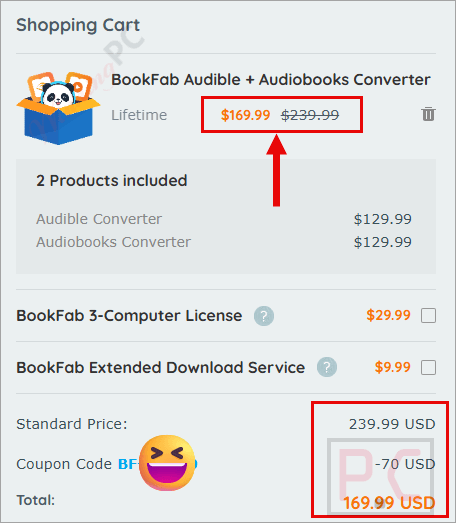
30% off coupon code: regular price $239.99, discounted price $169.99
Price Comparison Table
| License Type | Official Price | WinningPC Price | You Save |
| BookFab Audible Converter | $129.99 | $129.99 | $0 (Base Price) |
| BookFab Audible + Audiobooks Converter | $239.99 | $169.99 | $70 (30%) |
Redemption Guide
- Click our exclusive deal link above.
- Choose your preferred tier (we highly recommend the Lifetime plan to avoid recurring fees).
- Proceed to the secure checkout page. The 30% discount will automatically trigger in your cart.
What is BookFab Audible Converter?
BookFab Audible Converter is a desktop application designed to remove DRM from Audible audiobooks and convert them into open, device-friendly formats. It allows you to transform locked audiobooks into M4A, MP3, FLAC, WAV, or OPUS files so you can listen to them on any media player you already own.

Built for users who want true multi-format playback, BookFab Audible Converter features a built-in browser so you can sign in, browse, and download your Audible library directly inside the app. It preserves all essential metadata: including original chapter breaks, cover art, and titles, ensuring your library stays organized and easy to navigate no matter where you transfer the files.
In-Depth Review & Features
- Powerful Decryption: Removes Audible DRM during the conversion process, ensuring your audiobooks can be played smoothly across most standard media players.
- Broad Format Compatibility: You aren’t stuck with just MP3. You can export to M4A (the default), MP3 for maximum compatibility, FLAC and WAV for lossless archival quality, or OPUS if you need highly efficient file sizes.
- Built-In Browser: You don’t need to juggle the Audible website and the software. You sign in, browse, and download directly inside the app. This drastically speeds up access and keeps your downloads organized.
- Details & Chapter Preservation: It keeps original chapter breaks, cover art, titles, and durations intact. When you play the converted file, chapters remain fully selectable.
- Batch Management: A unified task queue lets you line up multiple downloads, monitor progress, and apply bulk actions (like batch conversions or deletions).
- Advanced Customization: Tweak your default download format, set how chapters are split, and choose your specific Audible regional site to fit your exact library setup.
Pros & Cons
Frequently Asked Questions
Is this the best coupon for BookFab Audible Converter?
Yes. WinningPC currently offers the highest verified discount rate available on the market for this software. We actively monitor this link to ensure the price drop triggers correctly.
Can I Try BookFab Audible Converter for Free?
Yes. You can use the free trial to download and convert up to 3 Audible audiobooks. All core features are available during this trial period.
Which Audible Regions Are Supported?
It supports downloads from all major regional sites: audible.com, audible.co.jp, audible.de, audible.fr, audible.co.uk, audible.ca, audible.es, audible.it, audible.in, and audible.com.au.
It is Legal to Remove DRM from Audible?
BookFab is strictly for personal use. If you own the audiobooks and use converted files for private listening/backup, it may be considered fair use depending on your region. Always check your local copyright laws and Audible’s terms of service first.
Is it safe to download BookFab Audible Converter?
Yes. It protects your account info and data. The conversion happens with high privacy protection, and no personal data is exposed.
Technical Specifications
| OS | Windows 11/10 (32/64 bit) |
| RAM | 4GB of RAM or above |
| Storage | 40GB of free hard disk space or above |
| Internet | Live Internet connection required |
| Supported Formats (Output) | M4A, MP3, FLAC, OPUS, WAV |