Laura Marano

Eagle.cool is a platform where you no longer have to worry about organizing or managing your image files no matter how many or varied they are in format. This great tool will contribute to the management of your data in the most scientific and safe way. This will also help you to immediately select the image you want to use without having to spend time searching like before.
In addition, with other useful features included, Eagle.cool can also turn your device into a place to store information more efficiently. Compared with traditional data management methods or similar software on the market, Eagle.cool is considered more outstanding and practical. The platform can be familiarized without much user time so that anyone can use it without difficulty.
Eagle.cool Coupon Code Oct 2026 (100% Working)

Key Features & Screenshots
Images are an extremely popular and diverse data format in the era of social networks as well as content-sharing platforms. If you are a photography enthusiast or simply someone who regularly saves beautiful pictures that you accidentally come across online, then you will definitely need a separate management tool for them. This is extremely necessary because the variety of content, quality, formats, and different types of images make it difficult for you to find them right away.
Therefore, professional image management support management software is a solution that can save you time and effort. While fully understanding the need for an image management tool, choosing the right one for your requirements is the next hurdle, but Eagle.cool is here to help.
- Tag Management: Unquestionably, Eagle can be used to control Tag. Images can be easily found by searching for assets with appropriately constructed tags. You are allowed to group tags and change tag colors in accordance with the tag groups to increase search efficiency.

- Hierarchical Folder: With the Hierarchical Folder feature, you can easily establish a logical framework for organizing your assets. This feature enables you to create a hierarchy of folders, allowing for a systematic arrangement of your files and documents.

- Smart Folder: Users can take advantage of this tool to adjust and manage the data files in their folders. This feature automatically searches and sorts folders based on user-specified characteristics. Users will be able to increase their working efficiency and save time searching each folder.

- Rating: With the Star Ratings feature, Eagle enables you to rate your images on a scale of stars, giving you the ability to assign a specific rating to each image in your collection. This feature serves as a valuable tool for organizing and searching for images based on their assigned ratings, significantly improving your search and category efficiency.

- Auto-tagging: This feature provides users with the ability to automatically tag the data in their folders. This tool will automatically detect and identify important terms or information and tag them, helping users improve the accuracy and searchability of the information.

- Duplicate detection: This can automatically detect and verify duplicate data in your system. It will then assist you in reducing duplicate errors and optimizing your data management and search.
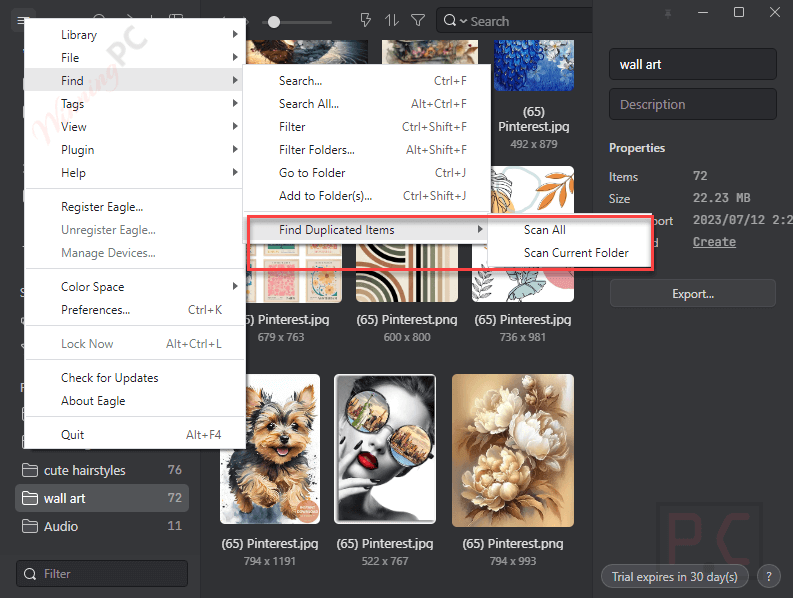
- Batch Processing: The software provides powerful algorithms that allow users to easily process batches of data files at the same time without any errors. This will be a useful feature that helps users save effort, time and optimize their working performance.
- Password protection: All personal information and important data of users will be securely protected when this feature is enabled. This software only allows you or people who can enter the correct password to access user data. This will also help you limit the risks of data theft.

- Video Management: Using Eagle, you can quickly browse and preview videos, without having to open videos one by one. It allows you to save videos in mp4 format files. You also can use it to adjust volume, adjust play speed (fast or slow) as well as set as video thumbnail.

- Audio Management: Eagle can play a variety of audio formats, including mp3, wav, aac, FLAC, m4a, and others. Hovering the mouse pointer over the audio file thumbnail will instantly play the audio file in list mode for preview. The audio waveforms will be shown in list mode, which increases the effectiveness of waveform-based searching.

- Font Management: It comes with a Font Management function, which is capable of managing font files, previewing, and categorizing without installation. It allows you to choose to display the font in “white”, “black”, “blue”, “and yellow” on four different color backgrounds as well as sow the basic information of the font file such as “Postscript Name”, “Full Name”, “Family”, “Style”, “Version”, “Copyright”, “Trademark”, “Characters”.
Technical Details
| Language Support | English, Français, Italian, Spanish, Swedish, and more… |
| Money Back Guarantee | 30-Day |
| Operating System | macOS 10.13+ or Windows 10+ 64bit |
| Shipping | Register code will be sent to your email in minutes |
| Subscription | Lifetime |
| Support Services | Forums |