
 Chris Bruner
The current EaseUS OS2Go Pro coupon is ANNI***T2025, giving 70% off, which drops the price from $19.95 to $5.98. ✅ Verified Oct 2026 by Chris, with a 30-day money-back guarantee. Click “Copy” below, then paste the code at checkout on EaseUS’s site.
Have you heard of Microsoft’s Windows to Go feature? If you’re acquainted with the word, you’re presumably aware that it was a feature of Windows 8 and 10 Enterprise editions before May 2020 that enabled the system to boot from a detachable USB drive, thus the name.
While this capability is no longer publicly accessible, EaseUS has developed an application that offers to assist you in creating a bootable USB with Windows 10 or 11. It’s called EaseUS OS2GO, and it allows you to take Windows with you everywhere you go. In other words, you may use it to make a portable Windows version.

EaseUS Halloween Sale - Enjoy Up to 55% Off
Save up to 55% on selected voice changers, data protection tools, and more during the EaseUS Halloween Sale. Ends October 31, 2026.
EaseUS OS2Go Professional
3 plans · best save 70%
Monthly ★ Best Deal
1-month free upgrades | 30-day money back guarantee
EaseUS Solutions to Windows 11 Upgrade
EaseUS Troubleshooting Toolkit for New Windows - 50% promotion code: regular price $338.85, discounted price $169.42

Table of Contents
Giveaway: EaseUS OS2Go Pro License Key Free
- Product name: OS2Go PRO 4.1.0
- Website: https://www.easeus.com/
- License type: 1-year
- Platform: Windows
- Download: os2go_4.1.0_portable.exe
- Giveaway page: EaseUS OS2Go giveaway
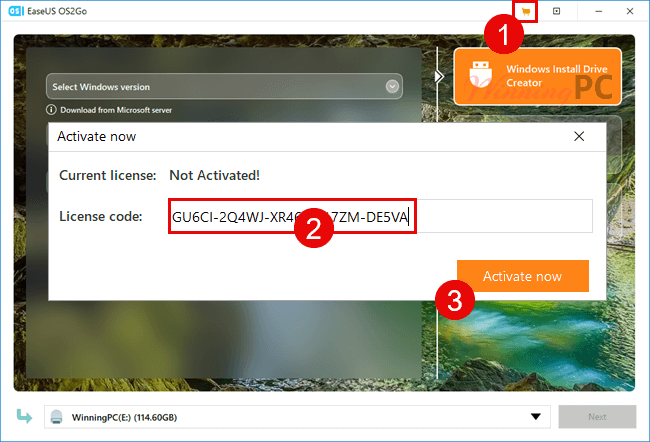
Open the giveaway page and get a free license code for EaseUS OS2Go.
After installation, activate this software to the PRO version:
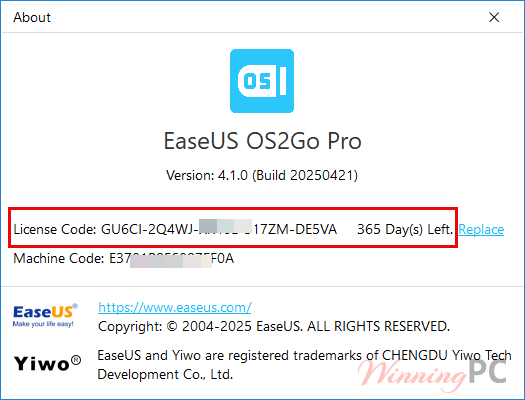
You have 365 days subscription:
Key Features & Screenshots
- This tool allows you to store Windows 10/11 operating system on a USB drive making it portable and bootable on different PCs and very useful for remote work.

- Using it, you can also use the same Windows operating system between two computers or use the newest version of Windows on another PC outfitted with an older operating system.
- This tool also helps you create a portable Windows Minecraft USB drive that is compatible with MacBook, iMac, Mac mini so you can play your favorite Windows games on macOS

- This tool helps you create an emergency bootable disk to get the system back to work in an emergency and resolve any problem or conflict associated with Windows.

- EaseUS OS2Go is the best choice for users who want to use Windows OS on a Mac computer and for users who might need two operating systems on one computer.

Working using EaseUS OS2GO is simple, and your bootable disk will be ready in no time. When starting from a USB, ensure that the transportable device and the host system are both in the same state.
Frequently Asked Questions
What is EaseUS OS2GO?
It is a software tool that creates a portable USB drive allowing users to run a fully functional Windows system on other computers.
Can I use it to install Windows on a Mac?
Yes, EaseUS OS2GO can create a Windows installation on a USB drive, enabling you to run Windows on a Mac without needing to partition the hard drive.
What versions of Windows can I use with it?
It supports creating portable USB drives for Windows 7, 8, 8.1, 10, and 11.
Do I need any special type of USB drive to use EaseUS OS2GO?
While this EaseUS software works with most USB drives, using a faster and more reliable USB drive is recommended for better performance.
Can it bypass certain system requirements for Windows installations?
Yes, it can help create installation media that bypasses some of the stricter system requirements like TPM 2.0 and Secure Boot for Windows installations.
Is there a coupon code available for OS2GO?
Yes, WinningPC regularly updates with the latest coupon codes for EaseUS OS2GO. You can use the coupon code ANNI***T2025 to save up to 70% on your purchase. For the most current discounts and promotions, check the WinningPC website before making your purchase.
Why Choose WinningPC
- Why Trust? We are committed to providing 100% valid and verified coupon codes, so you can always shop with confidence.
- Found an Invalid Coupon or a Better Deal? If you encounter an invalid code or a better offer, please let us know. Our team updates all discount information regularly to ensure accuracy.
- Official Authorization: We only share authentic discounts from trusted software developers.
- No Fake Discounts: Unlike some sites, we never use misleading deals. The final price you see is the true discounted price.
- Secure Purchases: All transactions are processed on the official vendor’s website, ensuring authenticity and data protection.
- Extra Support: If you face order or vendor issues, contact us. We’ll liaise with the vendor to help resolve your problem quickly.
Technical Details
| Language Support | English, Français, Italian, Spanish, Swedish, and more… |
| Money Back Guarantee | 30-Day |
| Operating System | Windows 11/10/8/7 |
| Shipping | Register code will be sent to your email in minutes |
| Subscription | 1-Month, 1-Year, Lifetime |
| Support Services | Email, Tickets, Chat |



Tried to use this to create a Win to Go from a windows 11 ISO running under Win10 and after waiting ages for the 7GB ISO to download it failed to write to a 250GB SATA SSD in a USB caddy… SSD was originally formatted GPT EFI compatible with requisite partitions… even tried deleting all the partitions to let OS2Go format it how it likes but no joy… tried creating a USB Windows 11 bootable installer but EFI boot screen would not show the USB drive as a bootable option… was going to try installing windows 11 directly to the another 200GB+ NTFS partition on the USB SSD… failed! Tried creating a windows 2 go of the current system but that requires a bigger SSD than I have available so failed. I did not want a win2go of my current system anyway as it’s spread over multiple drive letters and win2go only works if everything is on the one drive letter. All in all FAIL!
On the page to get the license key there is a link provided with the displayed key BUT it links to a file called “pct_trial_installer_20251020.17609727677496b4249406a020344637.exe” to me that is the trial PC Transfer installer NOT the OS2Go installer. It’s NOT the installer for that either but a NSIS packaged downloader for PC Transfer so don’t waste your time downloading from that link, use the one on THIS page here. And although its called “os2go_4.1.0_portable.exe” IT IS NOT PORTABLE! it installs into “C:\Users\[USERNAME]\AppData\Roaming\EaseUSOS2Go4.1.0\os2go and does not clean up after it’s exited so is NOT portable. There is no formal uninstall to get rid of it you have to manually delete the “EaseUSOS2Go4.1.0” folder and it’s contents when the license expires or if you’ve done what you want and don’t need it any more.
Thanks for your detailed comment and for pointing this out!
You’re right — the link on the license page mistakenly pointed to the EaseUS PC Transfer trial installer instead of the correct OS2Go file. We’ve updated the article with the correct download link to avoid confusion.
Really appreciate your feedback — it helps us keep things accurate and useful for everyone!