
 Laura Marano
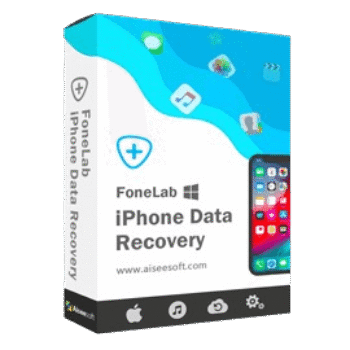
FoneLab iPhone Data Recovery helps users recover deleted or lost photos, messages, contacts, videos, call logs, and other data directly from an iPhone, an iTunes/Finder backup, or an iCloud backup. This phone data recovery tool focuses on selective recovery, allowing users to preview files before restoring them without overwriting existing data.
Aiseesoft FoneLab – iPhone Data Recovery (for Windows)
3 plans · best save 50%
Aiseesoft FoneLab - iPhone Data Recovery (for Mac)
3 plans · best save 50%
📄 Licensing & Support Details
- License Type: 1 Month, Lifetime, Business license.
- 30-Day Money-Back Guarantee
- Free Upgrades
- Technical Support
- 100% Secure.
📝 How to apply
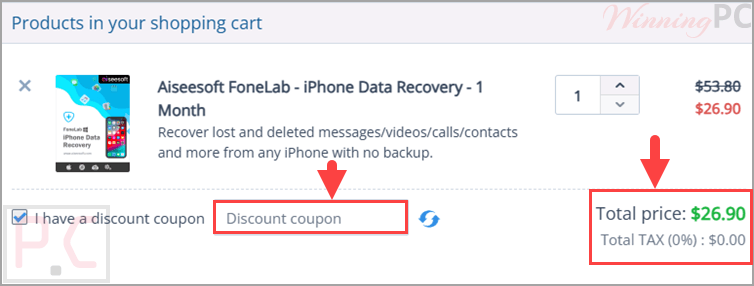
Choose the ‘Copy Code’ button in the coupon box to copy the code and be redirected to the payment page, where you can input it to secure the discounted rate.
FoneLab iPhone Data Recovery Free License Key
- Product name: FoneLab iPhone Data Recovery
- Website: https://www.aiseesoft.com
- License type: 1-year
- Platform: Windows
- Giveaway link:
click here - Download: fonelab.exe
How to get the license key?
Please enter your Name and E-mail address and click on the “Register” button on the FoneLab iPhone Data Recovery giveaway page.

In a few minutes, you will receive an email with an annual license ( If you don’t see it in your inbox, please check the junk mail.).

Download and install the software on your computer then register it with your free license code

Got it

FoneLab iPhone Data Recovery: Review & Features

Key Features:
- Recover data directly from iPhone, iPad, or iPod.
- Extract data from iTunes, Finder, or Apple Devices backups.
- Recover files from iCloud backups without full device restoration.
- Preview recoverable files before restoring them.
- Select only specific files for recovery.
- Restore data without overwriting current device content.
- Search files using keywords.
- Filter results by file type, date, or size.
- Show only deleted items for faster recovery.
- Recover photos, messages, contacts, videos, call history, and app data.
- Works even when no backup is available.
- Supports recovery from damaged, lost, stolen, or inaccessible devices.
- Helps recover data after system crashes, failed updates, freezes, and jailbreak failures.
- Compatible with a wide range of iPhone, iPad, and iPod models.
- Supports iOS 5 and later versions.
Pros & Cons:
More screenshots:

Frequently Asked Questions
Where can I find the latest FoneLab iPhone Data Recovery coupon codes?
The easiest way is to check WinningPC for updated deals and promotional offers. You can also monitor FoneLab’s official website for seasonal discounts and special promotions.
What’s the biggest discount currently available for FoneLab?
At the moment, WinningPC features a 50% OFF discount, reducing the 1-Month License from $53.80 to $26.90 and the Lifetime License from $79.95 to $39.97.
Can FoneLab recover deleted photos without a backup?
Yes. The software can scan compatible iOS devices directly and recover deleted photos and other supported data even when no backup exists.
Does it work with iCloud backups?
Yes. You can access and recover selected data from iCloud backups without restoring the entire backup to your device.
Can I recover data from an iPhone with a broken screen?
In many cases, yes. If the device can still be detected by the computer, the software may help recover available data.
Does FoneLab overwrite existing data during recovery?
No. It is designed to recover selected files without requiring a full device restore that could replace existing content.
What types of files can be recovered?
Supported data includes photos, messages, contacts, videos, call history, and various app-related data.
Can I preview files before restoring them?
Yes. The preview function allows you to inspect recoverable files and choose only the items you want.
Is the software compatible with both Windows and Mac?
Yes. FoneLab iPhone Data Recovery supports both Windows and macOS systems.
System Requirements & Details
| Operating System | Windows 10/8.1/8/7/Vista/XP (SP2 or later), Mac OS X 10.7 or above |
| Processor | 1 GHz Intel/AMD CPU or above |
| RAM & Storage | 1024 MB RAM minimum, 200 MB free disk space |
| Supported Input | iPhone, iPad, iPod devices, iTunes/Finder/Apple Devices backups, iCloud backups |
| Supported Output | Recovered photos, messages, contacts, videos, call history, app data, and other supported files |



i wish to recover my data