

FoneTool Unlocker Professional Giveaway

FoneTool Unlocker Professional
Remove iPhone passcodes, Apple ID and iCloud Activation Lock, manage saved iOS passwords, and bypass Google FRP lock on Samsung devices.
- Product
- FoneTool Unlocker Professional
- Product website
- fonetool.com
- License
- 1-Year
- Platform
- Windows 11/10/8/8.1/7 SP1, Windows Server 2012 to 2019
- Usage
- One personal computer, personal use only
- Updated
- 2026-10-09
Continue on fonetool.com
The publisher handles registration and license delivery on its official website.
The limited-time giveaway!
The free license is no longer available.
FoneTool Unlocker Professional Coupon Codes Oct 2026

AOMEI 2026 Halloween promotion: Up to 80% OFF
Join AOMEI's Halloween Sale 2026 and save up to 80% on popular software and the new Family Bundle. Protect, manage, and recover your valuable data for less. The event ends on Nov 15th, 2026!
You may also like



Is this FoneTool Unlocker giveaway safe and legit?
Yes, as long as the device you’re unlocking is yours. The license is a genuine key from FoneTool, and nothing is cracked or repackaged.
Official build, genuine key
You install FoneTool’s own installer and activate it with a real license code. No patches, no keygens.
Straight from the publisher
The giveaway runs through FoneTool itself, not a reseller or a grey-market key shop.
*Paid checkout stays with FoneTool
If you use the coupon, payment happens on FoneTool’s official store. Your card details never pass through WinningPC.
Ownership matters
FoneTool states the tool is only for devices you legally own or have the owner’s explicit permission to unlock. Using it on a lost or stolen phone isn’t a gray area, it’s off-limits.
How to get FoneTool Unlocker License Key for Free?
Access the FoneTool Unlocker giveaway page below to get your free license code.- Download FoneTool Unlocker from the official FoneTool site and install it on your Windows PC.
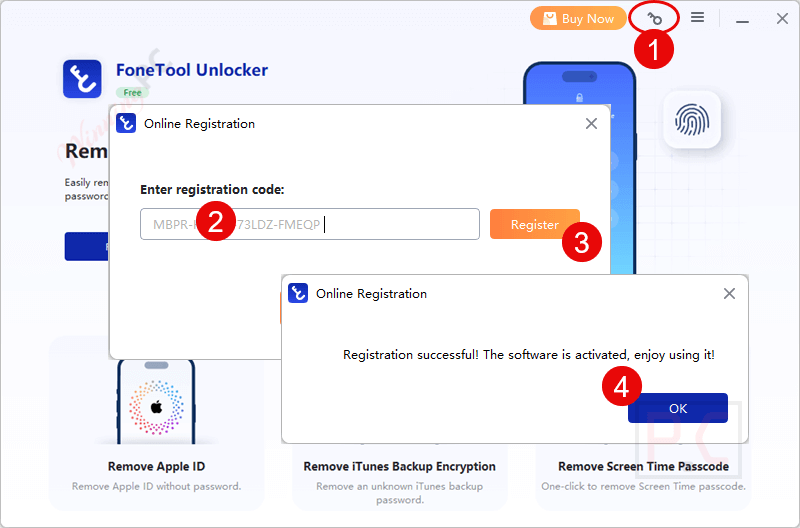
- Open the program and enter the giveaway license code shown above to activate the Professional version.
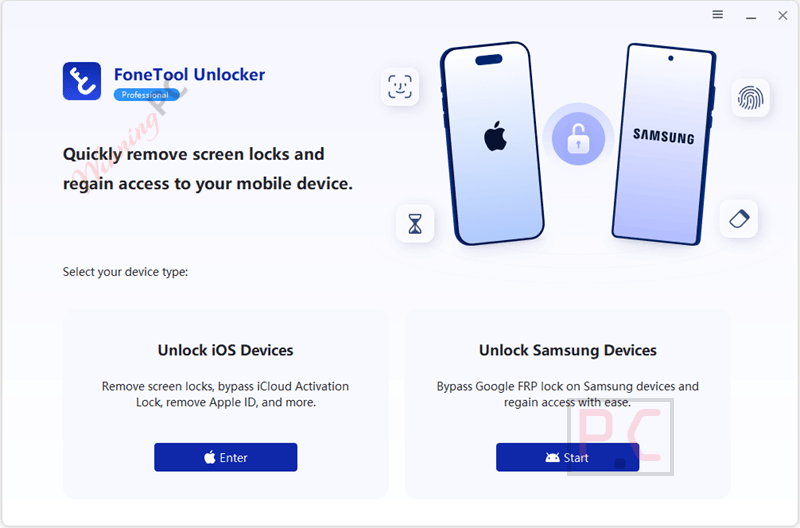
- Connect your iPhone, iPad or Samsung device with a USB cable, then pick the matching mode (Unlock iOS Devices or Unlock Samsung Devices).
- That’s it. FoneTool Unlocker Professional stays fully unlocked for 1 year from activation.

FoneTool Unlocker Professional Review & Features
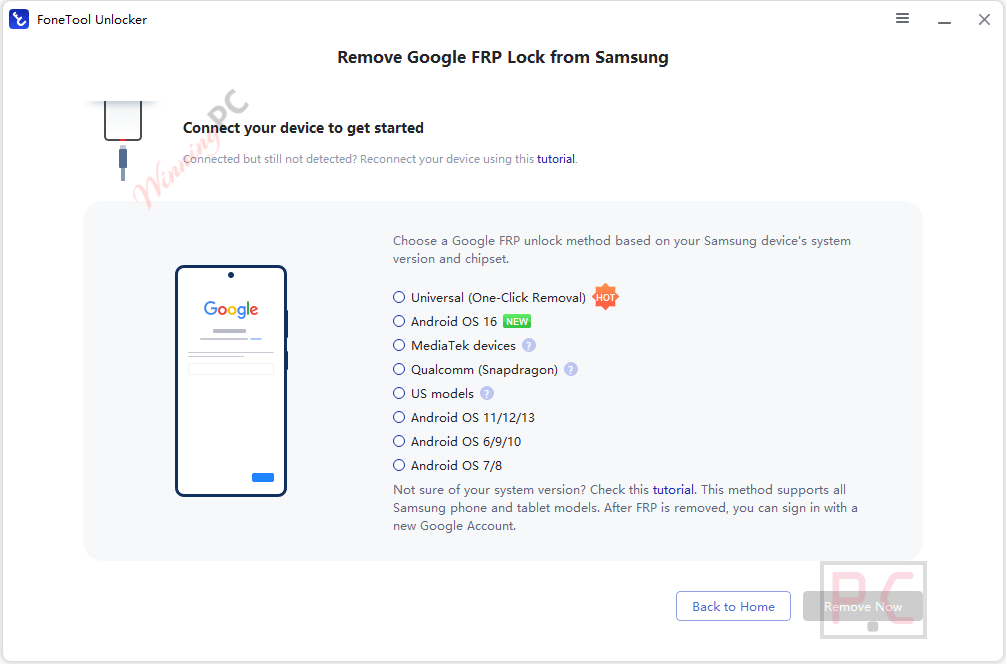
FoneTool Unlocker Professional appeals to users because of its breadth. Most iPhone unlockers stop at Apple devices, and you’d buy a separate Android tool for FRP. FoneTool Unlocker puts both in one Windows app, and the Samsung side is more thorough than you’d expect: separate methods for Android 16, 11 to 13, 6 to 10 and 7/8, plus MediaTek, Qualcomm and US-model routes. The Samsung workflow does ask more of you, though. You’ll type a hidden-menu code on the phone to enable Test Mode, and the Qualcomm method needs a Samsung EDL cable you probably don’t own. The catch for some readers is the platform. It’s Windows only, so Mac households are out of luck.
Key features
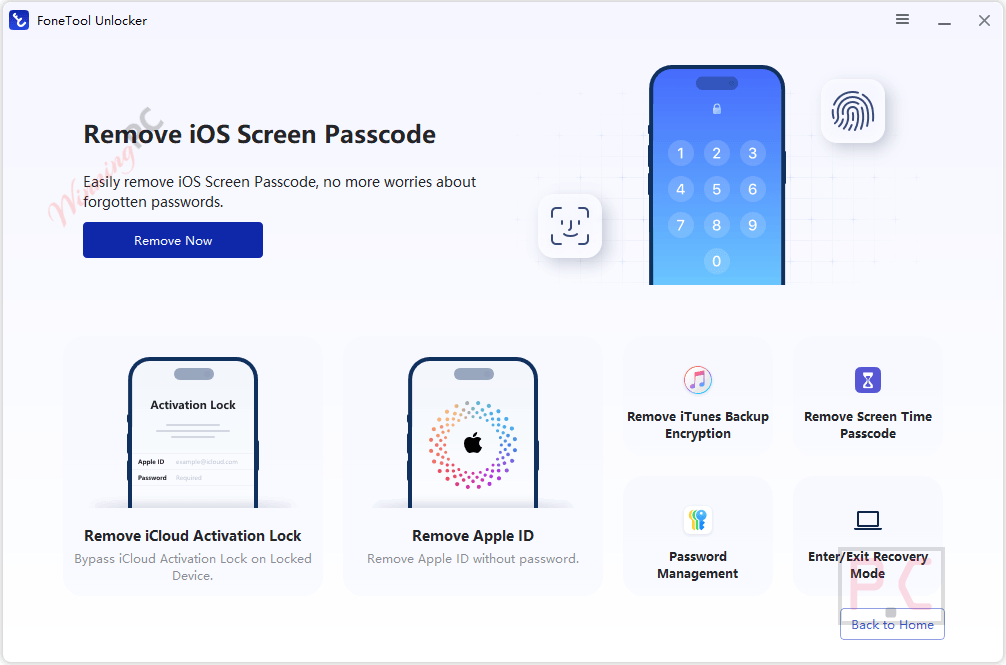
- Screen passcode removal for 4-digit, 6-digit, custom codes and Face ID locks on iPhone, iPad and iPod touch.
- Apple ID and iCloud Activation Lock removal on supported devices, useful when a used device still carries the previous owner’s account.
- Screen Time passcode removal without wiping photos or messages, plus iTunes backup encryption removal.
- Samsung Google FRP bypass with a one-click universal method and chipset-specific options.
- Saved password viewer for Wi-Fi, website and app logins stored on your iPhone or iPad.
How to Use FoneTool Unlocker (Step-by-Step Guide)
Step 1. Install & open FoneTool Unlocker on your PC, then connect iOS devices via USB.
Step 2. The home screen shows four options: choose Remove iOS Screen Passcode, Remove Apple ID, Remove iTunes Backup Encryption, and Remove Screen Time Passcode.
Step 3. To enter Recovery Mode, follow the on-screen instructions by clicking the “Tutorial” button.
Step 4. Upon entering Recovery Mode, please select “Next” to advance to the firmware download page. The software will automatically identify the model of your device and initiate the download of the corresponding firmware package when you click “Download.”
Step 5. After downloading, click “Remove” to begin removing the screen passcode. This process will take a few minutes, after which your device will restart in a passcode-free state.
Step 6. After successfully removing it, select “Back to Home Page” to reset the device. The device will revert to factory settings, allowing you to set it up again.
More screenshots!
What we think
What the free key doesn’t include
| Giveaway license | Paid Yearly ($39.95) | Paid Lifetime ($59.95) | |
|---|---|---|---|
| Duration | 1 year | 1 year | Lifetime |
| Version upgrades | None | 1 year of free upgrades | Lifetime free upgrades |
| Technical support | Not included | Not specified | Not specified |
| Devices | 1 personal PC (iOS device count not specified) | 5 iOS devices / 1 PC | 5 iOS devices / 1 PC |
| Use | Personal only | Not specified | Not specified |
| Price | Free | $39.95 | $41.96 with AMADABUBA30 |
Which FoneTool Unlocker plan should you buy?
| Plan | Regular price | Best price now | Devices | Upgrades | Best for |
|---|---|---|---|---|---|
| Professional Yearly | $39.95 | $39.95 | 5 iOS devices / 1 PC | 1 year | A one-off unlock job |
| Professional Lifetime | $59.95 | $41.96 with AMADABUBA30 (or $49.95 via the Lifetime Deal) | 5 iOS devices / 1 PC | Lifetime | Anyone who fixes family or second-hand devices regularly |
Frequently Asked Questions
Does FoneTool Unlocker work on Mac?
No. FoneTool Unlocker runs on Windows only (Windows 11, 10, 8/8.1, 7 SP1 and several Windows Server editions). Mac users will need an alternative such as Tenorshare 4uKey or Apple’s own recovery mode.
Will unlocking my iPhone erase my data?
It depends on the lock. Removing Screen Time or iTunes backup encryption keeps your photos and messages. Removing a forgotten screen passcode wipes the iPhone, because iOS doesn’t allow it any other way, so restore from a backup afterwards if you have one.
What happens when the 1-year giveaway license ends?
The Professional features stop working after 12 months. You can keep using the free version’s limits or buy a paid plan. Keep in mind the giveaway also doesn’t get version upgrades during that year.
Can it remove FRP on any Android phone?
No. The FRP feature is built for supported Samsung phones and tablets only, across Android 6 to 16 and both MediaTek and Qualcomm chipsets. Other Android brands aren’t covered.
Do I need special hardware for the Samsung unlock?
Usually just a USB data cable and at least 50% battery on the phone. The Qualcomm (Snapdragon) method is the exception: it requires a Samsung EDL engineering cable.
Does the AMADABUBA30 code work on the Yearly plan?
FoneTool’s offer lists the 30% discount for the Lifetime plan, bringing it to $41.96. Check the price at checkout if you’re buying Yearly instead.
Is it legal to use FoneTool Unlocker?
Yes, on a device you own or are authorized to unlock. FoneTool itself requires proof of that intent before you start, and using it on someone else’s phone without permission isn’t covered.
System Requirements & Details
| Operating system | Windows 11, 10, 8/8.1 (32/64-bit), Windows 7 SP1, Windows Server 2012/2012 R2/2016/2019, WHS 2011, SBS 2011 |
| Processor | 1 GHz x86 or compatible CPU |
| RAM | 256 MB |
| Disk space | 300 MB free for installation |
| Supported Apple devices | iPhone 4s to iPhone 14 series, iPad / iPad mini / iPad Air / iPad Pro, iPod touch 1 to 7 |
| Supported Samsung devices | Supported Samsung phones and tablets, Android OS 6 to 16, MediaTek and Qualcomm chipsets |
| Other | USB data cable; Samsung EDL cable for the Qualcomm method; device battery at 50% or more |





bo worjing for iphone 12
Hei. everytime i open the software asks again the registration key. why? something is not right if you can help it will be appreciated. thanks.
Please disregard the popup and continue using this app.
I used the provided key and activated the app but every time I restart the app , it would ask for an activation key ! any useful suggestion ?
Please disregard the popup and continue using this app.
iPhone needs to be activated to bypass icloud with this tool. Such crap as this tool advertises it can bypass icloud from the activation lock screen which it 100% cannot.
hello This error will not work.Invalid registration code. If you have already purchased, please try again or contact us.
Hi,
You should download the correct license code from our server: https://cloud.filezilla.io/aomeitech.com/FoneToolUnlocker_WinningPC_20Nov2025.zip
Registration failed, the registratin code is not within the valid period.
Please visit the giveaway section at https://winningpc.com/fonetool-unlocker-pro-giveaway-key-free/#claim-free-license to obtain the latest license code and download link.