
 Chris Bruner

iTop PDF Pro is a Windows PDF editor built to create, modify, and secure documents. The software directly changes original text, adds images, and updates fonts or links inside the file. It features a quick E-Signature tool for signing forms and uses password protection to lock private files. To make reading easier, the program also adjusts page sizes, layouts, and rotation.
- Product name: iTop PDF Pro v3.x
- Publisher: iTop Software
- Homepage: https://pdf.itopvpn.com
- License type: 1-year/3-month license
- Price:
$49.99$0.0 - Platform: Windows 11/10/8/7
- Giveaway page:
iTop PDF giveaway link - License code & download – last updated: Apr 30, 2026
Click here...
Unlocking content...
📝 Note: Please follow the Activation Guide to successfully claim your license.
iTop PDF Coupon Codes & Deals

iTopVPN Summer Sale: Up to 86% Off
Take advantage of special offer up to 86% off iTop VPN software!
iTop PDF for Windows
4 plans · best save 81%

Activation Guide: iTop PDF License Key Free Download
Click on the above download link to download and install the software on your computer for free. Please log in with your VIP account to get iTop PDF Pro for 12 months for free.


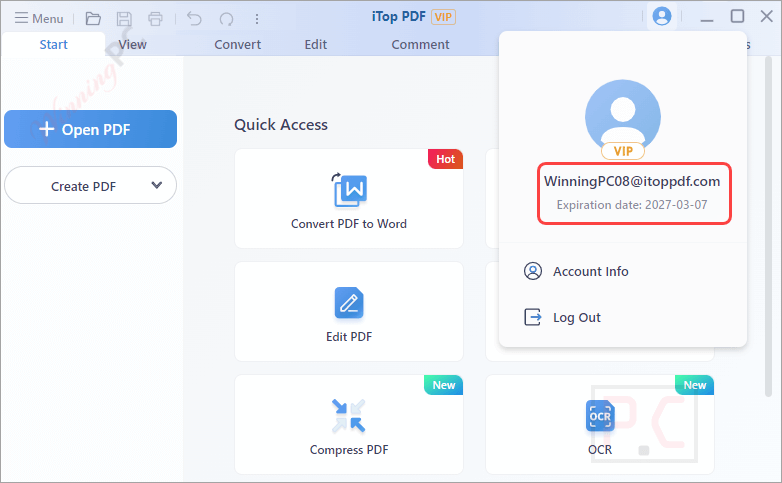
iTop PDF Pro Screenshot!

Main Features
- iTop PDF Pro allows you to view and read PDF content in a nice and neat way. You can also add bookmarks and comments with ease. If you want to rotate the PDF page, this tool can also help you.

- You can use iTop PDF to edit PDFs and convert PDF files into other formats. It is simple to use to help you easily convert PDF files to Word, image, Excel, PPT, text, and PDF/A, as well as convert office, image, and files to PDF files.

- iTop PDF Pro is a simple yet full-featured software that includes all basic PDF editor features. Using it, you can edit the original PDF content, add text, images & shapes, change the size, color & font style of the text, insert links, and customize your own stamp.

- Besides, you are allowed to add annotations to the PDF documents, such as adding notes & comments, highlighting, underlining, strikethrough specific text, and more.

- Protecting PDF files can be quickly completed. PDF files can easily be set passwords with the Encrypt feature and black out sensitive information with the Redaction functionality.

- Plus, you can protect any of your PDF documents by adding a watermark to PDF files to protect valuable copyrighted content quickly.

- It comes with a PDF E-Signature, which is capable of creating your own E-signature within iTop PDF and E-signature PDF files quickly and easily. Also, you can customize your exclusive signature based on your preference.

- The PDF compressor function can help you reduce the large PDF file size without losing its quality. All of your PDF files can be quickly compressed, and the compression level can be altered from “smallest size with good quality” or “medium size with the best quality”.

- iTop PDF is a lightweight software that allows you to quickly combine multiple PDF pages into a single document. Before combining them, you can insert, erase, and rearrange the pages.

- iTop PDF has a very simple and clear interface that lets you split one PDF document into multiple new PDF files. You can split PDFs by the number of pages, page range, and top-level bookmarks.

iTop PDF Pro offers a complete solution for PDF document management, making it an ideal choice for individuals and organizations who need to create, edit, and manage PDFs. With its comprehensive features and user-friendly interface, iTop PDF Pro makes it easy to handle all types of PDF-related tasks.
Frequently Asked Questions
What key features does iTop PDF offer?
Features include PDF editing, converting PDFs to other formats, merging and splitting PDFs, compressing PDFs, and adding security measures like passwords.
Does iTop PDF support OCR technology?
Yes, iTop PDF includes OCR technology to recognize and convert text within images and scanned documents.
Is there a trial version of iTop PDF available?
Yes, iTop PDF offers a trial version with access to all features for a limited period.
How can I protect my PDF files with iTop PDF?
iTop PDF offers options to encrypt PDF files with passwords for enhanced security.
How can I get a discount on iTop PDF?
Use the coupon code from WinningPC to save up to 81%.
Technical Details
| Language Support | English, Français, Italian, Spanish, Swedish, and more… |
| Money Back Guarantee | 30-Day |
| Operating System | Win11/Win10/Win8/Win7 |
| Shipping | Register code will be sent to your email in minutes |
| Subscription | 1-Year |
| Support Services | Email, Phone, Forums |




What do you expect of Chinese software companies? They only offer 3-month, 6-month or 1-year giveaways.
For them, it is an opportunity to promote their pdf editor and other software. In short, it is a longer trial period. But at the end of the day, you don’t own it.
Thanks but no thanks!
Try out PDFgear v2.16. It is absolutely 100% free for now. No ads, no catch. It will put a lot of paid pdf editors to shame.
now it’s only 2 month trial license for a product that is just a GUI on top of unattributed 3rd party software… Chinese software is synonymous with pirated Intellectual property to sustain and fund the CCP economy. Not sure why this is STILL online and promoted as the giveaway is LONG expired! Be warned this program WILL overwrite the source PDF if you edit a PDF and then save it thankfully it was nothing irreplaceable I didn’t notice there was a save as icon next to save icon.
PDFGear installer is 64bit ONLY and the installer was likely at one time 32bit and 64bit compatible containing both sets of binaries but NOW contains duplicate 64bit binaries and writes both copies, one over the top of the other… complete waste of SSD erase/write cycles. When they went 64bit ONLY they should have re-made the installer to just include one set of 64bit files instead of two sets and doubling up the writes! But it’s free editor and OCR is quite good but the installer hijacks the Open PDF association without asking and editing existing text does not provide options to change ink colour or font type and size, just the option to change the character to a different one, so still needs further dev work.
I will keep it just in case I need it in the future and my other PDF editors cannot cope with a PDF I want to edit.
You download this for 6 months and then decide to buy, it’s all subscription based for a huge amount of dollars. Bad idea for subscription programs. Your house pays monthly for electricity, water, internet, medical insurance, school and, if you’re going to pay a lot of subscription fees, don’t even think about it.
New giveaway account:
Email: vip0607@itoppdf.com
Password: dCKCHXYs
thaaaaaaanx brooo
Downloaded and installed on 7th April without any issue. The app opens as the pro VIP version and runs as it says on the tin! A nice little all in 1 package! Thank-you Winning PC and Dev’s for making this available.
it doesn’t work cannot be activated in region
New giveaway account:
Email: vip0607@itoppdf.com
Password: dCKCHXYs
This password has been changed now, please share the updated one
Thanks
You can get Soda PDF Standard 14 for 1-year free here: https://winningpc.com/soda-pdf-standard-coupon-code-free-license/
p/s: In my opinion, it’s not safe to use the same iTop PDF account for everyone.