
On this page
iTop PDF Pro Giveaway

iTop PDF
Edit PDF with an easy and full-featured PDF editor on Windows PC.
- Product
- iTop PDF VIP
- Product website
- pdf.itopvpn.com
- License
- 1-Year
- Platform
- Windows 11/10/8/7
- Usage
- Non-commercial only
- Updates
- Free updates during the subscription
Continue on pdf.itopvpn.com
The publisher handles registration and license delivery on its official website.
The limited-time giveaway!
The free license is no longer available.
iTop PDF Coupon Codes & Deals

iTop VPN Halloween 2026: Up to 83% Off + 12 Months Free
Take advantage of special offer up to 83% off iTop VPN software!
iTop PDF for Windows
4 plans · best save 81%

Is this iTop PDF Pro giveaway safe and legit?
Yes. Pro is unlocked by iTop itself through your account sign-in, so there’s no patched file or shared key involved.
No crack or keygen
You install iTop’s own build and activate through their account system. Nothing is modified or repackaged.
Official source
The download and activation come from iTop’s own PDF site (pdf.itopvpn.com), not a third-party key reseller.
Secure checkout
If you buy a plan with the coupon, payment happens on iTop’s store, and your card details never pass through WinningPC.
Refunds
The offer doesn’t state a money-back window, so check iTop’s refund policy before you pay. The giveaway itself costs nothing, so there’s no risk there.
Activation Guide: iTop PDF License Key Free Download
- On the giveaway page, please enter your email address correctly to claim your VIP.
- Download and install the software on your PC using the installer from the homepage.
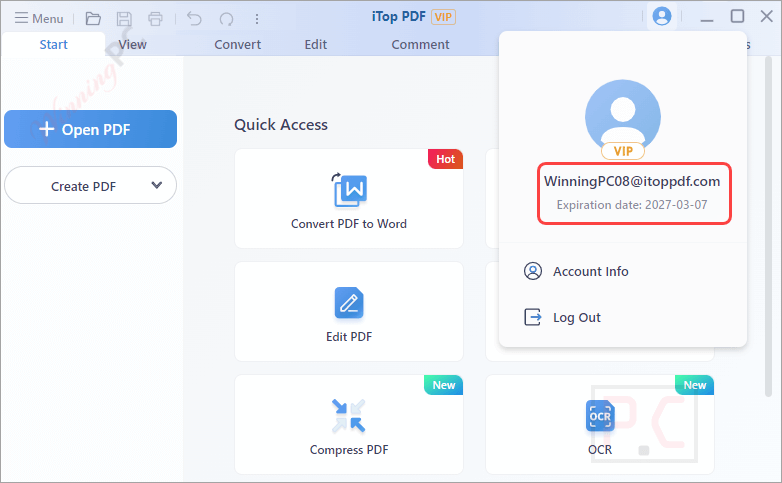
- Launch it, then sign up/log in with the same email to activate your VIP during the event period to officially claim your prize.
- Enjoy it for 12 months VIP subscription for free.


iTop PDF Pro: In-Depth Review & Features
The appeal here is scope in a small package. iTop PDF Pro puts editing, conversion, OCR, page management, compression and password protection in one app that stays light on system resources, which is more than most free editors bother with. The compressor is a good example of thoughtful design: instead of a vague slider you get two clear presets, smallest size with good quality or medium size with best quality, so you know what you’re trading. Where it falls short is reach. It’s Windows only, with no Mac or mobile app, and iTop doesn’t clearly spell out which tools need Pro and which work in the free edition. That matters, because it decides how much this giveaway is really worth to you.

Key features
- Direct editing: change text, images and links inside the PDF, or move and delete objects, without converting to Word first.
- Conversion with OCR: turn PDFs into Word, Excel or PowerPoint files, and pull editable text out of scans and images.
- Merge, split and reorder: combine several files into one, extract selected pages into a new PDF, rotate, crop or insert pages.
- Protection tools: add a password, redact sensitive text or images so they can’t be read, or stamp a watermark on your work.
- Forms and e-signatures: fill detected form fields by clicking and typing, and create reusable e-signatures to sign documents quickly.
What we think
iTop PDF Pro vs the alternatives
| Tool | Price | Platforms | Stand-out strength | Best for |
|---|---|---|---|---|
| iTop PDF Pro (this giveaway) | Free for 12 months, then from $37.19/year with code | Windows | Light app with all core PDF tools | Home users on Windows |
| UPDF | $69.99/lifetime | Windows, Mac, iOS, Android | One license across devices, optional AI add-on | People who switch between computer and phone |
| Wondershare PDFelement | $116.99/lifetime | Windows, Mac, iOS, Android | Mature editor with strong forms and OCR | Office-heavy users |
| SwifDoo PDF Pro | $77.40/lifetime | Windows | Lightweight Windows editor | Budget Windows users |
| EaseUS PDF Editor | $39.97/lifetime | Windows | Simple editing and conversion | Occasional users |
| LightPDF | $93.49/lifetime | Web, Windows, Mac | Runs in the browser | Quick jobs without installing anything |
| PDF24 Creator | Free | Windows | Merge, compress, convert and OCR at no cost, no account needed | Basic tasks when you don’t want to pay at all |
More iTop PDF Pro Screenshots


Frequently Asked Questions
What key features does iTop PDF Pro offer?
Features include PDF editing, converting PDFs to other formats, merging and splitting PDFs, compressing PDFs, and adding security measures like passwords.
Does iTop PDF support OCR technology?
Yes, iTop PDF includes OCR technology to recognize and convert text within images and scanned documents.
Is there a trial version of iTop PDF available?
Yes, iTop PDF offers a trial version with access to all features for a limited period.
How can I protect my PDF files with iTop PDF?
iTop PDF offers options to encrypt PDF files with passwords for enhanced security.
Can iTop PDF turn a scanned PDF into editable text?
Yes. The built-in OCR recognizes text in scanned PDFs and images so you can edit or copy it. Clean, straight scans give the best results, as with any OCR tool.
How can I get a discount on iTop PDF?
Use the coupon code from WinningPC to save up to 81%.
System Requirements & Details
| Operating system | Windows 11/10/8/7 |
| Processor / RAM / disk | Not specified |
| Supported input formats | PDF, scanned PDF, Word, Excel, PowerPoint, images |
| Supported output formats | PDF, Word, Excel, PowerPoint, images (including JPG), editable text via OCR |
| Other requirements | An iTop VIP account to activate the giveaway |




Let IObit at least write for which country or region the giveaway is and why they mislead others with fake shares.
Did you change your IP address and try again?
Changing the IP address, unfortunately, does not help.
You can get Soda PDF Standard 14 for 1-year free here: https://winningpc.com/soda-pdf-standard-coupon-code-free-license/
p/s: In my opinion, it’s not safe to use the same iTop PDF account for everyone.
New giveaway account:
Email: vip0607@itoppdf.com
Password: dCKCHXYs
Aktivierungsfehler!
Nach der Installation wollte ich mich einloggen mit den folgenden Daten:
eastergiveaway2023@itoppdf.com
tEXbJjSr
Daraufhin:
“Dieses Werbegeschenkkonto ist in ihrer Region oder ihrem Land nicht gültig.”
Fazit: Ich kann das Programm nur in der FREE Version anwenden!
Auch mit IP Methode versucht! Keine Veränderung!
Das obige Programm will oder kann einfach nicht sich registrieren/aktivieren lassen!
Lösung meiner Anfrage: UNINSTALL
Eine andere Frage:
Ist es recht das ich Ihnen in deutscher Sprache schreibe?
Im Voraus Vielen Dank!
New giveaway account:
Email: vip0607@itoppdf.com
Password: dCKCHXYs
hello I really like your giveaways. I like iTop pdf reader too. But can I request ‘KDan PDF reader’ license giveaway please? I would really appreciate it if you could.
Hello
The PDF software can not be activated as a message in red would appear on the Log in page which says :
This account has been blocked or disabled. Pease contact support team for help.
any idea ?
Thanks for the report.
I’ve sent this problem to the developer.
You can activate this giveaway now.