WinningPC

Whether switching email service providers, merging accounts, or upgrading to more advanced platforms, email migration is an important task for both organizations and individuals. Kernel Migration for IMAP is a specialized IMAP migration tool designed to help you easily transfer single or multiple mailboxes, folders, and metadata between IMAP servers without data loss or interruptions. This tool is compatible with all major IMAP servers, including Gmail, Yahoo, Outlook/Hotmail, Zoho, AOL, AT&T, GroupWise, Zimbra, Dovecot, and many more. Additionally, it supports migrations to and from Office 365 (Microsoft 365) and Google Workspace environments.
What sets this software apart is its support for the concurrent migration of multiple mailboxes, allowing you to migrate several mailboxes simultaneously, saving valuable time. This feature is especially useful for organisations or IT administrators who need to transfer extensive email archives efficiently.
Kernel Migration for IMAP also offers advanced filtering options, such as date-range selection and folder exclusions, enabling you to migrate emails based on specific criteria like date range, sender, recipient, and more. This ensures that you only migrate the data you need, saving time and resources. The tool maintains the original folder hierarchy and preserves the read/unread status of emails during migration, meaning the migrated IMAP mailbox folders remain untouched and systematically arranged, just as they were in the source IMAP mailbox.
Kernel Migration for IMAP Coupon Code Oct 2026
IMAP to Office 365
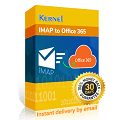
Kernel IMAP to Office 365 - Home License
65% off coupon code: regular price $199, discounted price $69.30
Kernel IMAP to Office 365 - Corporate License
48% discount coupon code: regular price $399, discounted price $209.30
Kernel IMAP to Office 365 - Technician License + Gift
Free gift (IMAP Backup to PST) + 50% discount coupon code: regular price $699, discounted price $349.30
IMAP to IMAP

Kernel Migration for IMAP - 50 Mailboxes
65% coupon code: regular price $199, discounted price $69.3
Kernel Migration for IMAP - 100 Mailboxes
54% coupon code: regular price $299, discounted price $139.3
Kernel Migration for IMAP - 250 Mailboxes
56% coupon code: regular price $549, discounted price $244.3
IMAP to Google Workspace
Kernel IMAP to Google Workspace - 50 Mailboxes
65% coupon code: regular price $199, discounted price $69.3
Kernel IMAP to Google Workspace - 100 Mailboxes
54% coupon code: regular price $299, discounted price $139.3
Kernel IMAP to Google Workspace - 250 Mailboxes
56% coupon code: regular price $549, discounted price $244.3
Key Features and Screenshots

- Feasible IMAP to IMAP migration: Kernel Migration for IMAP supports seamless migration between different IMAP servers, including Gmail, Yahoo, Outlook.com, AOL, and more, ensuring data integrity throughout the process, which means all emails, folders, and metadata are accurately transferred without data loss.
- Migrate complete mailbox: When using this tool to migrate IMAP to IMAP, all mailbox folders (such as Inbox, Drafts, Sent Items, Deleted Items, or custom folders) will also be transferred, and the mailbox data will be kept while transferring.
- Advanced Filtering Options: Kernel Migration for IMAP offers advanced filtering options, allowing you to customise your migration by applying filters based on date ranges, sender, recipient, excluding deleted or empty folders, skipping previously migrated items, and other criteria. This allows for selective migration and reduces unnecessary data transfer, saving time and resources.
- CSV-Based Bulk Migration: You are allowed to migrate multiple mailboxes at once by importing the CSV file to the IMAP migration tool to simplify large-scale migrations. This feature helps you save time and reduce manual input.
- Batch Migration: Kernel Migration for IMAP excels in facilitating the migration of multiple mailboxes at once, thanks to its robust batch migration capabilities. This tool can seamlessly transfer all emails and associated content from one IMAP account to another, without imposing any limitations on the number or size of the mailboxes involved. This functionality is particularly advantageous for organizations aiming to efficiently migrate substantial amounts of data.
- IMAP to Office 365 migration: Another key feature of Kernel Migration for IMAP is its ability to transfer all mailbox folders and their contents from IMAP to Office 365 and Exchange Server. Users can migrate data to various locations within the chosen destination, such as archive mailboxes or public folders, simply by entering the IMAP server and Office 365 account credentials to authenticate the process.
- Migrate IMAP to Google Workspace: In addition to facilitating IMAP to Office 365 migrations, this tool also supports transferring data from IMAP to Google Workspace. It ensures that all mailbox folders and their contents are migrated while maintaining the original hierarchy and data integrity. Furthermore, it allows for the simultaneous migration of multiple mailboxes.


Frequently asked questions
Who can benefit from using Kernel Migration for IMAP?
IT administrators, businesses, and individual users looking to migrate their email data between IMAP servers can benefit from this tool. It’s especially useful for organizations transitioning to new email platforms or consolidating multiple email accounts.
Can I migrate specific folders or emails?
Absolutely. The tool offers advanced filtering options, enabling users to migrate specific folders, date ranges, or exclude certain items like deleted or empty folders.
How does Kernel Migration for IMAP ensure data security during migration?
The tool encrypts all data during the migration process to protect sensitive information from unauthorised access.
Which email services are supported?
Kernel Migration for IMAP supports all IMAP-enabled services, including but not limited to Gmail, Yahoo, Outlook, Zoho, AOL, AT&T, GroupWise, Zimbra, and company-specific IMAP servers.
Can I migrate multiple mailboxes at once?
Yes, you can migrate multiple mailboxes simultaneously by importing a CSV file with the source and destination account details.
Are there any discounts available?
Yes, you can use the coupon code VW***30 provided by WinningPC to receive a 65% discount on Kernel Migration for IMAP.
Technical Details
| Language Support | English, Français, Italian, Spanish, Swedish, and more… |
| Money Back Guarantee | 30-Day |
| Operating System | Windows 365, 11, 10, 8.1, and older versions. Windows Server 2022, 2019, 2016, 2012, 2008 R2/2008, 2003, R2/2003 |
| Shipping | Register code will be sent to your email in minutes |
| Subscription | Lifetime |
| Support Services | Email, Tickets, Forums, Phone |