
 Laura Marano

Nero TuneItUp Pro is a PC optimizer software for Windows that is designed to clean up cache, cookies, temp files, program leftovers, etc., that took up high storage on your hard drives. To improve your computer performance, this tool also provides an uninstaller that is able to completely uninstall the unwanted software and browser plugins. Another important feature of this software is the ability to find and delete duplicate files to recover storage space.
During this time, if your computers or laptops aren’t running at the speed like they normally used to, or they are taking a lot of time to respond, then you need the professional PC optimizer software to make the computer efficient and faster than before. If you are looking for a tool to help you make your computers or laptops run like brand new machines, then Nero TuneItUp Pro might be the utility to lend you a hand.
Nero TuneItUp Pro Coupon Code

Nero TuneItUp Pro - 3 PCs
3 PCs license | free lifetime update | 30-day money-back guarantee
You may also like

Nero Platinum Suite 2026 - 1 Year
1 PC - 1 year license | Updates & upgrades included with automatic renewal
Nero Platinum Suite 2026 + 3 Free Gifts!
3 Free Gifts includes: Steganos Data Safe, Abelssoft Easy PDF, 3D Chess.
Nero TuneItUp Pro License Key Free Download
- Product name: Nero TuneItUp Pro v3.x
- Website: https://www.nero.com
- License type: 1-year
- Platform: Windows
- Download: NeroCore-26.5.1010.exe
- Giveaway: Nero TuneItUp Pro giveaway link
How to get the license key?
Please click on the “Register” button on the Nero TuneItUp Pro giveaway page.

Then sign in or sign up for the Nero account for free.

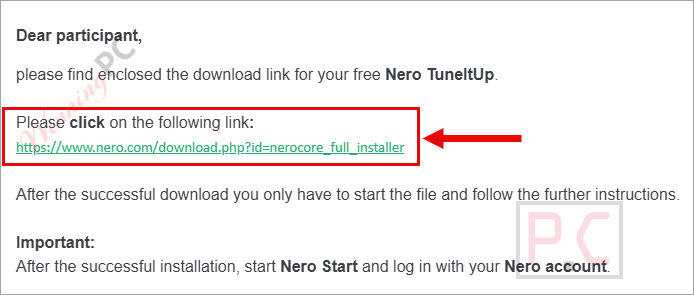
You will receive the free download link for Nero TuneItUp PRO via the email you provided. Download and install the software on your computer.
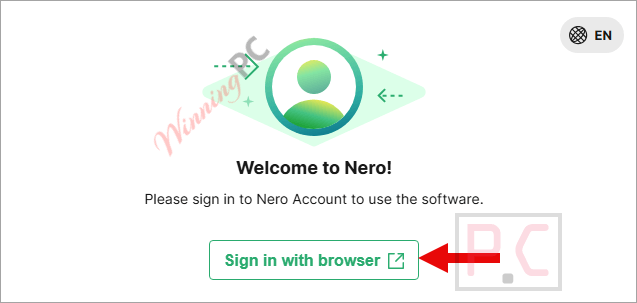
After the installation is complete, a new window appears; please click on the “Sign in with browser” button to sign in to your Nero account
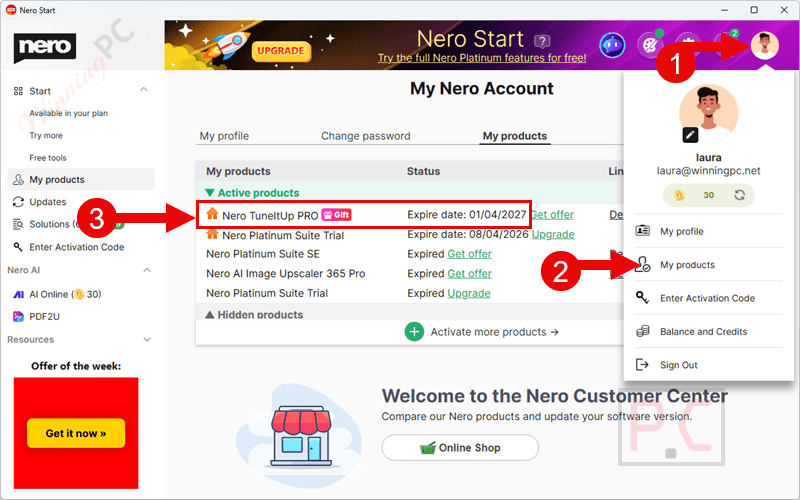
When you log in successfully, you can get Nero TuneItUp Pro (Gift) for 1 year free.
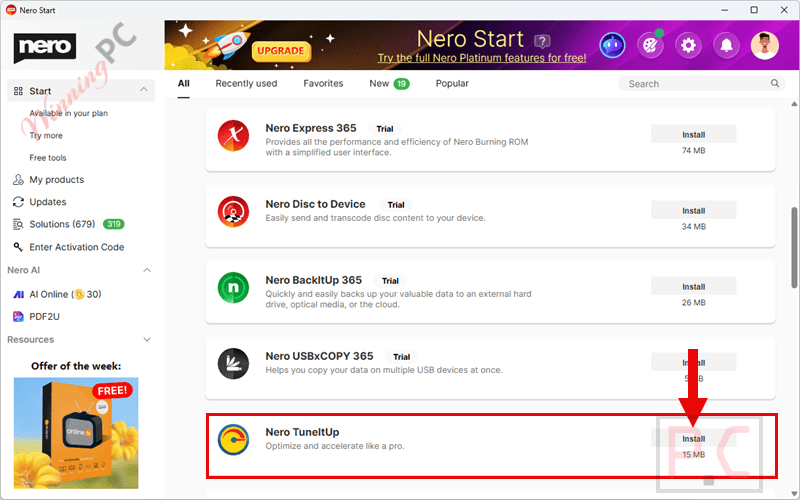
Click on the “Install” button to install the software and use it for free!
Key Features and Screenshots
- Nero TuneItUp PRO is a dedicated system optimization tool that can free up valuable hard disk space as well as resolve performance issues that might be affecting your PC.
- Nero TuneItUp PRO is a PC optimization tool that is available for the Windows operating system, which can delete junk files, temporary files, unwanted registry entries, etc., to improve the overall PC performance.

- This tool provides Software Uninstaller. Here you will see all installed programs and known programs are arranged into clear categories. You are allowed to select one or more programs to be uninstalled and free up the storage.

- It also has the ability to find duplicate files, including all subdirectories, to help you search for multiple copies stored. It will show you duplicate photo/ video/ audio files and give the decision to delete similar items or not.

- Using the Media Files Manager function, you are able to easily find big media files on your hard disk drives, including video, audio, photo, and iso. It allows you to filter the list by categories of media files and select a minimal file size of files you want to see in that list. You are allowed to open the folder and directly mark them to delete them and free memory instantly.

- Another noteworthy feature of this PC optimizer is that it shows your hard drive agraphic overview, including large directories and files. You will see the files and folders that take up a lot of space on your hard drive, and remove them to get more free space.

- Process viewer: see all running processes and find out what is negatively affecting your PC performance. You can see CPU, memory usage, and the Last Minute Activity. Use the “Identify process” button to get more details about the selected process.

- Clean Keeper: With CleanKeeper you can sort files in folders by intelligent rules to fixed destination folders. You can create new rules, clean specific folders or use the icon on the desktop via drag & drop to sort a file or folder instantly to the correct folder.

- Nero TuneItUp PRO has a clean and simple interface. It has a Computer Info tab where you can get information about your computer with ease, including operating system, hard drive, mainboard, graphic card, processor, memory, and monitor.
Technical Details
| Language Support | English, Français, Italian, Spanish, Swedish, and more… |
| Money Back Guarantee | 30-Day |
| Operating System | Windows 7, Windows 8/8.1, Windows 10/11 |
| Shipping | Register code will be sent to your email in minutes |
| Subscription | Lifetime |
| Support Services | Tickets, Phone |






The worst optimizer I’ve ever used in my entire life
Oh, that’s too bad.
This is a bloated suite of everything Nero has ever programmed or partnered with in the last 50 years – including Audials!
Without permission or notification, it installed ‘DriveSpan WiFi+Transfer’ to run at boot, even without a functional license, what does it even do?!?
Without permission or notification, it installed ‘NeroInfo’ in the task scheduler, what does it even do?!?
FIRST, after install, go to the avatar icon in the upper right, if you remember your Nero account password from 20 years ago when Nero was the go-to CD ‘burner’ – hence the name ‘Nero’ – and was included by Dell et cetera with Windows 95-type computers on up, and we all tried Nero once, just reset your password if you can’t remember it, and they’ll send a jibberish new password to your email, with no way to change it to what you might prefer and remember, anyway, sign in first.
SECOND, at the avatar icon in the upper right, ‘Add a product’ under your account, then paste the Nero TuneItUp license number from a prior email from them.
THIRD, at the whole-suite integrator, scroll down to load Nero TuneIt Up.
There seems to be no configuration options, and it locked up when trying anything.
Brave of me to try again, the second time it actually ran each thing.
There are little control icons at each feature, but they do nothing until AFTER running, then they let you see and toggle on and off the results, but only entire groups, categories of results, NOT individual items, so, for example, if we what ONE file to not be deleted from TEMP, we must un-toggle ALL TEMP results, manually go out to Windows File Explorer, copy or move that one file to a safe place of our own choosing, then re-run the cleanup task, I guess, oy.
Some results do not offer an itemized list, such as offering to delete 55 MB of ‘Temporary files from other applications’ with no detailed explanation – what are they? There’s no way to inspect, so either BLINDLY trust that Nero knows best, or DO NOT RUN NERO, your choice.
There’s no offer to remember our choices of what to include or exclude from ‘tuning’ or ‘deleting’, and no advance warning what will happen – will it just clean without warning, or will it pause and allow us to toggle?
What does ‘Power Saveer’ or ‘Instant Boost’ do? Who knows?
Uninstall – no way to inspect information about programs, we must exit and find them ourselves.
Duplicate Finder – pretty quick, and clicking on a file opens Windows File Explorer so we can inspect ourselves, I cleaned some duplicates while in the Windows File Explorer, not from within the Nero program, but thanks for finding stuff for me to look for outside Nero.
Media Files Manager – ONLY for the boot drive, not for external or network drives where my media is offloaded, but it’s quick, and we can toggle looking at video, audio, photo, and ISO files, that’s a nice find-and-overview, but NOT organizable by directory or any other criteria, I won’t manage them from Nero, but it’s nice to ‘see’ a total overview on occasion, I guess, but since this has a one-year expiration, and only works on the boot drive, I won’t be returning, I’ll manually use Windows File Explorer search feature across entire drives, including network drives, which always works.
Percentage progress is meaningless, it can zip up to 99% and then sit there for a long time.
And since it does not remember our choices, we must re-assert our choices every single time we run the program.
And, display windows are not resizable, results lists are not searchable, not sortable, not selectable, not exportable, and not highlightable for copying out – except ‘Computer Info’ which does export nicely formatted to the clipboard, or export unformatted as a text file.
This is version 3 when the field has such maturity as version 15 from IObit, for example, and apparently perpetual v5 from GlarySoft, WiseCleaner v6, YL/WinUtilities/PCClean v15, and so on, in other words, Nero has a -l-o-n-g- way to go to make this mature and competitive.
– – – – –
Editorial comment from my perspective: I’m trying to understand what I am seeing here, and I’m speculating, so forgive me if my guess is inaccurate. Here goes. I think we are seeing some older program vendors doing what appears to be trying to squeeze the last remaining profit out of old programs, as if their programmers are gone and all they have left is old programs, so they keep remarketing the same old stuff, sometimes painfully updated by what appears to be contract programmers on-the-cheap from around the world who don’t really know the program but make it appear new and pretty, plus outright remarketing of other vendor’s stuff, I’m looking at Franzis, Englemann, now Nero, Norton/Symantec gave up, you each may know of other programs that seem dead-ended – but that’s what I think I’m seeing here.
Thanks for letting us explore this and share.
.
It’s a great review.
Thank you so much 😀