On this page
Today’s Seedream special offers

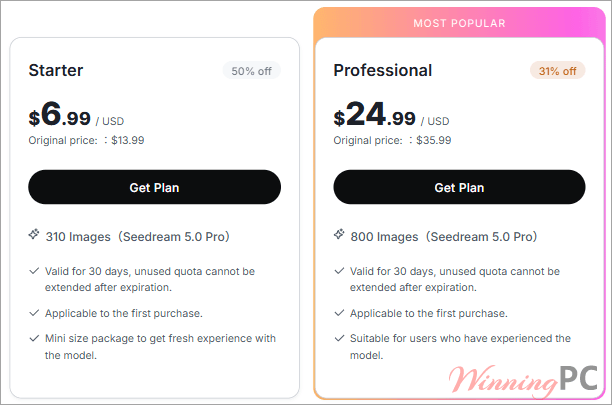
Seedream 5.0 Pro Starter: 310 Images (50% Off)
New-customer special offer. 310 Seedream 5.0 Pro image generations, valid for 30 days. The lowest cost per image of the three plans and the safest way to test the model.
Seedream 5.0 Pro Professional: 800 Images (31% Off)
BytePlus's most popular plan. 800 Seedream 5.0 Pro image generations, valid for 30 days. A good fit if you already know the model and produce assets every week.
Seedream 5.0 Pro Team: 1,555 Images (29% Off)
The largest quota: 1,555 Seedream 5.0 Pro image generations, valid for 30 days. Built for teams running campaigns, product shoots or storyboards at volume.
How to grab this Seedream 5.0 Pro deal
- Open the offer link above to reach BytePlus’s official Seedream 5.0 Pro offer page.
- Pick the plan (Starter, Professional or Team).
- Sign in to your BytePlus account, or create one, and complete checkout. The discounted price is shown on the plan itself.
- Activate the Seedream 5.0 Pro model in the BytePlus ModelArk console.
How well does Seedream Pro actually work?
Most generators make you re-roll the whole image to fix one detail, while Seedream 5.0 Pro lets you mark the spot with a box, an arrow, a point or exact coordinates and edit just that region. For anyone producing product shots or ad variations, that’s the difference between a toy and a production tool. Layer separation pushes the same idea further, and the Seedance link means a finished still can go straight into image-to-video. The catch is the setup. This lives inside BytePlus’s ModelArk developer platform, so it feels more like a cloud service than a consumer app, and casual users may find the console a bit much.
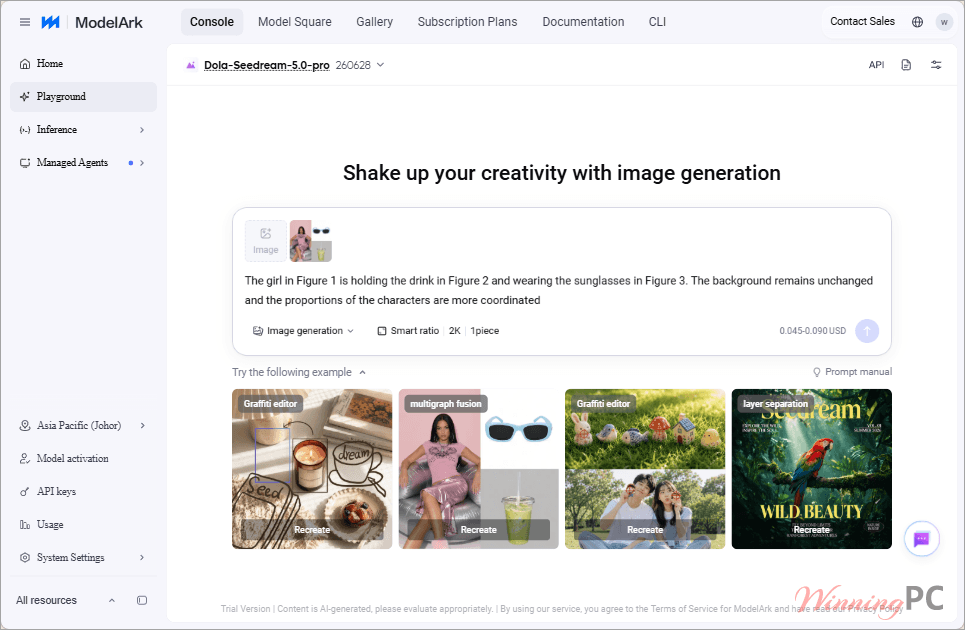
Key features
- Point-and-edit control: select, box, annotate or give coordinates to replace, move or adjust one object while the rest of the image stays put.
- Layer separation: split text, subjects, objects and backgrounds into editable layers you can drag, scale and recompose later.
- Multilingual text rendering: outputs readable text in 14 languages, including Arabic, Thai, Korean, Japanese, Russian and French, handy for localized posters and menus.
- Sketch-to-edit: doodles, color blocks and handwritten notes become edit instructions, and it respects exact color codes and material requests.
- Seedance handoff: since July 8, Pro images work across Seedance 2.5, 2.0, Fast and Mini for image-to-video.
What we think
Questions people ask about Seedream
How long does a Seedream Pro plan last?
30 days from purchase. Any images left in your quota after that expire and can’t be extended, so size the plan to what you’ll use in a month.
Can I get a refund on a Seedream plan?
No. BytePlus lists all plans as non-refundable and non-cancellable.
Can I use it right after buying?
Not quite. You need to activate the Seedream 5.0 Pro model in BytePlus’s ModelArk console first. Once it’s active, the quota is ready in the web playground and through the API.
Do reference images cost extra?
Only after the first one. The first reference image in a request is free, and each additional reference image starts at $0.003, which is worth knowing if your edits lean on several product photos.
System Requirements & Details
| Field | Value |
|---|---|
| Operating system | Not specified. Runs in BytePlus’s web playground and via API, so any modern browser should work |
| Processor / RAM / disk | Not specified (cloud-based, nothing installed locally) |
| Supported input types | Text prompts, reference images, sketches and doodles, color blocks, color codes, points, arrows, boxes and coordinates |
| Supported input file formats | Not specified |
| Supported output | Images, with optional layer-separated elements; output file formats not specified |
| Other requirements | BytePlus account, Seedream 5.0 Pro activated in the ModelArk console |