
 Laura Marano
I’ve found Stellar Converter for NSF really useful when moving from HCL/Lotus Notes to Outlook or Microsoft 365. It lets me convert NSF files into PST with complete accuracy and no risk of losing data. What I like is that it doesn’t stop at PST; you can also save emails, contacts, calendars, and more in MSG, EML, RTF, PDF, or HTML. If you go for the Technician edition, you even get the option to export directly to Microsoft 365 and split PST files by size or date. Plus, I can preview items for free and pick only what I need to export, or Stellar Converter for NSF Technician edition supports batch-converting multiple NSF files at once.
Stellar Converter for NSF Coupon Code (100% Working)
Stellar Converter for NSF Corporate (Upto 50 Mailboxes)
10% coupon code: regular price: $149, discounted price: $134.10
Stellar Converter for NSF Technician
40% coupon code: regular price: $599, discounted price: $359.10
Key Features and Screenshots
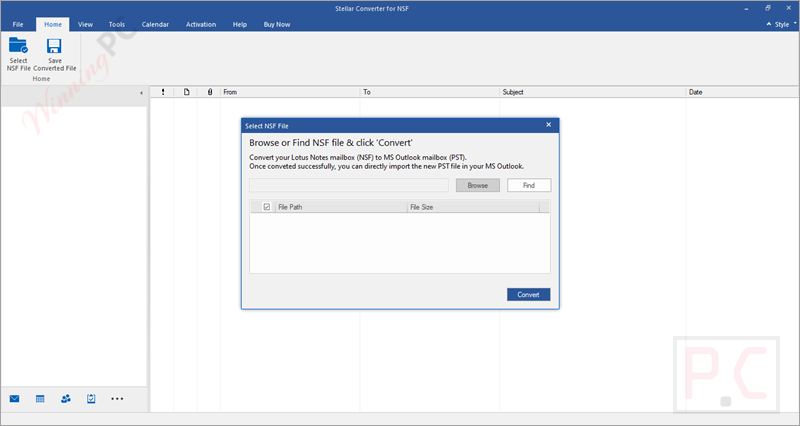
- Converts Lotus Notes/HCL Notes NSF files into Outlook-compatible PST format while keeping the folder structure, email properties, and attachments exactly as they were.
- Beyond PST, you can export mailbox items to popular formats like MSG, EML, PDF, HTML, and RTF, making it versatile for archiving, sharing, or compliance purposes.
- The Technician edition allows you to move NSF mailbox data straight into Microsoft 365 (Office 365) accounts securely.
- Supports batch processing of multiple NSF files (the Technician edition), saving time during large-scale migrations and reducing manual effort.
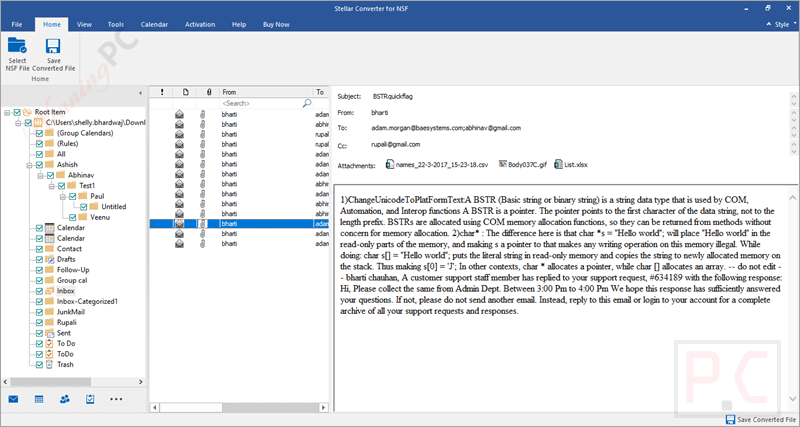
- The built-in preview function enables users to inspect emails, contacts, and other items before saving, ensuring accuracy, and allows for the selective conversion of only the necessary data.
- Apply filters by date range or sender to refine what gets converted, avoiding clutter and ensuring only relevant data is migrated.
- The built-in search function quickly finds and loads it for conversion when you can’t remember where the NSF file is stored.
- Every conversion generates a detailed log report, helping users track progress, verify results, and maintain audit trails.
- To prevent performance issues in Outlook, the software can automatically split oversized PST files by size or date, keeping things manageable.
- Works seamlessly with HCL Notes versions 6.0 through 10.0.1, so no matter how old your data is, you can still bring it over to Outlook.
- Runs smoothly on Windows 11, 10, 8.1, and 8, and supports Outlook 2019, 2016, 2013, and earlier editions.
Pros and Cons
Conclusion – Is Stellar Converter for NSF Worth It?
If you’re trying to move from Lotus Notes to Outlook or even Microsoft 365, I really think Stellar Converter for NSF is a trustworthy pick. It excels in the essentials, offering accurate conversions, a wide range of output formats, a handy preview feature for double-checking, and even auto-splitting for large PST files. And if you’re dealing with bigger projects, especially on the IT side, the Technician edition takes it up a notch. With batch conversion, smart filters, and direct Office 365 export, handling large-scale transitions is so much easier.
Review by Laura Marano – tech writer and software reviewer at WinningPC
How to Use (Step-by-Step Guide)
Step 1. Select Your NSF File
Click on Browse to locate the NSF file you want to convert. If you don’t know the exact location, use the Find option to search your system. After selecting the file, click on the Convert button. The software will scan the NSF file and display all mailbox items in a tree-view format.
Step 2. Preview the Data
Expand the folders to see emails, contacts, calendars, journals, and attachments. You can click on any item to preview its content before saving.
Step 3. Choose What to Export
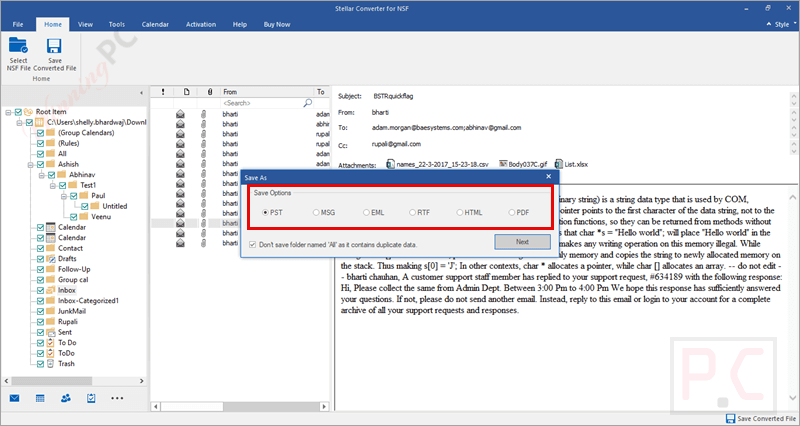
Select the specific items or the full mailbox you want to convert. You can also apply filters like date range or exclude certain email addresses. Click on Save Converted File. Choose PST (or MSG, EML, RTF, PDF, or HTML) as your format. If you’re using the Technician edition, you can also export directly to Microsoft 365 or append data to an existing Outlook profile.
Step 4. Finalize the Conversion
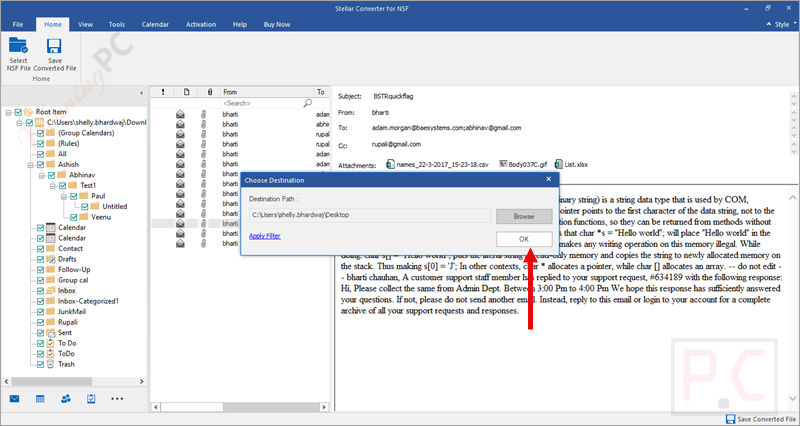
Pick a destination folder, hit OK, and let the tool finish the export. A detailed log report will be generated for your records.
Frequently Asked Questions
Do I need both Lotus Notes and Outlook installed to use the software?
Yes, you should have both applications installed on the same system for a successful conversion.
Can I preview the emails before saving them?
Absolutely! The software gives you a free preview of emails, attachments, contacts, and calendars so you can confirm the data before exporting.
What’s the difference between the Corporate and Technician editions?
The Corporate edition is great for single-system conversions, while the Technician edition adds features like batch conversion, PST splitting, and direct migration to Microsoft 365.
Is there any size limit for NSF files?
No, the software can handle large NSF files without restrictions, though bigger files may take more time to process.
Can I save selected emails only instead of the entire mailbox?
Yes, you can choose specific items through filters or by manually selecting emails in the preview window.
Where can I buy Stellar Converter for NSF with a discount?
You can purchase it through WinningPC and apply the coupon code STE***R10 to get up to 40% off the official price.
Why Choose WinningPC for the Best Software Discounts?
At WinningPC, we are committed to providing 100% valid and verified coupon codes, so you can always shop with confidence.
- If you come across an invalid code or a better offer, let us know.
- Our team updates all discount information regularly to ensure accuracy.
- Official Authorization: We only share authentic discounts from trusted software developers.
- No Fake Discounts: Unlike some sites, we never use misleading deals. The final price you see is the true discounted price.
- Secure Purchases: All transactions are processed on the official vendor’s website, ensuring authenticity and data protection.
- Extra Support: If you face order or vendor issues, contact us. We’ll liaise with the vendor to help resolve your problem quickly.





