
 Laura Marano
Why You Need Stellar Converter for OLM
Now, I don’t get a headache when switching from Outlook for Mac to Outlook for Windows. Stellar Converter for OLM can help me solve the issue. This OLM to PST converter tool enables the conversion of OLM files to PST format, preserving every email, attachment, contact, calendar entry, and note intact, while maintaining the original folder hierarchy and integrity.
Along with PST exporting, the software also exports to MSG, EML, PDF, HTML, and RTF, with the Technician edition adding direct migration to Microsoft 365. The preview function enables you to verify conversions before saving, providing confidence in the results. With the Technician edition, Stellar Converter for OLM delivers several functions, including export capabilities to Microsoft 365, as well as support for PDF, HTML, and RTF formats, making it ideal for cross-platform backups or migration workflows.
Stellar Converter for OLM Coupon Code (100% Working)
Stellar Converter for OLM Standard
10% coupon code: regular price: $39, discounted price: $35.10
Stellar Converter for OLM Technician
55% coupon code: regular price: $199, discounted price: $89.10
Key Features and Screenshots
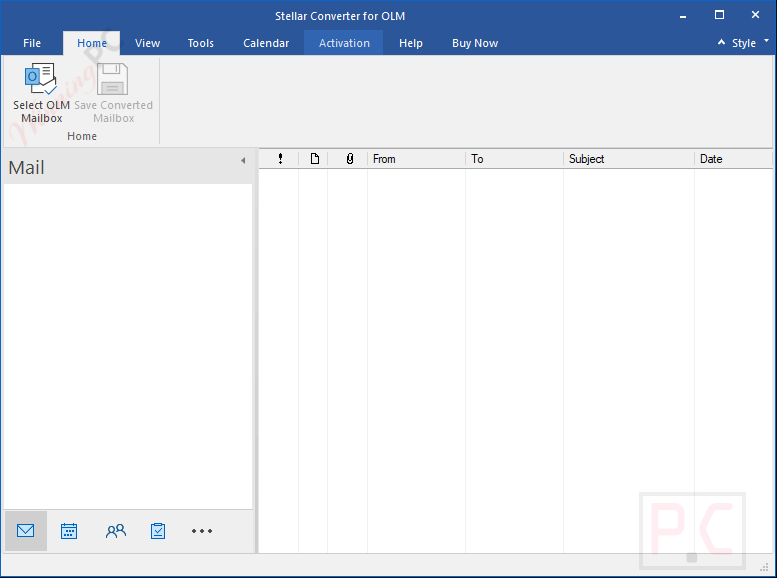
- Converts all mailbox items, emails, attachments, contacts, calendars, tasks, and notes from Outlook for Mac (.OLM) into Outlook PST format with 100% data integrity.
- Handles oversized OLM files without file size limitations, ensuring smooth conversion for bulk or archive mailboxes.
- Maintains folder hierarchy, subfolder arrangement, and metadata exactly as in the original OLM file.
- Standard edition exports to PST, MSG, and EML. The Technician edition adds PDF, HTML, and RTF export options.
- Uploads converted OLM mailboxes directly to Microsoft 365/Office 365 accounts, preserving folder organization.
- Automatically scans and lists all OLM files on your system when you don’t know their exact location.
- Displays a three-pane preview of converted mailbox items, allowing you to verify content before exporting.
- Apply filters to export only specific folders, date ranges, or email addresses, reducing conversion time.
- Automatically splits PST files at around 45 GB for better performance in Outlook.
- Generates detailed logs of the conversion process for auditing or troubleshooting.
- Works with OLM files from Outlook 2021, 2019, and earlier for Mac; output PSTs are compatible with Windows Outlook 2021, 2019, 2016, and older.
Stellar Converter for OLM – Pros and Cons
Conclusion – Is Stellar Converter for OLM Worth It?
If you’re moving Outlook for Mac data to PST, I recommend trying Stellar Converter for OLM. For me, it’s been quick and extremely accurate, and it keeps my folders and message details exactly as they should be. I love that I can preview before saving, so I know I have the right information. If you’re just doing a basic OLM to PST conversion, the Standard edition will do the job. However, if you require additional formats or a Microsoft 365 export, let’s choose the Technician edition.
Review by Laura Marano – tech writer and software reviewer at WinningPC.
How to Use Stellar Converter for OLM (Step-by-Step Guide)
Step 1. Select Your OLM File
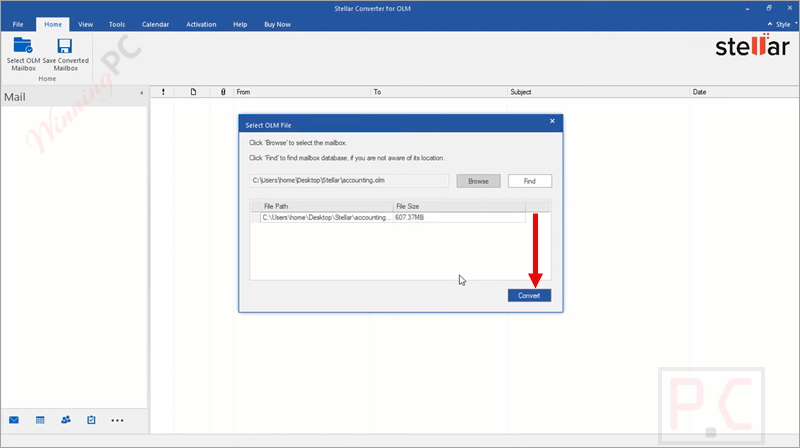
On the home screen, click on the “Select OLM Mailbox”. Click on the “Browse” button to locate your OLM file. If you’re not sure where it is, use the Find option to search your system.
Step 2. Start the Conversion
After selecting the file, click Convert. The software will scan your OLM file and extract all mailbox items.
Step 3. Preview the Data
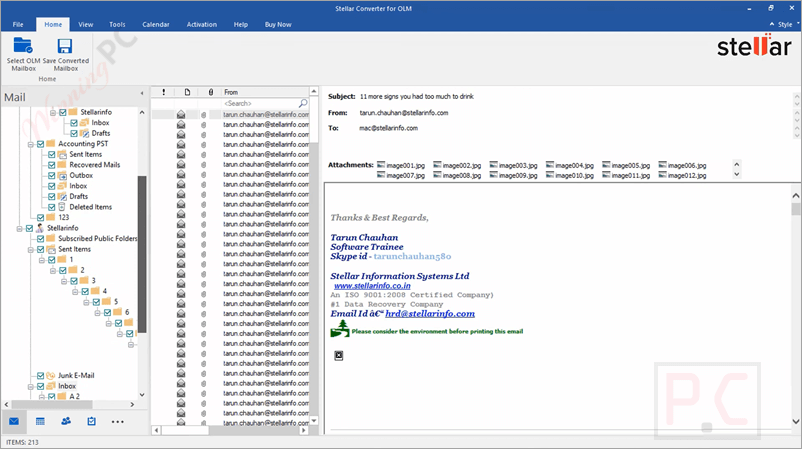
Once the scan is complete, you’ll see a preview in three panes: folders on the left, email lists in the middle, and detailed content on the right. Review the data to confirm accuracy.
Step 4. Choose What to Save
Select the folders or items you want to export. You can convert everything or filter by date, sender, or folder.
Step 5. Save the Converted File
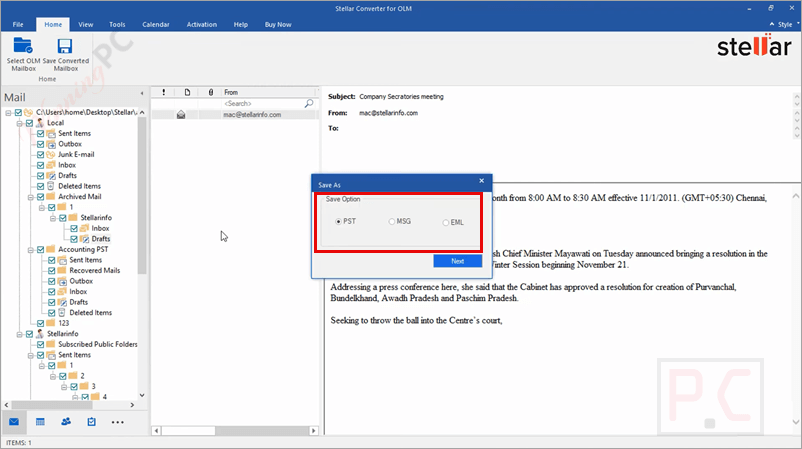
Click Save Converted File. Choose your desired format: PST, MSG, EML, PDF, HTML, or RTF (depending on your edition). Select a destination folder, then click OK to begin saving.
Step 6. Open in Outlook
If you exported to PST, open Outlook and import the file to start using your converted mailbox.
Frequently Asked Questions
Can I migrate my Mac Outlook data directly to Microsoft 365?
Yes. The Technician edition includes a direct export option to Microsoft 365, keeping the folder hierarchy intact.
Does the software keep my email formatting and attachments?
Absolutely. It preserves your original formatting, inline images, attachments, metadata, and folder structure.
How large of an OLM file can it handle?
There’s no fixed size limit; users have reported successful conversions of files over 50 GB.
Do I need Outlook installed to convert to PST?
Yes, Outlook should be installed on your Windows system to generate and open the PST file.
What’s the difference between the Standard and Technician editions?
Standard converts to PST, MSG, and EML. The Technician edition adds PDF, HTML, and RTF exports and direct Microsoft 365 migration.
How can I get a discount when buying?
If you purchase through WinningPC, you can use the coupon code STE***R10 to get up to 55% off.
Why Choose WinningPC for Software Discounts?
At WinningPC, we are committed to providing 100% valid and verified coupon codes, so you can always shop with confidence.
- If you come across an invalid code or a better offer, let us know.
- Our team updates all discount information regularly to ensure accuracy.
- Official Authorization: We only share authentic discounts from trusted software developers.
- No Fake Discounts: Unlike some sites, we never use misleading deals. The final price you see is the true discounted price.
- Secure Purchases: All transactions are processed on the official vendor’s website, ensuring authenticity and data protection.
- Extra Support: If you face order or vendor issues, contact us. We’ll liaise with the vendor to help resolve your problem quickly.





