
 Cathryn Lee
SysTools PST Converter is a new and powerful software for seamlessly converting Outlook PST files into multiple formats. With this top-tier software, you can convert Outlook PST files into 10 different file formats. This software has a simple, beautiful, and user-friendly graphical environment, allowing you to convert PST files to MSG, PST to HTML, PST to DOC, PST to TXT, PST to ICS, and more. All you have to do is choose all data items like emails, calendars, contacts, tasks, journals, and notes, and then convert them into the desired export option.
The next bright spot in SysTools PST Converter software to mention is the intuitive user interface that caters to both novice users and experienced professionals. You are without requiring Microsoft Outlook to be installed on the system to convert PST file data. Furthermore, it provides advanced features such as batch processing, support for encrypted and corrupted PST files, and precise data export options. Another of its best features is the ability to maintain the integrity of the original data, including folder hierarchy and formatting to make it an ideal choice for users who need to convert emails, contacts, calendars, or other Outlook data items.
SysTools PST Converter Coupon Code Oct 2026
SysTools PST Converter
25% off coupon code: regular price $49, discounted price $36.75
You may also like

Bundle Offer - SysTools Outlook Recovery + PST Converter
52% discount code: regular price $98, discounted price $47.20
Bundle Offer - SysTools PST Merge + Outlook Recovery + PST Password Remover + PST Converter + Split PST + Outlook Duplicate Remover
20% discount code: regular price $214, discounted price $171.2
Key Features and Screenshots
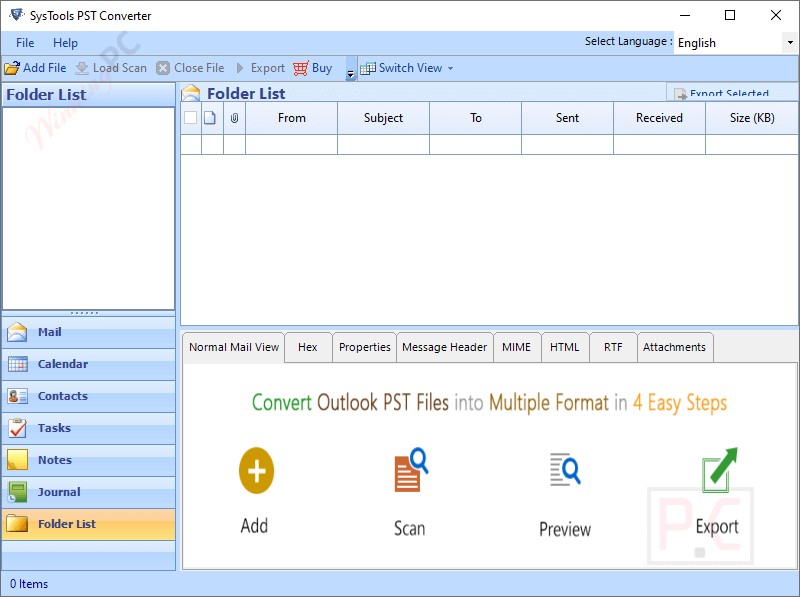
- Convert PST to Multiple Formats: SysTools PST Converter is designed to help you convert EML, MSG, MBOX, and PST into more than 14 formats including HTML, MHT, TEXT, PDF, DOCX, DOC, RTF, VCF, ICS, CSV, etc. With its help, you can export all Outlook data items like emails, calendars, contacts, tasks, journals, and notes into the desired export option without any issue.
- Batch Convert PST Files: To save time and effort, this PST converter application allows you to insert multiple PST files at one time. Once the adding is done, you can convert multiple PST files simultaneously. This function is particularly useful for users handling large volumes of data. There is one special thing, various PST files’ exported data will be kept in various directories.
- Convert PST Contacts & Calendar: Another notable feature of this tool is that it lets you convert calendars and Outlook PST Address Book into other file formats. It allows you to export PST to VCF & CSV and calendars into an ICS file. Along with converting contacts and calendars to their default file formats, you also are allowed to export group contacts to PDF, HTML, CSV, MSG, and TXT file formats.
- Selective Export Option for PST File: If you want to selectively export specific data items – SysTools PST Converter software offers a date-based filter option. Using it, you can export data based on the date range that comes under the specified date range in the “To” and “From” fields (except calendar and contacts), ensuring precise data management.
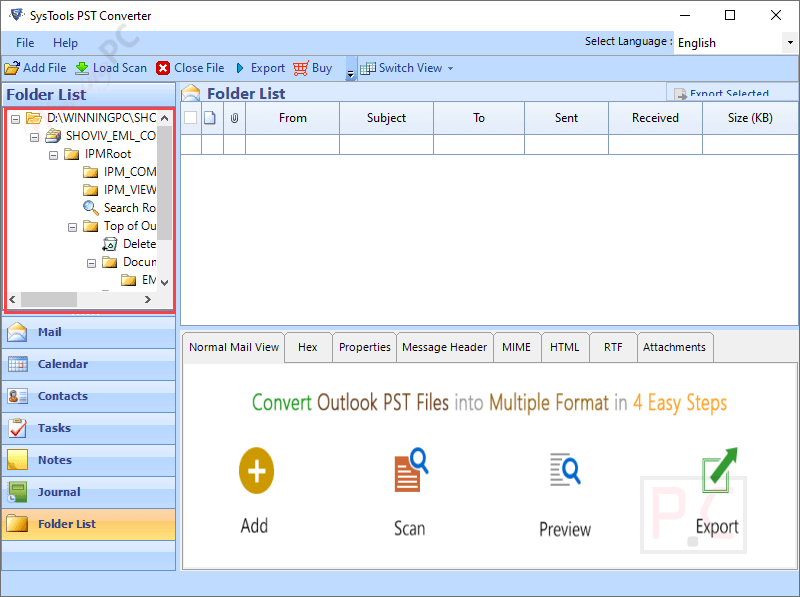
- Advanced Filters and Naming Conventions: Another handy feature of the program is creating a “Flexible Naming Convention”. By default, files are named as per subject but you can choose an appropriate file naming convention according to your want while saving the files using the Outlook PST File Converter tool. You can choose between naming conventions like, AutoIncrement, Subject+Date (DD-MM-YYYY), Date(YYYY-MM-DD)+From+Subject, etc.
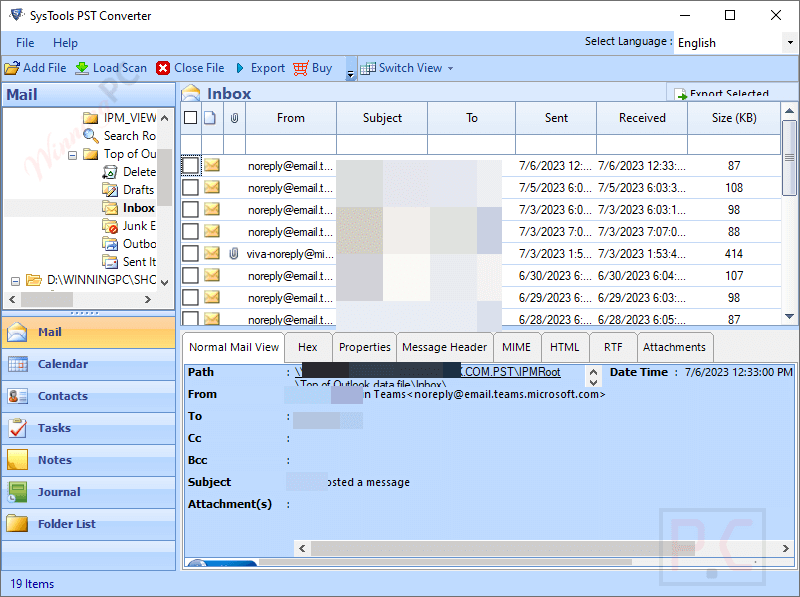
- Preview Option: This software provides a preview function to help you preview all PST file items, including emails, calendars, contacts, and more. You can preview in 8 different ways: Normal Mail View, Attachment, Hex, Properties, Message Header, HTML, MIME, and RTF, ensuring accurate results before conversion.
- No Outlook Required: Not requiring Microsoft Outlook to be installed on the user’s system, SysTools PST Converter operates independently to convert PST file data. This feature simplifies the conversion process, especially for users who do not have access to Outlook.
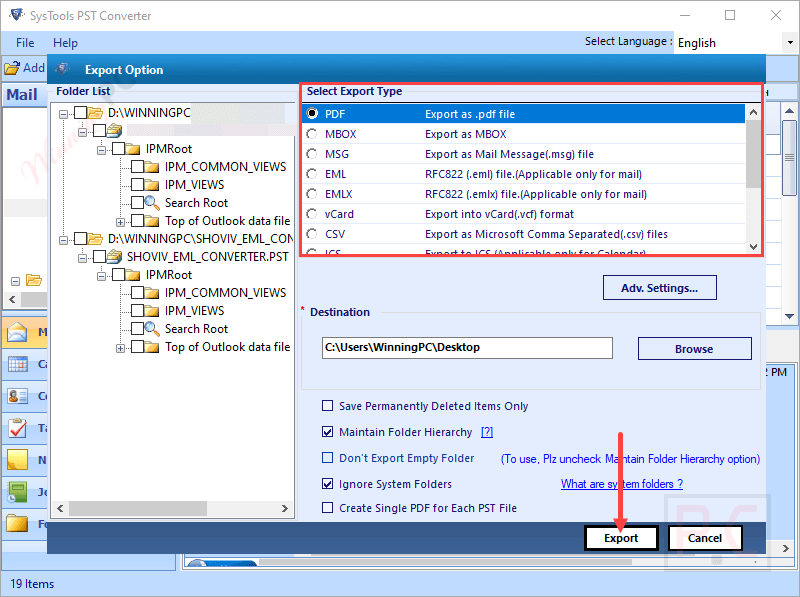
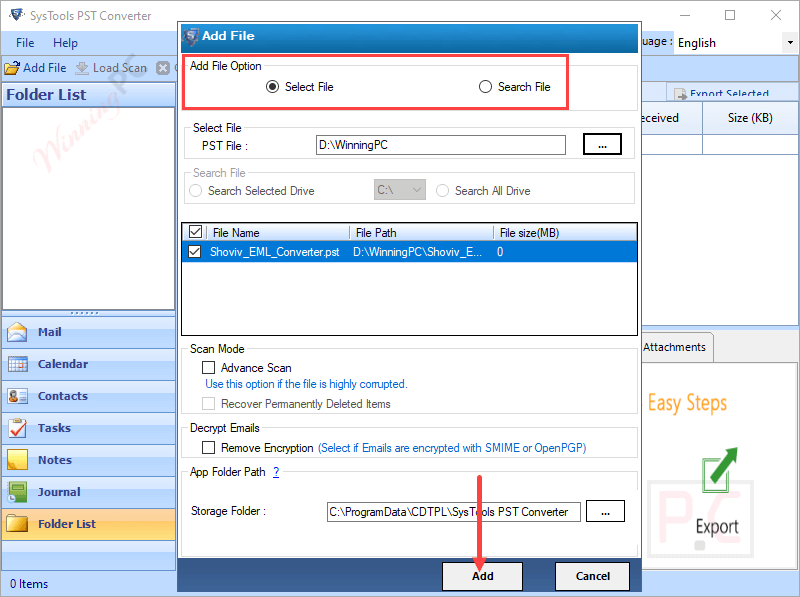
- Search PST Files from Computer Drive: Beyond its capability to select files, SysTools PST Converter offers a comprehensive range of features that search for PST files from the system’s drive. You are allowed to browse PST files within the selected drive or all drives to save your time and effort.
Frequently asked questions
Do I need Microsoft Outlook installed to use SysTools PST Converter?
No, the software does not require Microsoft Outlook to be installed for converting PST files.
Can SysTools PST Converter handle corrupted PST files?
Yes, the software can convert corrupted and even password-protected PST files.
Is batch conversion supported by SysTools PST Converter?
Yes, the software supports batch conversion, allowing users to convert multiple PST files at once.
Does SysTools PST Converter maintain the folder hierarchy?
Yes, the software maintains the original folder hierarchy and formatting during the conversion process.
Is there any file size limitation on PST for conversion in this tool?
No, there is no such limitation imposed by the Outlook converter software. It can convert any size of PST file successfully irrespective of its size or format.
Does PST Converter make any changes to the original PST file after conversion?
No, Outlook PST File Converter does not make any changes in the original PST file. All contents of converted file will be as same as the original PST file.
Is there a discount available for purchasing the software?
Enter the WinningPC coupon code WINPC25 during the checkout process on the SysTools website to receive a 25% discount on your purchase.
Technical Details
| Language Support | English, Français, Italian, Spanish, Swedish, and more… |
| Money Back Guarantee | 30-Day |
| Operating System | Microsoft Windows – Win 7 / 8 / 8.1 / 10 (32-Bit & 64-Bit), Windows 11 (64-bit) & Windows Server 2008 / 2012 R2 / 2016 / 2019 / 2022 Microsoft Outlook – 2003, 2007, 2010, 2013, 2016, 2019, 2021 (32-Bit & 64-Bit) MacOS X 10.8 (Mountain Lion), MacOS X 10.9(Mavericks), MacOS X 10.10 (Yosemite), MacOS X 10.11 (El Capitan), MacOS X 10.12 (Sierra), MacOS X 10.13 (High Sierra), MacOS X 10.14 (Mojave), MacOS X 10.15 (Catalina), MacOS X 11.0 (Big Sur), MacOS X 12.0 (Monterey), MacOS X 13.0 (Ventura), MacOS X 14.0 (Sonoma) |
| Shipping | Register code will be sent to your email in minutes |
| Subscription | Lifetime |
| Support Services | Email, Live Chat, Tickets, Training |





