
 Laura Marano
Tipard Video Converter converts video and audio files to MP4, MP3, MOV, AVI, WMV, WAV, TS, and 350+ other formats. It also supports 4K UHD/1080p HD conversion, batch processing, video enhancement, and basic editing tools.
- Product name: Tipard Video Converter v9.2.52
- Publisher: Tipard
- Website: https://www.tipard.com
- License type: 1-year
- Price:
$45$0.0 - Platform: Windows 11, 10, 8, 7
- Giveaway & download – last updated: May 07, 2026
Click here...
Unlocking content...
📝 Note: Please follow the Activation Guide to successfully claim your license.
Tipard Video Converter Coupon Code (100% Working)
Tipard Video Converter for Windows
2 plans · best save 50%
Tipard Video Converter for Mac
2 plans · best save 50%
1 Month License ★ Best Deal
Use on 1 Mac | Monthly upgrade and support
📄 Licensing & Support Details
- License type: 1 year, lifetime license
- 30-day money-back guarantee
- The registration code will be sent to your email in minutes
- Free update
- 24/7 customer support
- The payment process is SSL-secured.
📝 How to apply
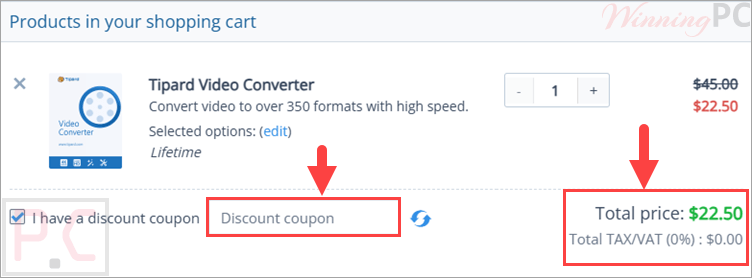
Select the ‘Copy Code’ option located in the coupon section to save the code, then go to the checkout to receive your discount.
Activation Guide: How to Get Tipard Video Converter Key Free?
Open the giveaway page to get the Tipard Video Converter registration code for free via your email.

Install the software on your computer, launch it and register to the full version by the Tipard Video Converter serial number above:

Tipard Video Converter: In-Depth Review & Features

Key Features:
- Converts videos to over 350 formats, including MP4, AVI, WMV, MKV, MOV, FLV, WebM, and VOB.
- Supports 4K UHD and 1080p HD video conversion.
- Converts audio and extracted video audio to MP3, AAC, AC3, and more.
- Works with Windows, MacBook, iPhone, iPad, Android devices, and multimedia players.
- Lets users adjust encoder, frame rate, resolution, aspect ratio, bitrate, sample rate, and channels.
- Batch converts multiple videos with up to 6× faster speed using NVIDIA, Intel, and AMD technology.
- Includes rotate, crop, 3D settings, watermark, subtitle, and audio track tools.
- Enhances videos by improving resolution, reducing noise, reducing jitter, and adjusting brightness/contrast.
Pros & Cons:
More screenshots:
Add files

Trim

Settings:

Frequently Asked Questions
Are there any promo codes for Tipard Video Converter?
Yes. WinningPC is a good place to check for Tipard Video Converter coupons, along with Tipard’s official sales pages.
What is the best current Tipard Video Converter discount?
The best current deal listed on WinningPC is 50% OFF. The 1 Month License drops from $24.00 to $12.00, and the Lifetime License drops from $45.00 to $22.50.
Is Tipard Video Converter safe to use?
Yes. It is reliable and does not steal data, affect privacy, or damage the system.
Does it keep the original quality after conversion?
Yes. You can select output settings that match the source video, and the software can also optimize video effects.
What formats can it convert to?
It supports more than 350 formats, including MP4, MP3, MOV, WAV, AVI, WMV, TS, MKV, FLV, WebM, and VOB.
Can it convert 4K videos?
Yes. It supports 4K UHD video conversion and can also export 1080p HD videos.
Does it support batch conversion?
Yes. You can convert multiple videos at once.
Can I edit videos before converting?
Yes. You can rotate, crop, adjust effects, add watermarks, change subtitles, and manage audio tracks.
Can it improve video quality?
Yes. It can optimize brightness and contrast, enhance resolution, remove video noise, and reduce video jitter.
System Requirements & Details
| Operating System | Windows 7/8/10/11; Mac OS X 10.7 or above |
| Processor | 1.2GHz Intel or AMD CPU; Intel processor and Apple M2/M3/M4/M5 chip |
| RAM & Storage | 1GB RAM or more |
| Supported Input | 4K video, HD video, and audio formats including MP4, MOV, AVI, MKV, WebM, FLAC, WAV, MP3, AAC, and more. |
| Supported Output | MP3, MP4, MOV, WAV, AVI, WMV, TS, and 350+ formats. |





Just another Chinese illegal closed source user interface pirating an undistributeable build of FFMPEG to do the actual conversion. I prefer to give my patronage to LEGAL user interfaces that correctly attribute the FFMPEG project and abide by their license terms like xmedia recode or handbrake. I certainly would NEVER PAY Chinese software pirates for their illegal GUIs.
convertor.EXE -L returns:
“This version of ffmpeg has nonfree parts compiled in.
Therefore it is not legally redistributable.”
It’s an ancient version too with no modern GPU acceleration.
Helpful info. Fortunate me I found your website by accident, and I’m surprised why this coincidence did not came about earlier! I bookmarked it.