Laura Marano

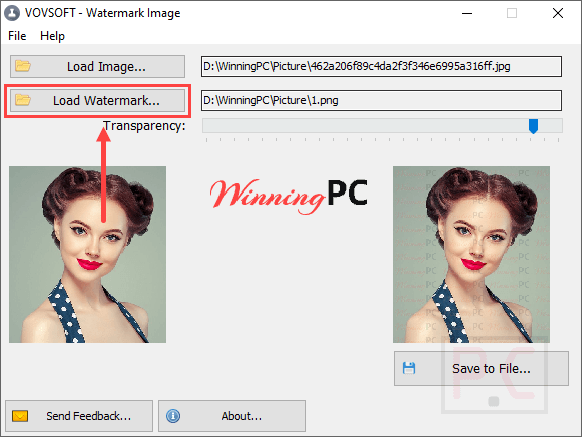
Vovsoft Watermark Image can add tiled watermarks to your photos and graphics. It provides a straightforward way to protect your images and apply branding, allowing you to load files and adjust transparency in real time using a clean, uncluttered interface.
Vovsoft Watermark Image
a lightweight and user-friendly application for adding tiled watermarks to your photos and graphics
- Product
- Vovsoft Watermark Image
- Website
- vovsoft.com
- License
- Lifetime v2.1
- Platform
- Windows 11/10/8/8.1/7/Vista
- Installer
- watermark-image.exe
- Support
- No technical support
- Updates
- No free upgrades
- Usage
- Non-commercial use only
- Updated
- 2026-05-30
Get your unique code by email
License key delivered free to your inbox within minutes.
This giveaway ended on .
Protected by Cloudflare Turnstile · Email quality checked by Reoon
All codes have been claimed or the giveaway has closed.
Vovsoft Watermark Image Coupon Code (100% Working)


Vovsoft Universal License Editor's Pick
The Complete Package: 111+ applications (and more in the future) with lifetime license & all future updates
How to Get the Vovsoft Watermark Image License Key Free?
Please enter your email address into the giveaway form above to acquire the Vovsoft Watermark Image in the full version for free. To install the software on your computer, you must first start the installer after downloading it.

Use the license code displayed above to register the software.

Now you can use it for a lifetime for free with full features!
In-Depth Review & Features

Key Features
- Supports loading and saving in PNG, JPG, and BMP image formats.
- Instantly preview your edited results inside the main window.
- Built-in transparency slider to control watermark intensity.
- Side-by-side display of the original file, the watermark image, and the processed output.
- Fast saving process requiring only a few clicks.
Pros and Cons
More Vovsoft Watermark Image Screenshots!
Add image

Add watermark
Frequently asked questions
Searching for active promo codes for Vovsoft Watermark Image?
You can find the most recent deals and verified discount codes right here on WinningPC, alongside any seasonal promotions offered directly through Vovsoft’s official website.
What is the top markdown currently running for this software?
Right now, you can claim a 30% OFF discount via WinningPC, which drops the regular $19 price tag down to an affordable $13.3.
What file types can I use for my watermarks?
The software currently supports PNG, JPG, and BMP formats for both your base image and the watermark file.
Is it possible to make the watermark see-through?
Yes, it includes a dedicated transparency slider so you can fade the watermark into the background.
Does it include tools to crop or color-correct my photos?
No, the program is built specifically for everyday watermarking tasks and intentionally leaves out complicated photo editing features.
Can I apply repeating logos across my image?
Yes, adding tiled watermarks across your graphics is one of the primary functions of this application.
System Requirements & Details
| Feature | Specifications |
|---|---|
| Language Support | English, Français, Italian, Spanish, Swedish, and more… |
| Operating System | Windows 11, 10, 8/8.1, 7, Vista (32-bit & 64-bit) |
| Subscription | Lifetime |
| Supported Input | PNG, JPG, BMP |
| Supported Output | PNG, JPG, BMP |