


Vovsoft VCF to CSV Converter Giveaway

Vovsoft VCF to CSV Converter
Converts VCF to CSV
- Product
- Vovsoft VCF to CSV Converter
- Product website
- vovsoft.com
- License
- Lifetime
- Platform
- Windows 11, 10, 8/8.1, 7, Vista
- Usage
- Non-commercial only
- Updates
- No future upgrades
- Support
- No support
- Updated
- 2026-09-21
Continue on vovsoft.com
The publisher handles registration and license delivery on its official website.
30% Off VCF to CSV Converter Coupon Code
Vovsoft VCF to CSV Converter Discount Code Sep 2026
Vovsoft Universal License
113+ programs | Lifetime license | All future updates
Is this Vovsoft VCF to CSV Converter giveaway safe and legit?
Yes. This is an authorized giveaway published directly by Vovsoft for its own software. Here’s what you should know:
No crack or keygen
You download the official Vovsoft installer and activate it with a genuine publisher-issued license key. Nothing is patched, modified, or repackaged.
Official publisher giveaway
The key comes straight from the developer. This is not a grey-market reseller or a key-farm site.
Your contacts stay on your PC
The conversion runs entirely offline. Vovsoft states explicitly that no contact information is sent to the internet at any point, which is the main reason to choose it over browser-based converters.
No payment required
This is a free giveaway. Your name is used only to generate your key – no credit card, no billing.
How to Get the Vovsoft VCF to CSV Converter License Key Free?
- Download the VCF to CSV Converter installer sing the download link provided on the page.
- Run the installer on your Windows PC and follow the on-screen setup steps.
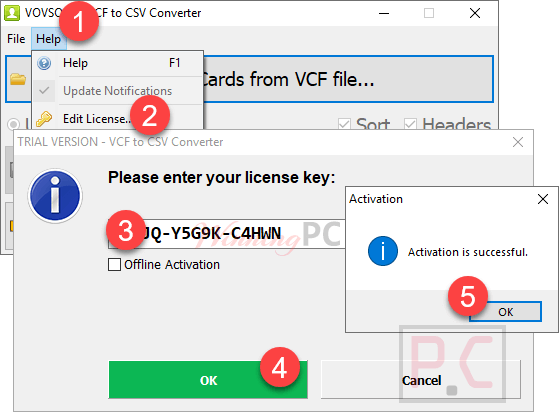
- When prompted, enter the product key provided on the giveaway page to activate your Lifetime license.
- Open Vovsoft VCF to CSV Converter – your activated copy is ready to use.
Vovsoft VCF to CSV Converter Review & Features
Vovsoft built Vovsoft VCF to CSV Converter to do exactly one thing, and it does it cleanly. You select the input VCF file, pick your output format, and the conversion is done in a couple of seconds. No configuration wizard, no subscription prompt, nothing to trip over. That simplicity is a real strength — especially for users who just exported their contacts from an iPhone or Android and now need a plain spreadsheet.
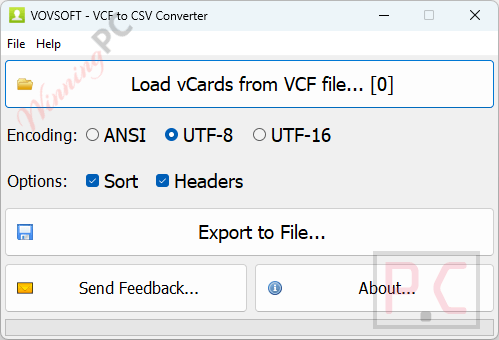
The offline design is the other genuine differentiator. Most free VCF converters work through a web interface, which means uploading your full address book to a third-party server. Vovsoft keeps every contact on your own machine. Vovsoft VCF to CSV Converter correctly handles ANSI, UTF-8, and UTF-16 encoded files, so non-Latin names and special characters come through intact. Exported fields cover the contacts you’d actually care about: name, phone numbers, email, address, organization, website, and notes.
The limitation is equally clear: this is a single-task converter. It does not edit vCards, merge duplicate contacts, or sync with any service. If you need any of that, this is the wrong tool.
Key features
- Converts VCF files from iCloud, Android, Google Contacts, and Outlook to CSV or Excel.
- Exports contact fields: name, phone numbers, emails, address, organization, website, notes.
- Fully offline – no contact data is sent to the internet.
- Handles ANSI, UTF-8, and UTF-16 (Unicode) encoded files for accurate character output.
- Multi-thread CPU support; multilingual interface (30+ languages including Vietnamese).
- Three CSV output profiles: Google/Gmail, Outlook, and Yahoo Mail formats.
What we think
Frequently Asked Questions
Is the giveaway Lifetime license really permanent?
Yes. The giveaway provides a permanent Lifetime license tied to v4.7 – no expiry date. What you give up is future updates and tech support. The version you activate is the version you keep.
Can I use the giveaway key for business or commercial work?
No. The giveaway terms specify non-commercial use only. For professional or business use, you’ll need the paid license ($13.30 with code WINNINGPC), which permits commercial use and includes lifetime updates.
Does the converter work on Windows 11?
Yes. Vovsoft VCF to CSV Converter supports Windows 11, 10, 8/8.1, 7, and Vista — both 32-bit and 64-bit editions.
Is my contact data safe when I use this?
Yes. The conversion happens entirely on your PC with no internet connection needed. Vovsoft states directly that no contact information is transmitted over the internet at any point. That puts it ahead of browser-based tools for anyone with a sensitive address book.
What contact fields get exported to CSV?
The output CSV includes: person name, phone numbers, email addresses, postal address, organization, website, revision date, and notes. Fields that are blank in the original VCF will simply be empty columns in the output.
What’s the cheapest way to buy Vovsoft VCF to CSV Converter?
The lowest verified price is $13.30 – the regular $19 Lifetime license with the 30% WinningPC coupon code WINNINGPC applied at checkout, confirmed working Sep 2026.
System Requirements & Details
| Operating system | Windows 11, 10, 8/8.1, 7, Vista (32-bit & 64-bit) |
| Supported input formats | VCF / vCard (iCloud, Android, Google Contacts, Outlook) |
| Supported output formats | CSV – Gmail format, Outlook format, Yahoo Mail format; Microsoft Excel spreadsheet (.xls/.xlsx) |
| File size | 3.97 MB (Installer) · 2.96 MB (Portable) |
| Internet connection | Not required (fully offline) |
| Languages | English + 30 additional languages (including Vietnamese) |



Bitdefender Total Security:
“Infizierte Datei gefunden!
…
Desinfektion wird durchgeführt!”
-> Das Programm kann nicht installiert werden!