On this page
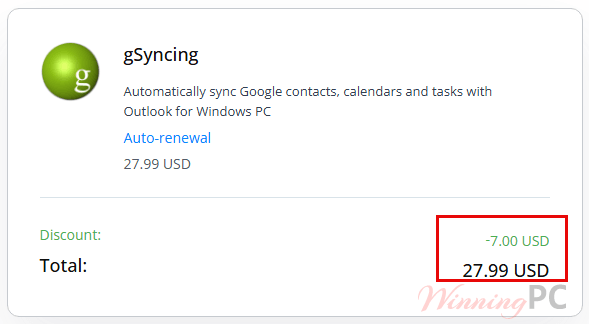
gSyncing prices with the code applied

gSyncing
Automatically sync Google contacts, calendars and tasks with Outlook for Windows PC
You may also like


SYNCING.NET FileSharing Edition (3 PCs)
for individuals and workgroups
How to redeem the discount
- Copy the code WinningPC20 from the box above.
- On the SYNCING.NET gSyncing checkout, look for the coupon or promo code field and paste the code in.
- Confirm the total drops from $34.99 to $27.99 before you enter payment details.
- Complete the order. Your licence key arrives by email
How well does gSyncing work?
The appeal here is narrow and honest: gSyncing does one job, and it does it for Outlook versions almost nobody else still supports. Two-way sync is the part that matters most, because it means an appointment added on your phone through Google Calendar lands in Outlook on its own, and a contact edited in Outlook pushes back the other way. Duplicate detection and the date filter for calendar entries are the two features that save real cleanup work, since a first sync between a busy Outlook profile and a Google account is exactly where duplicates pile up.
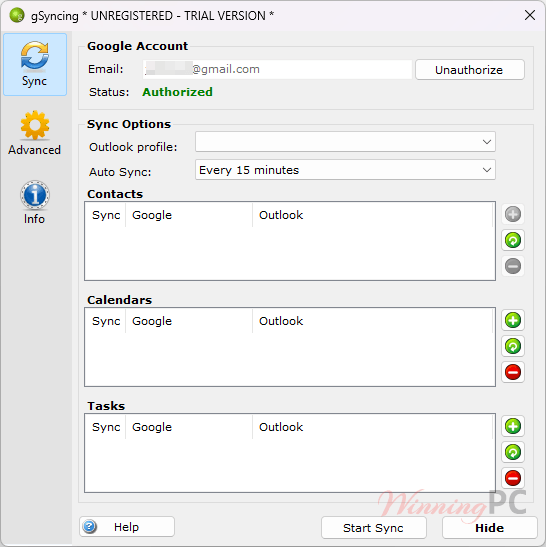
Shared Google calendars and contacts are supported too, which is unusual at this price and makes gSyncing workable for a small team rather than just a single desk. The interface is plain and the setup is not complicated, though you are still granting a desktop add-in access to your Google account, so expect an OAuth consent step during the first run.
Key features
- Two-way or one-way sync for contacts, calendars and tasks, applied to whichever folders you select rather than everything at once.
- Duplicate detection that runs during the sync, so a first run against a large Outlook profile does not leave you deleting doubles by hand.
- Multi-user support for shared Google calendars and contacts, which is what makes it usable for a small team.
- Timezone-aware calendar handling, so events booked from a different zone land at the right hour on both sides.
- Scheduled automatic syncing at a set interval, plus a date filter to keep years of old Outlook appointments out of Google.
What we think
Is there a cheaper or free option?
| Tool | Price | What it syncs | Best for |
|---|---|---|---|
| gSyncing | $27.99/yr with code | Contacts, calendars, tasks | Older Outlook versions and small teams sharing Google calendars |
| Outlook Google Calendar Sync (OGCS) | Free, open source | Calendar only | Anyone who needs calendar sync alone and runs classic desktop Outlook |
| Google Workspace Sync for Outlook | Free with a Workspace plan | Mail, calendar, contacts | Businesses already paying for Google Workspace |
Be honest with yourself about what you need. If it is only your calendar going back and forth, OGCS is free, open source and does that job well, and you would be paying gSyncing for contacts and tasks you never sync. If your Google account is a paid Workspace account, Google’s own GWSMO tool already covers mail, calendar and contacts at no extra cost. gSyncing earns its price when you need all three data types on a personal Gmail account, or when you are on an Outlook release the free tools no longer support.
Frequently Asked Questions
Is gSyncing a one-time purchase or a yearly subscription?
It is yearly. The licence covers one computer for 12 months at $34.99, or $27.99 with code WinningPC20, and it renews annually. There is no lifetime option listed, so budget for the cost repeating.
Is there a free trial?
Yes, 14 days with no feature restrictions. SYNCING.NET gSyncing publishes the trial build on its download page, and you can enter a licence key later to switch to the full version without reinstalling.
How many PCs does one licence cover?
One. The store sells the licence per computer, so syncing Outlook on a desktop and a laptop means buying two, which comes to $55.98 a year with the code applied.
Does it sync Google Tasks and shared calendars?
Yes to both. Tasks sync alongside contacts and calendars, and multi-user support lets a team work from shared Google calendars and contact lists. You can also sync several calendars at once rather than just the default one.
Requirements and what it syncs
| Operating system | Windows 11, 10, 8, 7, Vista, XP (32- and 64-bit) |
| Outlook versions | Outlook 365, 2021, 2019, 2016, 2013, 2010 (32- and 64-bit), 2007, 2003 |
| Data types synced | Contacts, calendars (multiple), tasks |
| Sync direction | One-way or two-way, on a set time interval |
| Version / size | 1.1.74 (1 May 2026), 9 MB installer |
| Processor / RAM / disk | Not specified |
| Other requirements | Google account, internet connection, one licence per computer |