Mailsware MSG Converter Toolkit Discount Codes
Mailsware MSG Converter Toolkit Lifetime License
3 plans · best save 30%
Standard License ★ Best Deal
2 Computers | 1 Year Upgrades and Customer Support
Migration License
10 Computers | 1 Year Upgrades and Customer Support
How to Use the Mailsware MSG Converter Toolkit Coupon Code
- Select your plan: Standard, Pro, or Migration License, from the Mailsware MSG Converter Toolkit coupon code box.
- Click the “COPY” button, and you will be redirected to the secure checkout page.
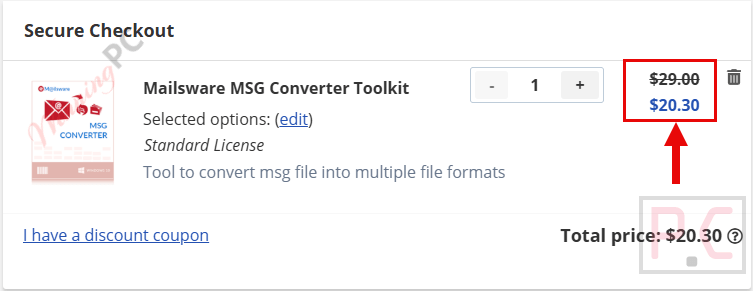
- On the checkout page, the price of Mailsware MSG Converter Toolkit will be reduced by 30%.
- Complete your payment. Mailsware will send the download link and activation key to your email address immediately after the transaction is completed.
Is the MailsWare MSG Converter Toolkit coupon legit?
Yes, this is a genuine, publisher-approved discount for WinningPC readers. Here’s what backs that up:
No crack or keygen
You download Mailsware’s official installer and activate it with a real license key – nothing patched, nothing repackaged.
Authorized coupon
WINNINGPC30 is a publisher-sanctioned code applied directly on Mailsware’s own storefront, not a reseller or grey-market key site.
Secure HTTPS checkout
Payment is processed on Mailsware’s encrypted store. Your card details never touch WinningPC.
30-day money-back guarantee
Every paid plan is fully refundable within 30 days, so there’s no financial risk to trying it.
Hands-on with MailsWare MSG Converter Toolkit
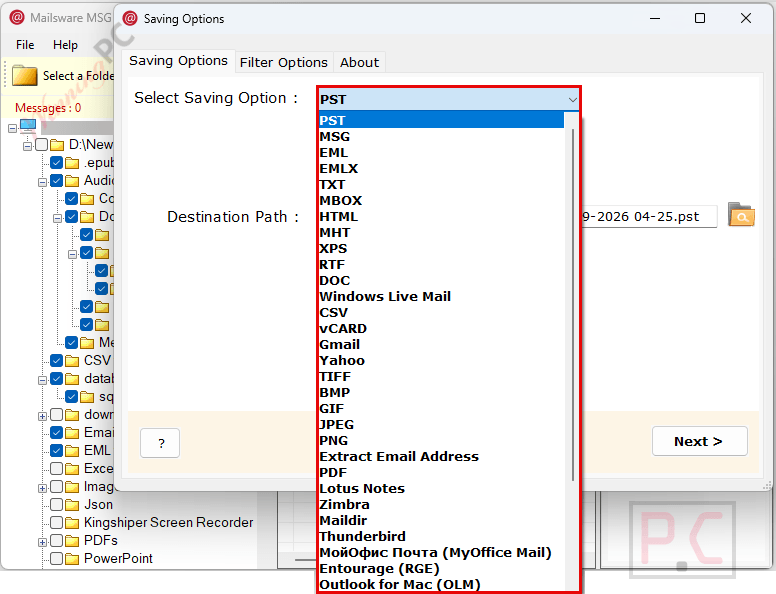
MSG is Outlook’s own format, which means that outside of Outlook, those files are effectively unreadable. MailsWare MSG Converter Toolkit solves that by loading MSG files natively and converting them to whatever format the target platform actually accepts. The 37+ output options are genuinely broad: PST gets emails back into Outlook, PDF handles legal archiving, MBOX works for Thunderbird and SeaMonkey, and the direct IMAP export pushes messages straight to Gmail or Office 365 without an intermediate step.
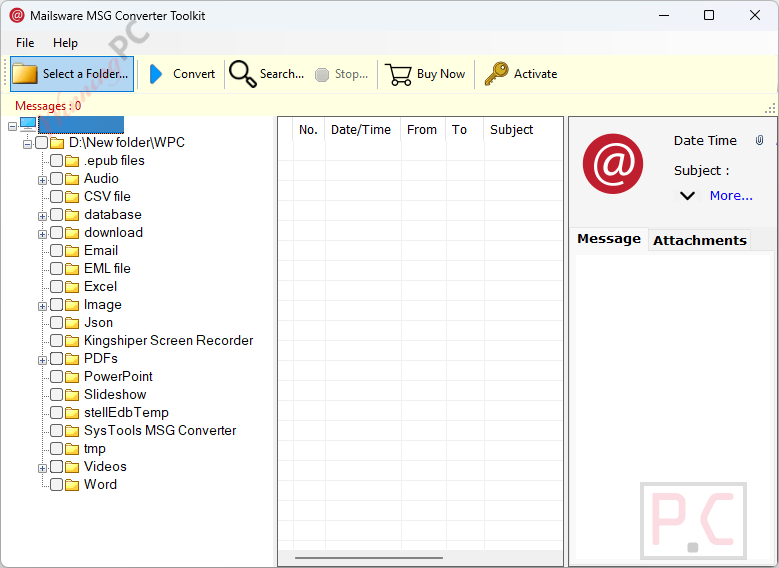
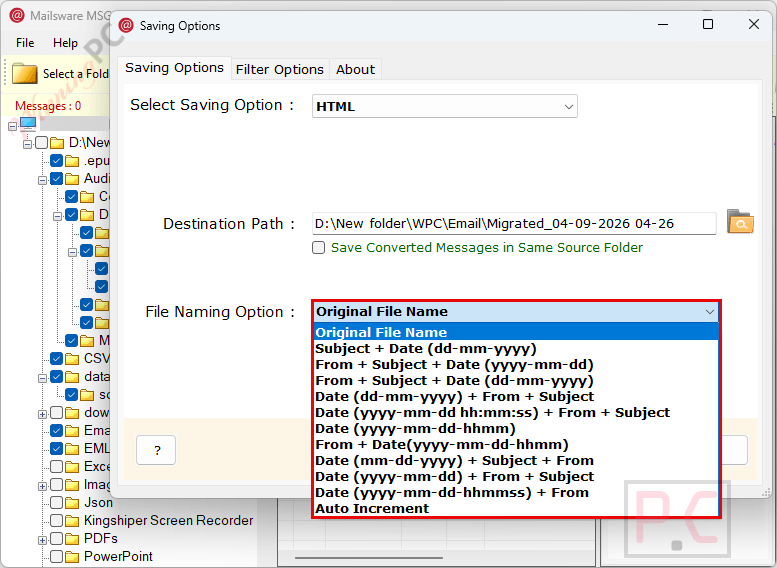
The preview pane is one of the more practical touches. Most batch converters run blind. Here you can open any message, check the attachments, and select only the files you actually want before the conversion job starts. For migration scenarios where you’re not sure what’s in a folder, that saves real cleanup time after the fact. File naming options (by sender, subject, date, or combinations) also help keep the output organized rather than landing as a pile of numbered exports.
Mac support is less common in this category and worth noting: the tool covers Mojave through Sequoia, so it works on Apple Silicon machines.
Key features
- 37+ export formats plus 10 cloud destinations. Converts to PST, PDF, EML, EMLX, MBOX, TXT, DOC, vCard, and more; also migrates directly to Gmail, Office 365, G Suite, Yahoo Mail, Outlook.com, and Exchange Server.
- No Outlook required. Reads and converts MSG files independently, on any machine.
- Preview before converting. Browse messages and attachments in the built-in viewer; convert only what you need.
- Smart Search and Advanced Filters. Locate emails by sender, recipient, subject, date range, or attachment status before running any job.
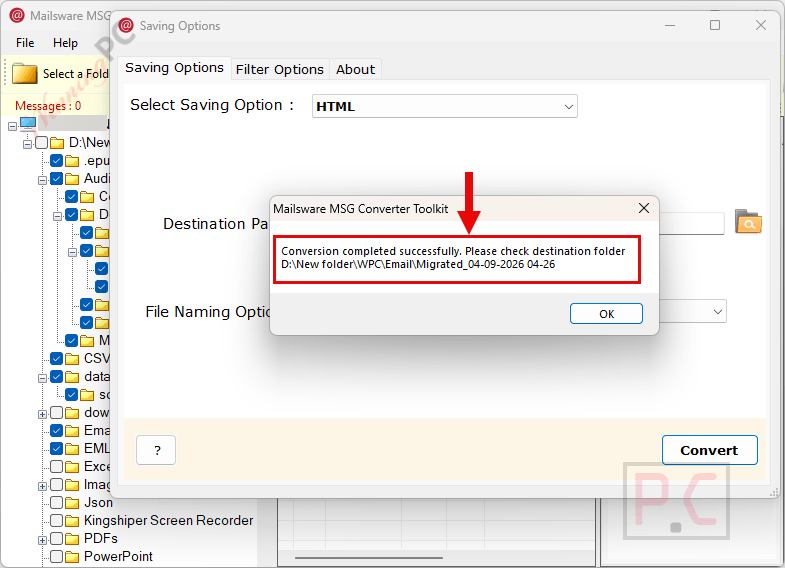
- Batch mode with folder structure preservation. Converts entire folder trees at once, keeping the original hierarchy, formatting, and attachments intact throughout.
What we think
more screenshots!
MailsWare MSG Converter Toolkit vs the alternatives
| Tool | Platform | Output formats | Direct cloud migration | Outlook required | Starting price |
|---|---|---|---|---|---|
| MailsWare MSG Converter Toolkit | Windows + Mac | 37+ formats | Yes (10+ services) | No | $20.30 (with code) |
| MacUncle MSG Converter | Windows + Mac | 12+ formats: PST, EML, EMLX, MBOX, PDF, DOC, HTML, CSV, TXT, MHT + more | Yes – IMAP/cloud migration | No | $23.2 (with code) |
| SysTools MSG to PST Converter | Windows + Mac | PST, MBOX, NSF, EML, EMLX, O365 + PDF, HTML, CSV, TXT, MHT, vCard, ICS, JSON | Yes – Office 365 | No | $29.25 (with code) |
| SysTools MSG to EML Converter | Windows + Mac | EML, EMLX, PST, MBOX, NSF, O365 + PDF, HTML, CSV, TXT, MHT, vCard | Yes – Office 365 | No | $29.25 (with code) |
If you only need to convert to one specific format – say, PST for an Outlook import a single-format tool like SysTools may be cheaper and simpler. MailsWare’s case is the breadth: 37+ formats plus direct cloud push in one workflow, and it works on Mac as well as Windows. That flexibility makes more sense for full migrations or mixed-format archiving than for a one-time PST export.
Frequently asked questions
What’s the cheapest plan and what does it cost with the coupon?
The lowest price is $20.30 for the Standard License, using code WINNINGPC30 (regular $29). That’s 30% off and includes a 30-day money-back guarantee.
Do I need Microsoft Outlook installed to use this?
No. MailsWare MSG Converter Toolkit reads and converts MSG files directly, without Outlook on the machine. That’s one of its main practical advantages – you can run it on a computer that doesn’t have an Outlook license at all.
Does the tool work on Mac?
Yes. Mac support covers macOS 10.14 (Mojave) through macOS 15 (Sequoia), which includes current Apple Silicon machines. Windows support runs from Windows 7 through 11, including Server editions.
Can I convert a whole folder of MSG files at once?
Yes, batch mode lets you point the tool at an entire folder and convert everything in it. It preserves the original folder structure, formatting, and attachments throughout.
What if the conversion doesn’t work the way I expected?
All plans come with a 30-day money-back guarantee. Contact Mailsware within 30 days of purchase if the tool doesn’t meet your needs.
Does MailsWare MSG Converter Toolkit keep email attachments during conversion?
Yes. Attachments are carried through the conversion process regardless of the output format. The preview pane also lets you view and selectively save attachments before running the full job.
System Requirements & Supported Formats
| Field | Value |
|---|---|
| Windows | Windows 11 (64-bit), 10, 8, 7 (32-bit & 64-bit); Server 2022, 2019, 2016, 2012 R2, 2008 |
| Mac | macOS 15 (Sequoia), 14 (Sonoma), 13 (Ventura), 12 (Monterey), 11 (Big Sur), 10.15 (Catalina), 10.14 (Mojave) |
| Processor | Intel Pentium 1 GHz minimum (2.4 GHz recommended) |
| RAM | 4 GB minimum |
| Hard disk | 183.3 MB free space |
| Supported variants | ANSI and Unicode |
| Supported input formats | .MSG (Outlook Message files) |
| Supported output formats | PST, PDF, EML, EMLX, MBOX, TXT, DOC, vCard (VCF), and 30+ additional formats; direct export to Gmail, Office 365, G Suite, Yahoo Mail, Outlook.com, Exchange Server, and other IMAP services |
| Delivery | Instant – download link and activation key sent to registered email after payment |