Duplicate Audio Finder is a desktop tool made to find and remove duplicate audio files on your computer.
- Status: ✅ Active & Verified
- Last checked: November 2026
- Offer: 15% Off
- Code: WINNINGPC15

Duplicate Audio Finder - Windows
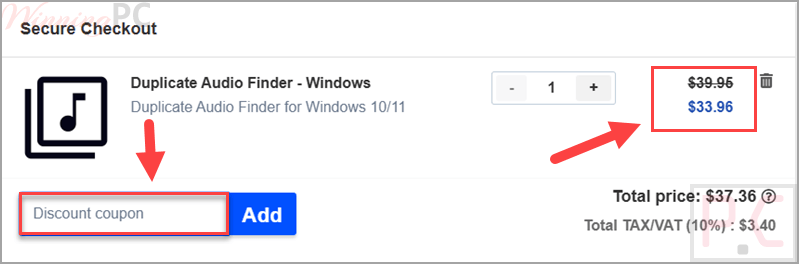
15% off coupon code: regular price $39.95, discounted price $33.96
Duplicate Audio Finder - macOS
15% off coupon code: regular price $39.95, discounted price $33.96
📄 Licensing & Support Details
- Instant License Delivery
- 100% safe and free of malware.
- Compatible with both Windows and MacOS
📝 How to apply
- Click “Copy code” to save the code, and you will be redirected to the checkout page.
- Check the price and order information before paying.
What is Duplicate Audio Finder?
Duplicate Audio Finder is built for users who want to manage and find duplicate audio files more accurately than a basic file-comparison tool can. Instead of checking only file names, sizes, or metadata, it uses audio fingerprinting to listen to the audio content and measure similarity. That makes the discount useful for anyone with a large music or media library, especially if duplicate files exist in different formats, bit rates, or lengths.
In-Depth Review & Features
- Audio fingerprinting: detects similar audio files by analyzing how they sound instead of relying only on file size, format, or metadata.
- Cross-format matching: can match the same audio in different file formats.
- Bit-rate independent detection: finds similar audio files even when file size, bit rate, sampling frequency, or quality differ.
- Different length matching: can detect duplicates even when one file is slightly shorter or longer.
- Volume-resistant matching: can identify duplicate audio files with different recorded volumes.
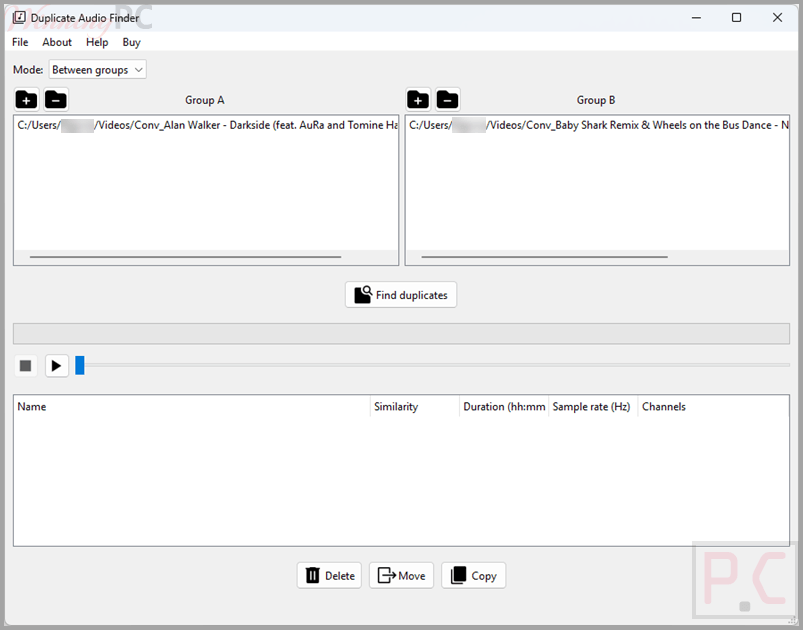
- Adjustable similarity setting: lets you search for broader matches or only exact matches.
- Between or within folder groups: can find duplicates inside one folder set or between two separate folder groups.
- Delete, move, or copy options: help you manage duplicate files directly inside the software.
- Built-in audio player: lets you listen to found duplicates and check them yourself.
- Multi-core optimization: uses multiple CPU cores to speed up the scanning process.
Pros & Cons
Frequently Asked Questions
What does Duplicate Audio Finder do?
It helps you find and remove duplicate audio files on your computer.
How does Duplicate Audio Finder detect duplicates?
It uses audio fingerprinting to measure how similar audio files sound.
Can it match files with different formats?
Yes. It can match the same song across different audio file formats.
Can it detect duplicates with different bit rates or audio quality?
Yes. The matching algorithm works even when the bit rate, file size, sampling frequency, or audio quality are different.
Can it detect files with slightly different lengths?
Yes. It can still match duplicate audio files even if one version is a little shorter or longer.
Does it work with different volume levels?
Yes. It can detect duplicate audio files with different recorded volumes.
Can I check the files before removing them?
Yes. The built-in audio player lets you listen to the files and validate their similarity.
What can I do with duplicate files after scanning?
You can delete, move, or copy duplicate audio files from inside the program.
Where can I find the Duplicate Audio Finder coupon code?
This page shares the current 15% off coupon offer for Duplicate Audio Finder.
What is the current Duplicate Audio Finder deal?
The current offer is 15% off, reducing the price from $39.95 to $33.96.
System Requirements & Details
| Feature | Specifications |
|---|---|
| Supported platforms | Windows, macOS. |
| Detection method | Audio fingerprinting. |
| Supported formats | wav, wma, mp2, mp3, mp4, aac, flac, ogg, m4a, ac3, webm, ape, flv, avi, f4v, mac, mov, tta. |
| Folder scan modes | between two folder groups or within the same group. |
| Audio review tool | built-in audio player. |
| Performance option | multi-core CPU optimization with adjustable speed-up level. |