Chris Bruner
You may encounter issues like data corruption, decreased performance, or even crashing Outlook when dealing with large Outlook PST (Personal Storage Table) files. SysTools Split PST is a simple but highly powerful and reliable PST splitter tool that was born to avoid these problems above and help you manage your data efficiently. With several advanced functions to help you split large-sized PST files into multiple smaller PSTs without the risk of data corruption, this tool ensures that your Outlook experience remains smooth and hassle-free.
With the help of this tool, you can split Outlook data files based on different parameters, such as size, date, year, folder, email ID, or category. Additionally, SysTools Split PST is designed to handle both healthy and corrupted PST files, and it can even split password-protected PST files, providing a comprehensive solution for all your PST management needs. Using it, you can split the corrupted and damaged PST files without any hurdles with ease.
You can also use it to split large Outlook PST files with password protection and maintain all the key elements and folder structure. By investing in SysTools Split PST, you can enhance the performance of your Outlook, prevent data corruption, and maintain better control over your email archives.
SysTools Split PST Coupon Code Oct 2026 (100% Working)
SysTools Split PST
25% off coupon code: regular price $49, discounted price $36.75
You may also like

Bundle Offer - SysTools OST Splitter + Split PST
20% discount code: regular price $69, discounted price $55.20
Key Features and Screenshots

- Split Single/ Multiple PST Folder(s): The main feature, the heart of the PST file splitter tool, is the ability to divide healthy as well as corrupted large PST files into smaller files. It supports splitting UNICODE and ANSI PST files without losing any data. When dividing up huge PST files and folders, this software also offers the option to include or omit PST folders. The program also preserves each item’s formatting and metadata.
- Multiple Splitting Options: SysTools Split PST is an easy solution to split a large Outlook PST data file into smaller parts. It is one of the best PST splitter tools as it offers six different options for splitting PST – split by date, size, email, folder, Email ID, and category.
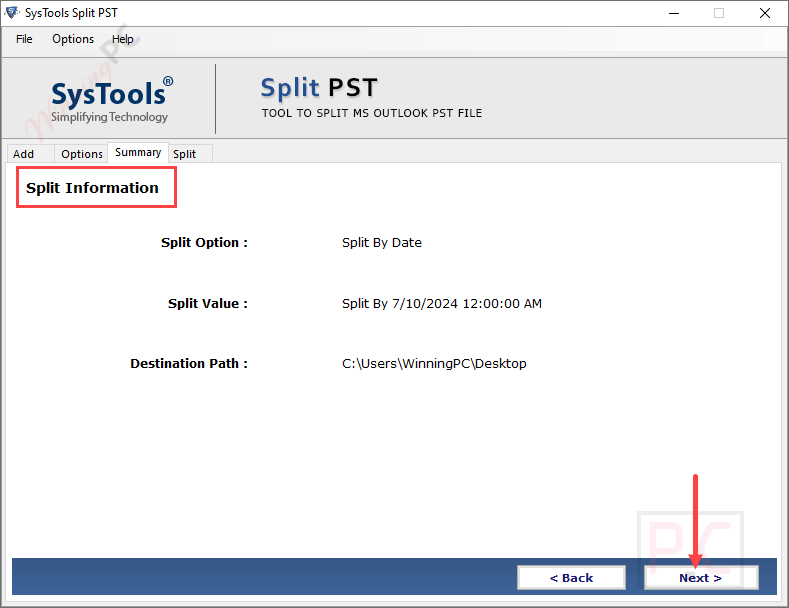
- Divide PST File by Date Range(s): It provides a straightforward solution to divide large PST files by a date range or multiple ranges of date. You are allowed to choose a specific date or select a date range(s).
- Cut PST by Desired Size: You can use this function to split Outlook PST files by providing any desired size in MB, GB, and TB. You are allowed to define the PST file size range from 1 MB to 1 TB, and then this tool will accordingly split one PST into multiple files.
- Truncate PST by Year(s): In addition, it can also be used to divide Outlook data files by year. Using the split-by-year function, you can split large PST into smaller files yearly. For instance, if you choose a year between 2010 and 2014, you will receive five PST files in separate folders.
- Separate PST by Folder: It provides a straightforward solution to help you choose the desired size and create numerous PST files for each folder or a single PST file for all chosen folders. This PST splitter software will divide an Outlook PST file into its separate folders and then further split each folder based on the size you select.
- Split Outlook PST File by Email ID: By using this PST splitter software, you can divide the PST files by Email IDs. A new Outlook PST file will be created with all of the email properties—such as From, To, Cc, and Bcc—specified in emails thanks to the use of this function. A CSV file containing various email addresses that are available in Outlook email messages is given for this tool to help you easily split a PST file.
- Divide Corrupt & Protected PST File: An Outlook PST can be corrupted if it is too large; therefore, SysTools Split PST permits you to split both healthy and corrupted large PST files without causing any data loss. You are also allowed to separate password-protected Outlook PST files with ease. You just add a strong password to the PST file in order to accomplish this, and the application will split large PST files using encryption.
- Split Outlook Archive Files: By using this PST Splitter tool, you can easily manage Outlook data files after importing them into Outlook. You can use it to split Outlook archive files/folders by date, size, year, folder, email ID, and category.
- Oversized PST File Corruption Issue: The problem of splitting oversized PST files that have been corrupted due to their large size will be solved by this tool. It allows you to divide a single PST into several files that range in size from 1 GB to 1 TB in the case of ANSI or UNICODE file formats.
- Division of PST by Category: Another thing is that you can use SysTools Split PST to separate an Outlook PST file according to its categories. Multiple categories, including Mail, Calendar, Contacts, Notes, Tasks, and Journals, are provided for your selection. You can view and tick one or more categories at once.
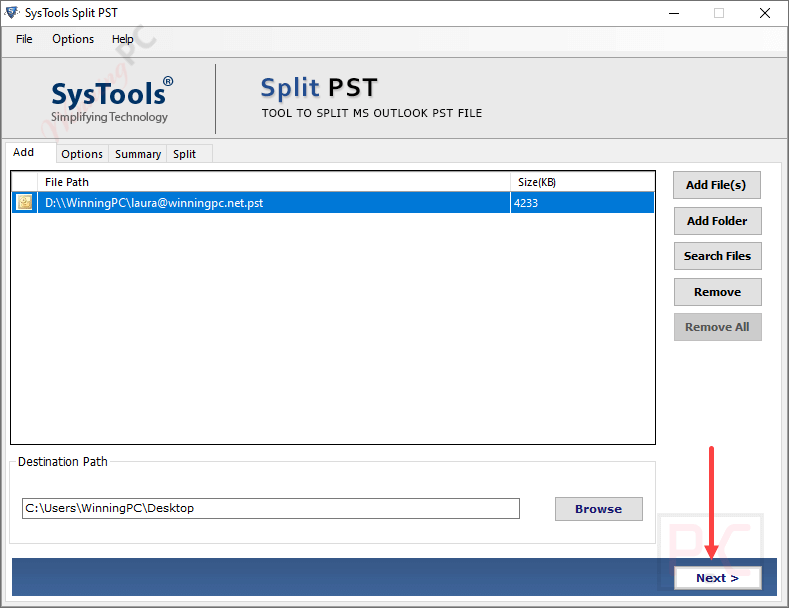
- Make New Folder to Save PST: The Outlook data file will saved in any location you want after splitting. Additionally, if necessary, you can store the files in a new folder that you create straight from the Outlook PST Split Software window.
- Supports Searching PST from Drive: The “Search Files” option is provided to help you search all PST files within the selected drive and its sub-folders in case you do not know the exact location of the PST file.
- Split PST File Without Outlook Installation: Working independently without installing Outlook on your computer, this tool can help you divide large-sized Outlook PST files. The split PST file can be saved to any folder on the computer and import the files into Outlook for later usage.
More Screenshots:


Frequently asked questions
What is SysTools Split PST?
SysTools Split PST is a software tool designed to split large Outlook PST files into smaller, more manageable parts to improve performance and prevent data corruption.
I have been using Outlook 2010. The Outlook PST exceeds size limit. Is there any method to truncate PST?
Yes, You can truncate Outlook PST file with the help of Split PST file software. The tool provides multiple methods to partition PST file.
What splitting options are available?
You can split PST files by size, date, year, folder, email ID, or category, offering flexibility to suit different needs.
Can SysTools Split PST handle corrupted PST files?
Yes, the software can split both healthy and corrupted PST files without any data loss.
How do I reduce my mailbox size?
Using the PST Split tool, you can reduce large Outlook mailbox size without losing a bit of data. The software splits PST files by size, date range, folder, year, and category.
Do I need to have an Outlook environment to perform PST split?
No, there is no need to install MS Outlook in order to split PST files.
Is there a discount available for SysTools Split PST?
Yes, WinningPC provides the coupon code WINPC25, which offers a 25% discount at checkout.
Technical Details
| Language Support | English, Français, Italian, Spanish, Swedish, and more… |
| Money Back Guarantee | 30-Day |
| Operating System | Mac OS, Windows |
| Shipping | Register code will be sent to your email in minutes |
| Subscription | Lifetime |
| Support Services | Email, Live Chat, Tickets, Training |