
 Cathryn Lee

WinX DVD Ripper Platinum converts DVDs, ISO images, and DVD folders into digital files for storage, playback, and sharing. It also provides 1:1 backup options, support for difficult discs, and hardware-accelerated processing.
WinX DVD Ripper Platinum
Rip DVD to MP4 (H.264/HEVC) in 5 min.
- Product
- WinX DVD Ripper Platinum
- Product website
- winxdvd.com
- License
- 1-Year
- Platform
- Windows 11, 10, 8, 7
- Updates
- No free upgrade to future versions
- Support
- No free tech support
- Updated
- 2026-06-30
Continue on winxdvd.com
Share to reveal your license code and the official claim page.
The free license is no longer available.
Table of Contents
WinX DVD Ripper Platinum Coupon Code Oct 2026
WinX DVD Ripper Platinum
2 plans · best save 63%
One-Year Subscription / 3 PCs ★ Best Deal
Free access & update for one year
Bundle content
3 plans · best save 80%
WinX DVD Copy Pro (Lifetime/1 PC) & WinX DVD Ripper Platinum - 1 Year
WinX DVD Copy Pro (Lifetime/1 PC) & WinX DVD Ripper Platinum (Lifetime)

WinX 4-in-1 Bundle (Lifetime License / 1 PC) ★ Best Deal
WinX DVD Ripper Platinum (Lifetime/1 PC) + WinX MediaTrans (Lifetime/1 PC) + WinX DVD Copy Pro (Lifetime/1 PC) + Winxvideo AI (Lifetime License) + Gift: 5KPlayer
How to Get the WinX DVD Ripper Platinum Free License Key?
Install the software on your PC, then activate it with the following key:
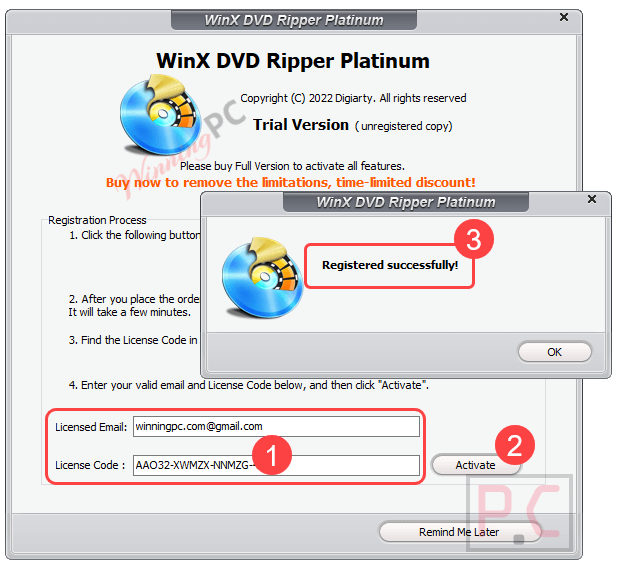
Enjoy it for free!

In-Depth Review & Features

Feature List
- Includes four DVD copy modes for creating ISO files, DVD folders, full-title MPEG files, or main-title MPEG files.
- Keeps video, audio, and subtitle tracks intact during lossless backups.
- Uses a title-check mechanism to identify the correct movie on deceptive 99-title discs.
- Applies adaptive structure analysis to regional, non-standard, and consumer-burned DVDs.
- Provides a Safe Mode for discs with bad sectors, flawed data streams, or complex structures.
- Offers more than 350 output profiles, including MP4, MOV, AVI, WMV, HEVC, and MP3.
- Creates files optimized for computers, HDTVs, iPhones, iPads, Android devices, and other playback hardware.
- Supports converted-file playback through Plex, Roku, cloud storage, and media servers.
- Can reduce file size by up to 80% while retaining high visual quality.
- Lets users select, disable, or import external subtitle tracks.
- Extracts selected audio tracks and provides volume controls.
- Includes trimming, cropping, chapter merging, and black-bar removal tools.
- Allows manual control of codec, resolution, frame rate, bitrate, and sample rate.
- Saves converted files to a PC, hard drive, NAS, or USB device.
Pros & Cons
More WinX DVD Ripper Platinum screenshots!
Output Profile

DVD Backup

Hardware Accelerator

Built-in video editor

Rip DVD to iPhone / iPad / Android / Tablet

Frequently Asked Questions
Where can I locate active promo codes for WinX DVD Ripper Platinum?
The most reliable place to find verified deals and promotional codes is right here on WinningPC. We continuously update our software pages to ensure you have access to official, working discounts.
What is the biggest markdown currently offered for this DVD ripper?
At the moment, you can activate a 63% OFF discount on the 1-Year/3 PCs license exclusively on WinningPC, lowering the standard $79.95 price tag down to just $29.95.
How do I digitize my physical discs using this software?
The process is straightforward: insert your disc, click the “DVD Disc” button to import your video, choose your desired output format or device profile, and click “RUN”.
Will this program work if my DVD is scratched?
Yes. The software features a Safe Mode designed to safely read defective areas and slightly damaged sectors, allowing you to recover and digitize aging media.
Can it handle newly released movie discs?
Absolutely. It is equipped to manage complex data streams and modern encryption schemes like ARccOS or X-project, ensuring your backups remain stable.
What happens when I try to copy a 99-title disc?
Unlike common software that gets confused and produces massive, unplayable files, this program relies on a unique title check kernel to isolate the correct main title in seconds.
How long does the ripping process usually take?
By leveraging your computer’s GPU acceleration, it can process and encode a full-length movie in about 5 minutes.
Does shrinking the video size ruin the picture quality?
No. You can reduce the overall file size by roughly 80% for easier storage on mobile devices without noticing a drop in visual clarity.
System Requirements & Details
| Language Support | English, German, Chinese, French, Italian, Spanish, Japanese |
| Operating System | Windows 11, 10, 8, 7; macOS 10.15 or later |
| Processor | 1 GHz Intel or AMD processor (Minimum) |
| RAM & Storage | 1GB RAM (2GB recommended) & 200MB free disk space |
| Supported Input | DVD disc (Old/New/99-title/Damaged), ISO image, Video_TS folder |
| Supported Output | MP4, MOV, AVI, WMV, HEVC, MP3, ISO, MPEG, and 350+ device profiles |




New License Code:
AA3J3-MQ7UO-SCN4Z-VQQBH
Setup file: https://www.winxdvd.com/download/winx-dvd-ripper-pt.exe
Please activate the license code before November 5, 2019.
many thanks.