

Bitdefender Total Security is a top-of-the-range security suite that includes everything you need to protect Windows, Mac, Android, and iOS devices. It delivers multiple layers of protection against ransomware, uses behavioral threat detection to prevent infections, and protects your most important documents from ransomware encryption. With Bitdefender Total Security, you can stop worrying about losing your data or money, and start enjoying life.
Bitdefender Total Security Giveaway
Bitdefender Total Security
Delivering ironclad protection against even the most advanced malware without slowing down your devices.
- Product
- Bitdefender Total Security
- Product website
- bitdefender.com
- License
- 6-Month
- Platform
- Windows, Mac, iOS, Android
- Installer
- bitdefender_tsecurity.exe
- Updates
- Free 6-month updates
- Usage
- Covers up to 5 devices
- Updated
- 2026-08-08
Continue on winningpc.com
Share to reveal the official giveaway page, then register there to receive your license.
The limited-time giveaway!
The free license is no longer available.
Bitdefender Total Security Discount Coupon
Bitdefender Total Security Individual
Up to 5 devices | Subscription billed annually, automatically renews
You may also like

Bitdefender Premium Security Individual
Up to 5 devices | Subscription billed annually, automatically renews

Special Offer: Bitdefender Premium Security, Total Security and Antivirus Plus
50% discount promo code. Bitdefender’s advanced protection stops fraud before it happens, keeping your digital world safe.
How to get the Bitdefender Total Security License Key Free
Go to the giveaway page, enter your email to get Bitdefender Total Security for Free.

You need to create a new Bitdefender account or sign in with your existing account.

Check your inbox and click the “Verify now” button to activate your subscription go to the Bitdefender Centre to install Bitdefender Total Security for 6 months free:

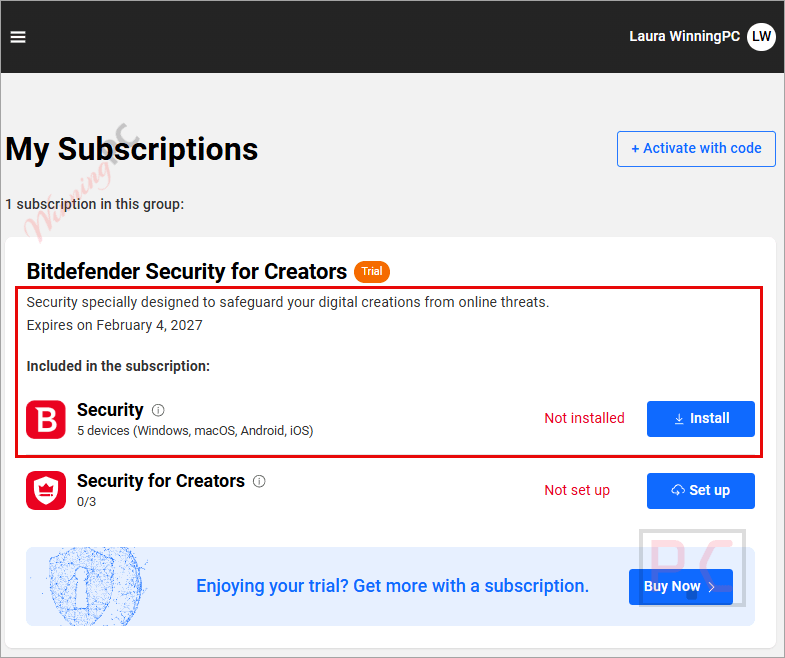
Bitdefender Total Security screenshot:

Protection features:

Privacy features:

Utilities feature:

Bitdefender Total Security Features
- New features in Total Security include a Windows and Mac Anti-tracker browsing extension that detects and blocks a wide range of web trackers, maintaining your privacy and possibly improving page load times.
- The Total Security Windows build now has a Microphone Monitor, which displays alerts whenever apps access your microphone (you can’t block access to the mic, though—this is strictly for information only).
- Bitdefender’s firewall works exactly as you would hope, intelligently deciding which apps are safe to allow online and which aren’t. Most people can leave the firewall to do its work, never seeing any prompts or having to tweak a single setting.
- Your sensitive files will be safe from malicious encryption programs that request delivery on your own records by putting them under multiple layers of protection.
- Bitdefender Total Security includes anti-loss and anti-theft tools that work well on your Windows laptop or tablet. No matter where you are, you can always connect via your account on Bitdefender Central web.
- Bitdefender’s Parental Controls feature does a reasonable job of monitoring and controlling your child’s digital activities. You can block websites by content, restrict application use, block device usage for specified periods (like bedtime), or set a daily limit of screen time that includes both mobile and desktop devices. Android apps enable monitoring of who your child contacts by calls and messages, and you can optionally block calls without caller ID.
- Total Security offers a polished and professional interface that delivers in just about every area. It’s easy and comfortable to use for beginners but also offers the configurability and control that experts need.
Technical Details
| Language Support | English, Français, Italian, Portuguese, Russian, Spanish, Swedish, and more… |
| Money Back Guarantee | 30-Day |
| Operating System | Mac OS, Android, iOS, Windows |
| Shipping | Instantly receive the latest Full Version download link and license code |
| Subscription | 1-Year, 2-Year, 3-Year |
| Support Services | Email, Live Chat, Tickets |






Thank You Very Much , WinningPc , you will always be my first love ,xD
Winnngpc, can you make pasting pictures available?
Sorry, I don’t understand.
I mean we can’t put past (or put pictures in the comment, right?) Can you make us able to put pictures in to the comment section?
If you want to add an image to your comment, please upload your picture to this host https://prnt.sc/ and share its link here.
How can I use the 180 day license? no matter how much I write any of my 2 emails, it doesn’t send me anything or that can’t be used?
You have to create a new Bitdefender account to use 180 days, just use a new email address on the giveaway page and follow our instructions above.
Thanks for the info, really good anti virus
Thank you and keep it up a good deed.
Pros: user friendly easy to operate..
powerful protection.
Cons: nil